AnyWebView
Any WebView is OK!


Feature
It tries to detect all system webviews and add them to the developer options -> WebView implementation list.
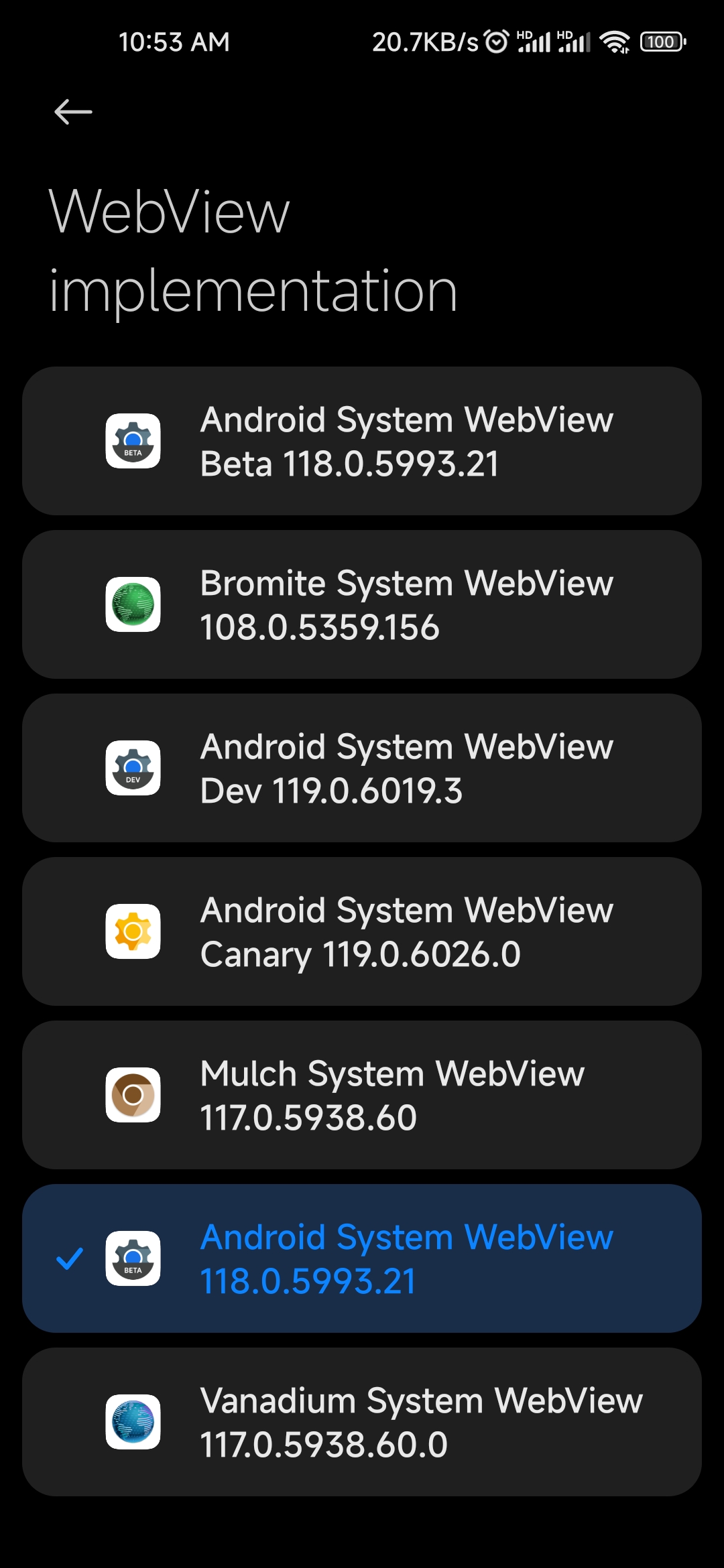
Compatibility
Android 7.0 is the minimum: the WebView provider-selection mechanism this app hooks was introduced in Nougat, so there is nothing to hook on older releases.
Framework requirement: v1.4's modern entry point targets libxposed API 101, so the framework must implement libxposed API >= 101 (e.g. Vector-SR, LSPosed 1.11+). JingMatrix's Vector 2.0 release implements only API 100 and cannot load v1.4, while newer Vector canary builds (post-2.0) implement API 101 and work - see #32. The legacy de.robv entry point is still included for pre-libxposed frameworks.
Latest release compatibility:
| Android | Status | Environment (real-device reports) |
|---|---|---|
| 7 - 9 | not established | the hooked internals have been stable since Android 7; success and failure reports are welcome |
| 10 - 12 | confirmed working | Vector SR + AOSmium/Cromite WebView, see #32 |
| 13 - 14 | confirmed working | Vector SR + AOSmium WebView on an SM-G780G (stock One UI 13, LineageOS 22), see #32 |
| 15 | confirmed working | Vector SR + AOSmium WebView on an SM-G780G, see #32 |
| 16 | confirmed working | AOSP-style ROMs: LineageOS 16 QPR2 with Vector canary + KowSU, see #32; stock Pixel with Cromite, see #35. Samsung One UI: requires v1.4.5+ (constructor fallback for the inlined getter), see #37 |
| 17 | confirmed working | Vector SR + AOSmium WebView on PixelOS (SM-G780G), see #32 |
Usage
Android Framework should be selected in LSPosed.
A webview app must be installed for all users (or in all spaces, so-called Dual app, Second space, etc.) to be selectable. Maybe deleting redundant users is alternative. adb command:
Enable "redundant packages" (Maybe it won't work, but that's OK.):
adb shell cmd webviewupdate enable-redundant-packages
Get USER_ID list:
adb shell pm list users
Each user entry is as follow: UserInfo{USER_ID:USERNAME:INT} , USER_ID 0 is the main user.
Install apk for specific USER_ID:
adb install --user USER_ID PATH/TO/APK/ON/COMPUTER
or
adb shell pm install-existing --user USER_ID PACKAGE.NAME.OF.APK (for apks already installed for one user)
or
adb push PATH/TO/APK/ON/COMPUTER PATH/TO/APK/ON/PHONE (copy an apk file to phone from computer)
adb shell pm install --user USER_ID PATH/TO/APK/ON/PHONE
Delete a user (NOT RECOMENDED, be careful, you may lose important data):
adb shell pm remove-user USER_ID
All the adb shell pm ... commands above can be run in an Android terminal simulator(root access granted) as pm ...
Reboot to take effect.
FAQ
Can I set Chrome as the system webview implementation?
Only supported on Android 8-9, not supported on Android 10+. It is Google's policy that Google Chrome app is no longer the WebView provider in Android 10. Even though it is listed in the WebView implementation, it does not work on Android 10+. Related discussion: AnyWebView#12
Is Bromite/Mulch/Vanadium etc. system webview supported?
Yes.
Does the WebView need to be installed as a system app?
No — a normally installed WebView APK is enough. Stock Android treats being a system app merely as a signature-check bypass, not a requirement, and AnyWebView registers each provider with its own signature so it passes validation either way. This also covers forks that reuse a stock package name, such as Cromite SystemWebView (com.android.webview): the stock entry's declared signature is rewritten to the installed APK's, so it is selectable without a Magisk module.
Does this still work on Android 17?
Yes — confirmed working on Android 17 (PixelOS custom ROM, Vector SR + AOSmium WebView, see #32). The internal interfaces behind this are unchanged on the AOSP master branch and have been stable since Android 7. Details: Discussion #31
Build
- JDK: OpenJDK 17 (Temurin)
- OS: Linux recommended (releases are built on
ubuntu-24.04via GitHub Actions) - Command:
./gradlew assembleRelease-> APK inapp/build/outputs/apk/release/(app-release-unsigned.apkwithout signing,app-release.apkwith signing) - Signing: optional, via environment variables
KEYSTORE_FILE,KEYSTORE_PASSWORD,KEY_ALIAS,KEY_PASSWORD(set by the Release workflow from repository secrets; unset = unsigned build)
Toolchain is pinned: Gradle 8.9 (wrapper), AGP 8.7.3, exact dependency versions.
