JavaFXSmartGraph
This project provides a generic (Java FX) graph visualization library that can automatically arrange the vertices' locations through a force-directed algorithm in real-time.
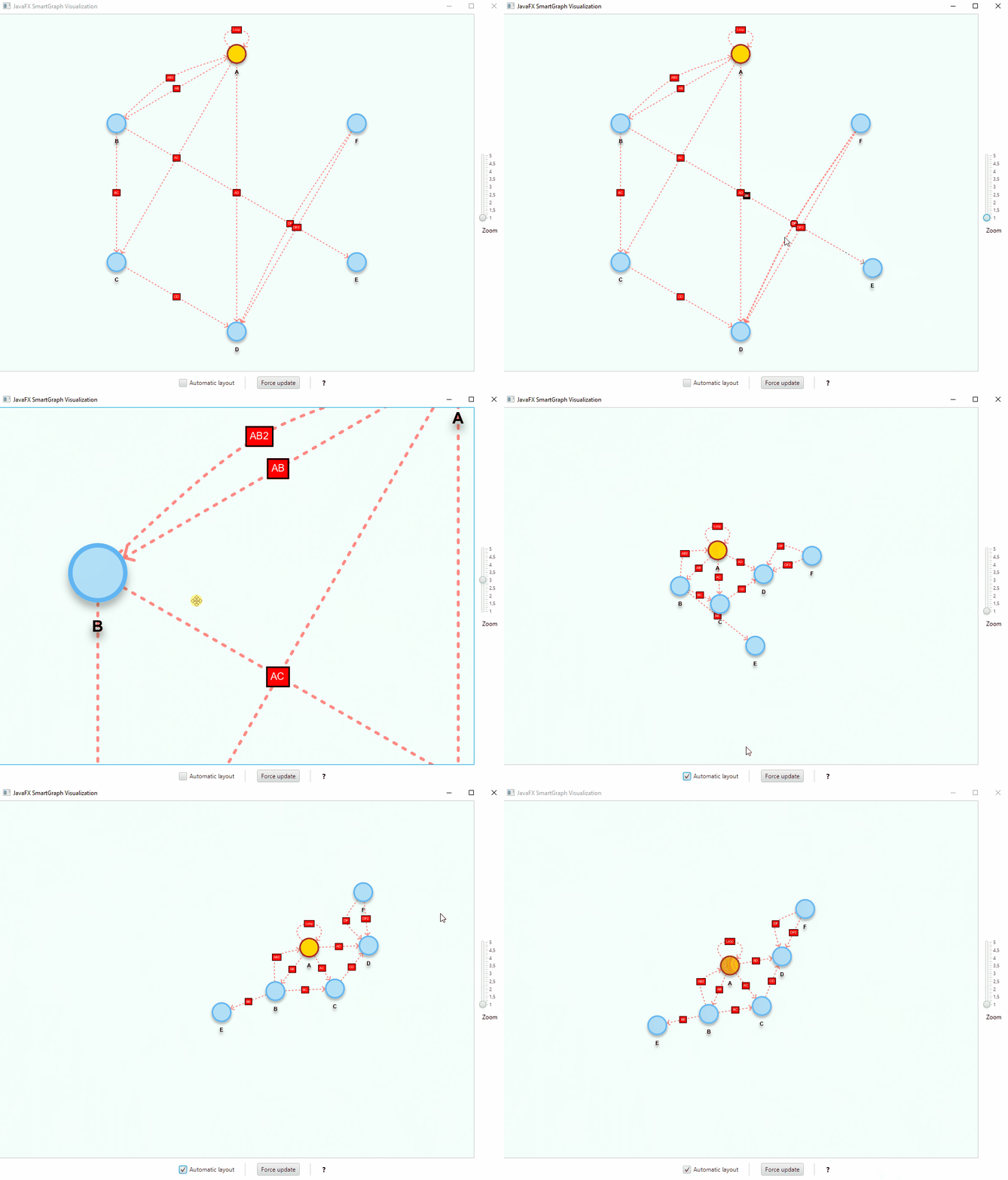
Features
The visualization library can be used together with any abstract data type (ADT) that adheres to the
Graph<V,E>orDigraph<V,E>interfaces. Default implementations are included, but you can devise your own;Instead of the force-directed automatic layout, vertices can be statically placed according to other algorithms and at runtime;
Actions can be performed when clicking the vertices and/or the edges;
Vertices can be freely moved, if the configuration allows it;
Can use different shapes to represent vertices;
The default appearance of vertices and edges are determined by a properties and a css stylesheet files;
Can use annotations and providers to change some properties at runtime, e.g., shape and size of vertices;
The styles can be changed at runtime programmatically and based on click events.
Documentation
What's new?
(2.4.0) Notable changes:
- Fix a latent scroll bug in
ContentZoomScrollPaneunder certain scroll events sequences. - ⚠️JavaFX is now an
optionaldependency: your application must provide and declare the JavaFX modules it uses. smartgraph no longer forces a JavaFX version on consumers;- Minimum runtime is now documented as JDK 17, since JavaFX 21 requires it; the library is compiled against JavaFX 21 (LTS);
- Added a
javafx.versionMaven property and aligned the build with the actual JavaFX/JDK requirements.
- Fix a latent scroll bug in
See the CHANGELOG.md for the complete changelist.
Using the library
Binaries and dependency information for Maven, Gradle and others can be found at http://search.maven.org.
Requirements
- JDK 17 or later. smartgraph is compiled against JavaFX 21 (LTS), and JavaFX 21 requires JDK 17+.
- JavaFX 21 or later, provided by your application. JavaFX dependencies are declared as
optionalon purpose: they are not transitive, so smartgraph does not force a JavaFX version on your project. Add the JavaFX modules you use (javafx-controlsbringsjavafx-graphicsandjavafx-base).
What does the declared JavaFX version mean?
The JavaFX version in smartgraph's POM is the minimum compile baseline, not a runtime restriction. smartgraph is compiled only against JavaFX 21 APIs, so the same jar runs on JavaFX 21 and on newer releases. The JDK you need is determined by the JavaFX version your application uses, not by smartgraph:
| JavaFX | Minimum JDK |
|---|---|
| 21 (LTS) | 17 |
| 22 | 17 |
| 23 | 21 |
| 24 | 22 |
| 25 | 23 |
| 26 | 24 (JDK 25 is fine) |
:warning: When upgrading JavaFX, keep all javafx-* modules on the same version. Maven resolves each module independently and can end up mixing, for example, javafx-controls:26 with javafx-graphics:21. OpenJFX publishes no BOM, so declare the modules explicitly or pin them in <dependencyManagement>. Gradle picks the highest version automatically, so this mainly affects Maven.
Running on JDK 24 or later
JDK 24 introduced JEP 472, which restricts JNI calls such as System::load. JavaFX loads its native libraries this way, so JDK 24+ prints a warning like:
WARNING: A restricted method in java.lang.System has been called
WARNING: java.lang.System::load has been called by com.sun.glass.utils.NativeLibLoader in module javafx.graphics
WARNING: Use --enable-native-access=javafx.graphics to avoid a warning for callers in this module
Grant native access to JavaFX with the VM option:
--enable-native-access=javafx.graphics
Use --enable-native-access=ALL-UNNAMED instead if JavaFX is on the classpath rather than the module path. The warning is harmless today (JDK 24/25 use warn by default), but a future JDK will deny the call unless the flag is present.
- Maven (
javafx-maven-plugin):
<configuration>
    <options>
        <option>--enable-native-access=javafx.graphics</option>
    </options>
</configuration>
- Gradle:
run { jvmArgs '--enable-native-access=javafx.graphics' }, orapplicationDefaultJvmArgswhen using theapplicationplugin. - IDE: add the option to the run configuration's VM options.
Maven
Example for Maven, where x.y.z is the library version, e.g., 2.4.0:
<properties>
    <javafx.version>21.0.13</javafx.version>
</properties>

<dependencies>
    <dependency>
        <groupId>com.brunomnsilva</groupId>
        <artifactId>smartgraph</artifactId>
        <version>x.y.z</version>
    </dependency>

    <!-- JavaFX is not bundled by smartgraph: add it yourself -->
    <dependency>
        <groupId>org.openjfx</groupId>
        <artifactId>javafx-controls</artifactId>
        <version>${javafx.version}</version>
    </dependency>
</dependencies>
To pin every JavaFX module to the same version (recommended when using a JavaFX version newer than the one smartgraph was compiled against):
<dependencyManagement>
    <dependencies>
        <dependency>
            <groupId>org.openjfx</groupId>
            <artifactId>javafx-base</artifactId>
            <version>${javafx.version}</version>
        </dependency>
        <dependency>
            <groupId>org.openjfx</groupId>
            <artifactId>javafx-graphics</artifactId>
            <version>${javafx.version}</version>
        </dependency>
        <dependency>
            <groupId>org.openjfx</groupId>
            <artifactId>javafx-controls</artifactId>
            <version>${javafx.version}</version>
        </dependency>
    </dependencies>
</dependencyManagement>
Gradle
implementation 'com.brunomnsilva:smartgraph:x.y.z'
implementation 'org.openjfx:javafx-controls:21.0.13'
Java modules (JPMS)
The library's module name is com.brunomnsilva.smartgraph. In a modular application:
module my.app {
    requires com.brunomnsilva.smartgraph;
    requires javafx.controls;
}
Migrating from 2.3.x
JavaFX used to be a transitive dependency. From 2.4.0 on, you must declare it yourself; if you see package javafx.* does not exist after upgrading, add the JavaFX dependency shown above. The effective minimum JDK was already 17 (JavaFX 21 requires it), even though earlier documentation mentioned 11.
:warning: Please note that the files smartgraph.css and smartgraph.properties must be added manually to your project.
You can also find in the releases section the binaries, source code and documentation.
Graphics acceleration
Since the force-directed layout is computation-intensive, rendering should be offloaded to the GPU. JavaFX does this automatically through its own pipeline (Prism): D3D on Windows, OpenGL/ES2 on Linux and macOS, falling back to a software renderer when no usable GPU is available. The sun.java2d.* properties only affect Swing/AWT and have no effect on JavaFX.
To check which pipeline is in use:
-Dprism.verbose=true
To force a specific pipeline, e.g. for troubleshooting, virtual machines or remote desktops:
-Dprism.order=es2   # hardware (Linux/macOS)
-Dprism.order=d3d   # hardware (Windows)
-Dprism.order=sw    # software
If JavaFX falls back to software on Linux, check the graphics driver (Mesa/OpenGL) rather than setting Java2D properties; prism.verbose reports the reason.
Basic usage
// Create the graph
Graph<String, String> g = new GraphEdgeList<>();
// ... see Examples below

SmartPlacementStrategy initialPlacement = new SmartCircularSortedPlacementStrategy();
SmartGraphPanel<String, String> graphView = new SmartGraphPanel<>(g, initialPlacement);
Scene scene = new Scene(graphView, 1024, 768);

Stage stage = new Stage(StageStyle.DECORATED);
stage.setTitle("JavaFXGraph Visualization");
stage.setScene(scene);
stage.show();

//IMPORTANT! - Called after scene is displayed, so we can initialize the graph visualization
graphView.init();
This will display the graph using the instantiated placement strategy. You can create your own static placement strategies by implementing the SmartPlacementStrategy interface (see included examples).
// Even with a static initial placement of vertices, we can toggle automatic layout
// at any time, e.g.:
graphView.setAutomaticLayout(true);
API Reference

Examples
Below are provided some graphs and the corresponding visualization, either using a static placement strategy or by the automatic force-directed layout algorithm.
:bulb: You can check the examples package and the wiki for these and other advanced usages.
Sample Graph
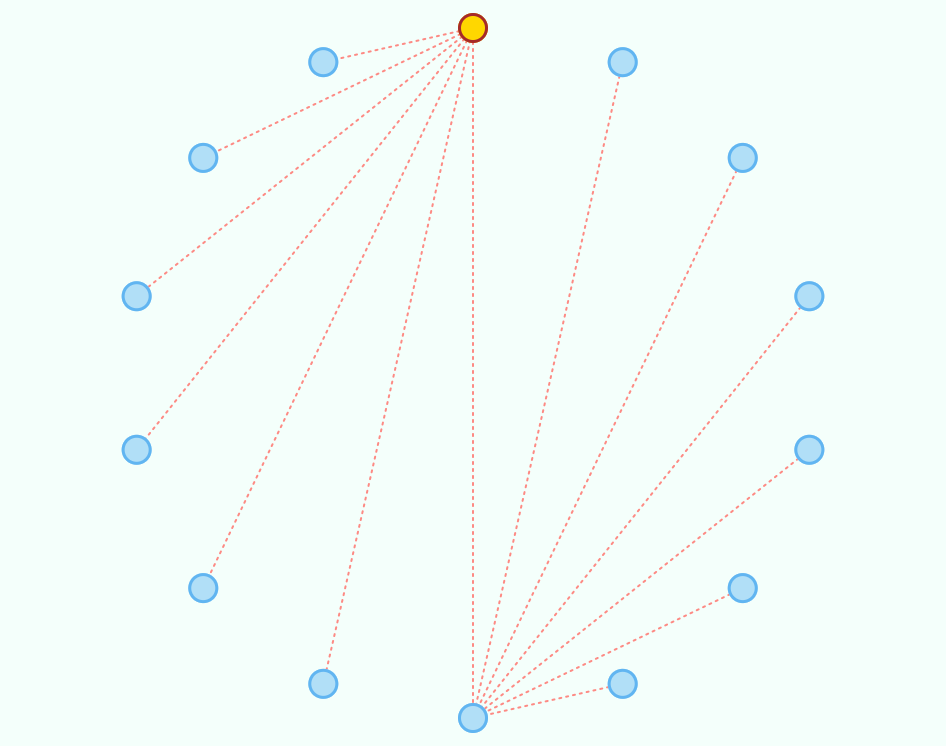
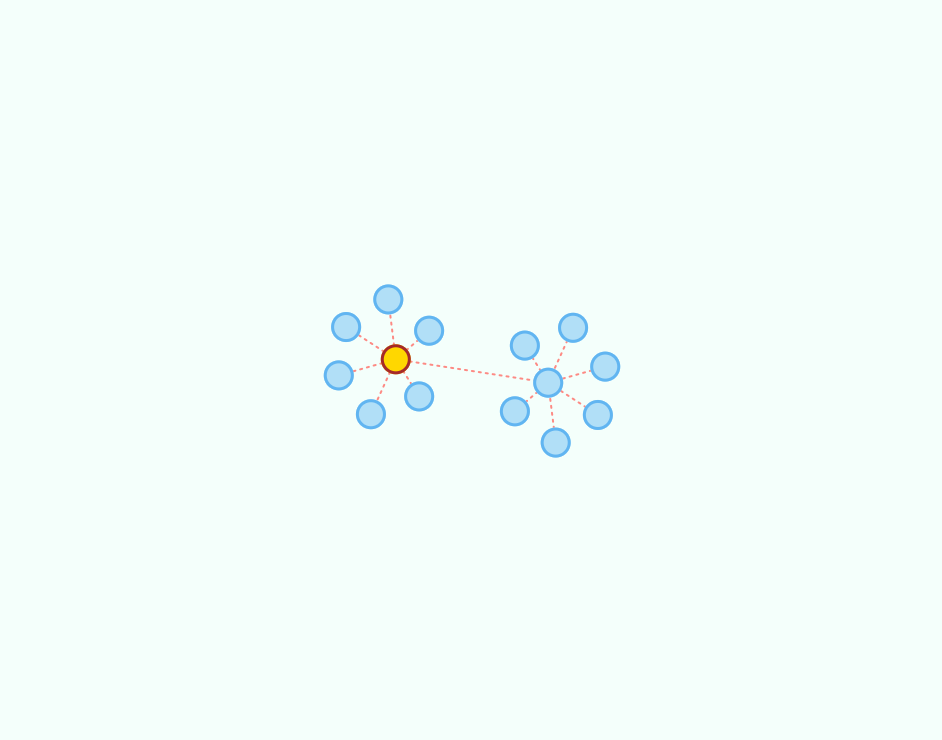
The following code creates a sample graph:
Graph<String, String> g = new GraphEdgeList<>();

g.insertVertex("A");
g.insertVertex("B");
g.insertVertex("C");
g.insertVertex("D");
g.insertVertex("E");
g.insertVertex("F");
g.insertVertex("G");

g.insertEdge("A", "B", "1");
g.insertEdge("A", "C", "2");
g.insertEdge("A", "D", "3");
g.insertEdge("A", "E", "4");
g.insertEdge("A", "F", "5");
g.insertEdge("A", "G", "6");

g.insertVertex("H");
g.insertVertex("I");
g.insertVertex("J");
g.insertVertex("K");
g.insertVertex("L");
g.insertVertex("M");
g.insertVertex("N");

g.insertEdge("H", "I", "7");
g.insertEdge("H", "J", "8");
g.insertEdge("H", "K", "9");
g.insertEdge("H", "L", "10");
g.insertEdge("H", "M", "11");
g.insertEdge("H", "N", "12");

g.insertEdge("A", "H", "0");
Sample Graph circular sorted placement (static)
Sample Graph automatic layout
Sample Digraph (directed graph)
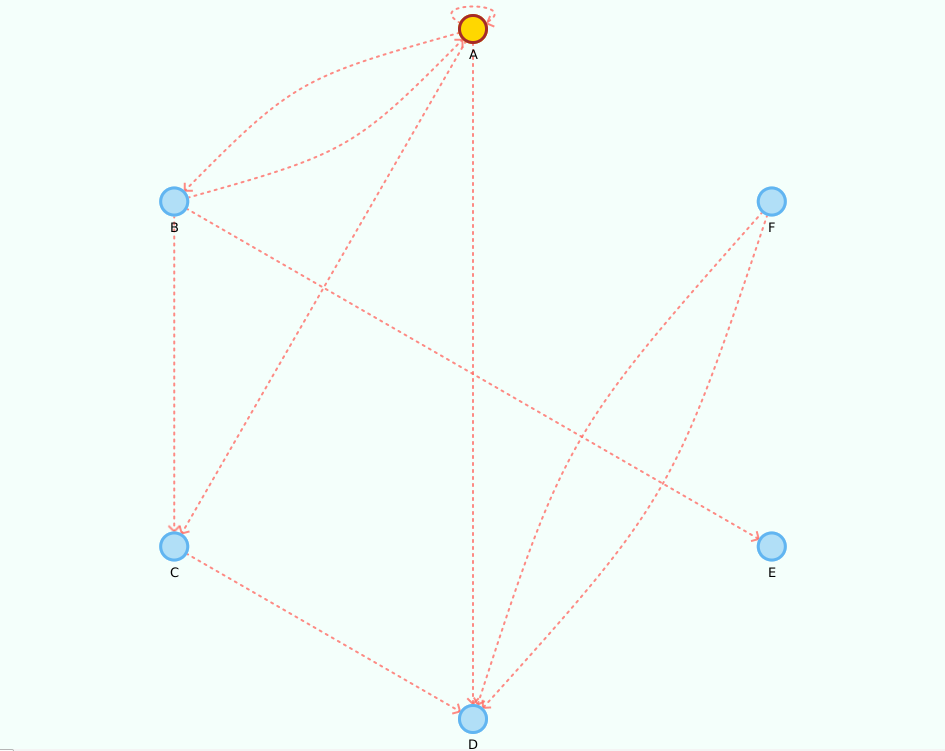
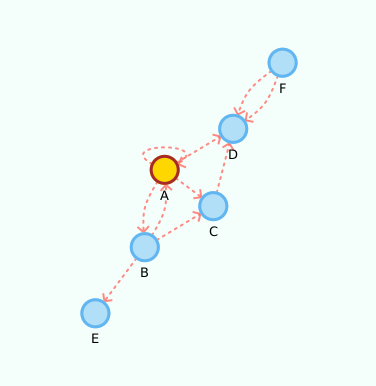
The following code creates a sample digraph:
Digraph<String, String> g = new DigraphEdgeList<>();

g.insertVertex("A");
g.insertVertex("B");
g.insertVertex("C");
g.insertVertex("D");
g.insertVertex("E");
g.insertVertex("F");

g.insertEdge("A", "B", "AB");
g.insertEdge("B", "A", "AB2");
g.insertEdge("A", "C", "AC");
g.insertEdge("A", "D", "AD");
g.insertEdge("B", "C", "BC");
g.insertEdge("C", "D", "CD");
g.insertEdge("B", "E", "BE");
g.insertEdge("F", "D", "DF");
g.insertEdge("F", "D", "DF2");

//yep, its a loop!
g.insertEdge("A", "A", "Loop");
Please note that we use the property values edge.arrow = true and vertex.label = true.
Given it's a small graph, we increased the layout.repulsive-force = 25000. You should use higher values for smaller graphs; inversely, use smaller values for larger graphs.
See Configuration and Styling section.
Sample Digraph circular sorted placement (static)
Sample Digraph automatic layout
Updating the view
When you make changes to the graph, you must update the visualization by calling SmartGraphPanel#update() or SmartGraphPanel#updateAndWait(). The latter version "blocks" the caller thread until the visualization has updated.
// Any number of changes to the graph
g.removeVertex("A");
//...

// Update the visualization
graphView.update();
this will add/remove the corresponding vertices and edges from the visualization. If a new vertex is connected to an existing one, it will be initially placed in the vicinity of the latter. Otherwise, if it is an isolated vertex it will be placed in the center of the plot.
Responding to click events on vertices and/or edges
You can attach actions with:
graphView.setVertexDoubleClickAction(graphVertex -> {
    System.out.println("Vertex contains element: " + graphVertex.getUnderlyingVertex().element());
});

graphView.setEdgeDoubleClickAction(graphEdge -> {
    System.out.println("Edge contains element: " + graphEdge.getUnderlyingEdge().element());
    //dynamically change the style, can also be done for a vertex
    graphEdge.setStyleInline("-fx-stroke: black; -fx-stroke-width: 2;");
});
These actions will be performed whenever you double-click a vertex and/or an edge.
Configuration and Styling
SmartGraph Properties
:warning: The smartgraph.properties file must exist in you project folder.
You can set the graph visualization properties in the smartgraph.properties file:
# Vertex related configurations
#
vertex.allow-user-move = true
vertex.radius = 15
vertex.shape = circle
vertex.tooltip = true
vertex.label = false

# Edge related configurations
#
edge.tooltip = true
edge.label = false
# only makes sense if displaying an oriented graph
edge.arrow = false

# (automatic) Force-directed layout related configurations
#
# Notice: deprecated since version 1.1. Force directed layout strategies are now
# instantiated and can be swapped at runtime, per the Strategy design pattern.
# The parameters are passed as arguments or one can use the default ones described
# in the javadoc documentation.
#   -- You should experiment with different values for your
#   -- particular problem, knowing that not all will achieve
#   -- a stable state
layout.repulsive-force = 25000
layout.attraction-force = 30
layout.attraction-scale = 10
SmartGraph CSS styling
:warning: The smartgraph.css file must exist in you project folder.
For example, if all your vertices turn out black, this is because this file cannot be found.
You can set the default CSS styles in the smartgraph.css file; see below.
The style classes graph, vertex, vertex-label, edge, edge-label and arrow contain the default styling for the nodes and must exist in the file. You can, however, provide different classes to apply to specific elements, e.g., vertices, edges and labels.
The following example contains an additional definition for the CSS class .myVertex. You can apply the style individually to an existing element, e.g., vertex, as follows:
graphView.getStylableVertex("A").setStyleClass("myVertex");
.graph {
    -fx-background-color: #F4FFFB;
}

.vertex {
    -fx-stroke-width: 3;
    -fx-stroke: #61B5F1;
    -fx-stroke-type: inside; /* you should keep this for vertex.radius to hold */
    -fx-fill: #B1DFF7;
}

.vertex:hover { /* pseudo-classes also work */
    /*-fx-cursor: default; */ /* You can use this style to override the hand/move cursors while hovering. */
    -fx-stroke-width: 4;
}

.vertex-label {
    -fx-font: bold 8pt "sans-serif";
}

.edge {
    -fx-stroke-width: 2;
    -fx-stroke: #FF6D66;
    -fx-stroke-dash-array: 2 5 2 5; /* remove for clean edges */
    -fx-fill: transparent; /*important for curved edges. do not remove */
    -fx-stroke-line-cap: round;
    -fx-opacity: 0.8;
}

.edge-label {
    -fx-font: normal 5pt "sans-serif";
}

.arrow {
    -fx-stroke-width: 2;
    -fx-stroke: #FF6D66;
    -fx-opacity: 0.8;
}

/* Custom vertex. You should revert any unwanted styling in the default element,
   style, since custom styles will be appended to the default style */
.myVertex {
    -fx-stroke-width: 5;
    -fx-stroke: green;
    -fx-stroke-type: inside; /* you should keep this if using arrows */
    -fx-fill: yellowgreen;
}
Contributing
You can submit a pull request. Pull requests should adhere to the existing naming and Javadoc conventions.
Projects that use this library
Word Automata - "... a graphical tool that allows you to create and simulate automata that recognize words. You can add states, transitions, and set the initial and final states. The tool will then allow you to simulate the automaton on a given word, showing you the path that the automaton takes."
PathGraph - "Path Graph is a library with all the tools necessary to create and work both path and walk graphs in a stable and simple way."
PetriNet Hub - "is a comprehensive desktop application developed in Java for the design, visualization, and simulation of Petri nets, following the formalisms of the ISO/IEC 15909-2 standard to save and load them."
GraphMateKT - "is a library created for making, traversing and visualizing graphs and grids. It contains a set of useful graph algorithms like bfs, dfs, dijkstra, topological sorting, among others."
:star: If you use the library in your project, you can send me a message and I can showcase it in this page.
License
This project is licensed under the MIT License - see the LICENSE file for details. All derivative work should include this license.
Authors
Original author: Bruno Silva - (GitHub page) | (Personal page)
I hope you find SmartGraph useful and look forward to seeing the projects you create with it!
