kotlin-wasm-benchmarks




Kotlin Multiplatform Collection of Benchmarks focused on Kotlin/Wasm performance.
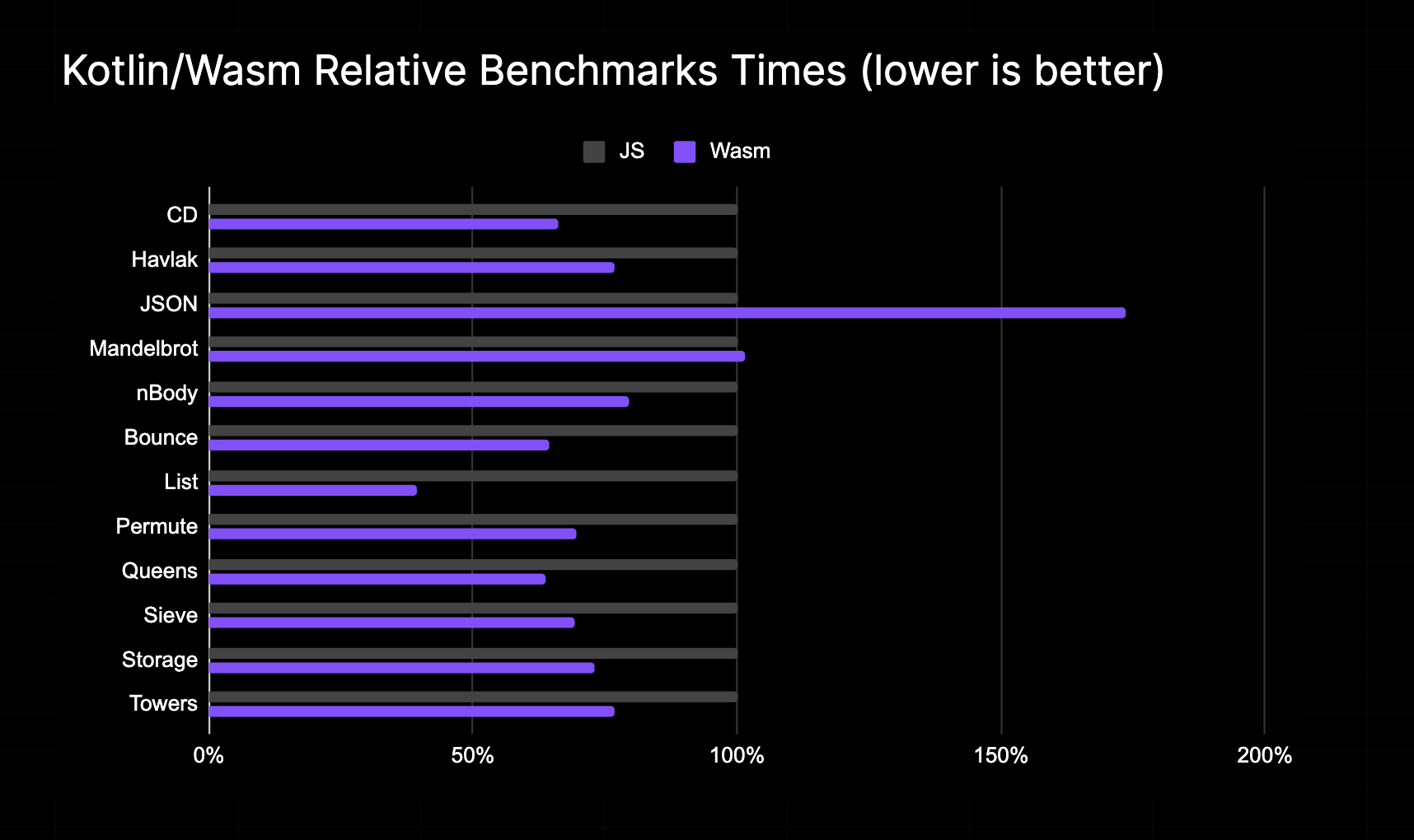
 Based on data from Compose Multiplatform Benchmarks
Description
These benchmarks are based on are-we-fast-yet benchmarks collection and JetBrains/Kotlin micro-benchmarks (work-in-progress). To perform benchmarks it uses kotlinx-benchmarks library.
Build and Run
Specify Kotlin version in gradle.properties file or use additional gradle argument -Pkotlin_version=2.4.20.
Run benchmark
The benchmarks can be run with the following parameters:
- Name:
FastMacro,FastMicro,SlowMacro,SlowMicro,VolatileMicro - Binaries:
Js,Wasm - Build:
Prod,Dev - Engine:
D8,Jsc,JsShell,Wasmtime,WasmEdge
To run the benchmarks you need to specify those parameters in the following command and run it:
./gradlew wasmJs[Name]_[Binaries]_[Build]_[Engine]Benchmark
For example to have FastMicro benchmarks compiled to Wasm in Prod mode with Wasmtime one need to run:
./gradlew wasmJsFastMicro_Wasm_Prod_WasmtimeBenchmark
To see all tasks:
./gradlew tasks
Result output is located in build/reports directory.
License
See LICENSE.md file for details.
Generic rules writing the benchmarks
Some rules considering a benchmark writing:
- Whenever is possible, consume some benchmark result into
Blackholeparameter. - Do not use function return value as a blackhole consumer.
- Always prepare benchmark data in
@Setupmethod. - Never mutate shared data in the benchmark.
- If the benchmark uses other functions, try make them top-level to be sure that function call does not use VTable.
- Prefer
const val's when possible. - Call blackhole
consumeas rarely as possible but consumed value should cover as much data-flow as possible. - If you write a
microbenchmark, write as less code as possible to be sure that this benchmark is still beingmicro. - Do not use
kotlinx.benchmarkannotations to tune your benchmark, use gradle file. - Benchmark iterations could be also tuned with a loop on the
BENCHMARK_SIZEvalue. If you need to use small value, it is also fine. - Do not consume into blackhole instances of
externalclasses orexternalinterfaces. - Do not have multiple access to non-local properties in the benchmark. Read it once into a local variable and use that variable instead.
- Use
microBenchmarks.Randomrandom generator to generate random data.
