ghidra-r2web

Radare For Ghidra

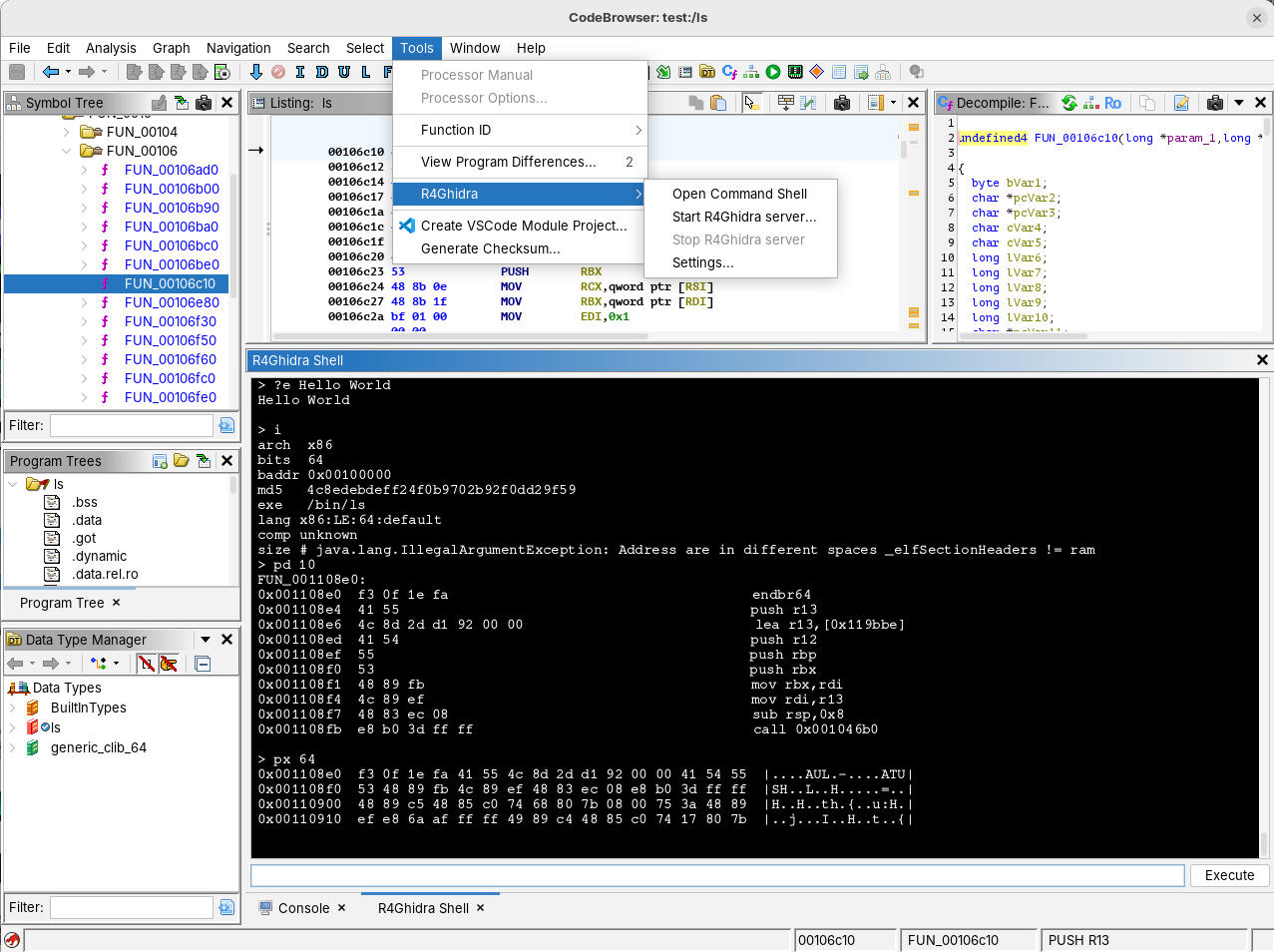
R4Ghidra provides a standalone radare2 experience inside Ghidra, implemented fully in Java but powered by Ghidra's APIs internally. This plugin allows users to communicate from/to radare2 instances via r2web and r2pipe protocols.
R4Ghidra supports not just the most common radare2 commands, but also all the handy command tricks you can do with r2 oneliners, including pipes, redirects, iterations, command substitution, file operations and more. The plugin features a complete REPL (Read-Eval-Print Loop) implementation that faithfully reproduces the radare2 command line experience within Ghidra.
Please use the Issue tracker for feedback and bug reports!
#
Build
To build the plugin, simply run:
make
The extension .zip will be created in dist/ directory. You can also download pre-built releases from the release page.
To install that extension just run make install and that will remove the current r4ghidra plugin in your detected Ghidra installation and place the last build into the ghidra Extensions directory. And you will only need to follow these simple steps:
- Run ./ghidraRun
- In Ghidra Project Manager choose
File->Install Extensions - Click on the R4Ghidra plugin, close the window
- You will be prompted to restart ghidra. Do it
- When loading the project it will prompt you to setup the R4Ghidra plugin
- Click in
Tools->R4Ghidramenu
Debugging Issues
ghidraRun will start in background mode by default, you must edit the script to replace "bg" with "fg" to see backtraces and other startup debugging logs.
Build Requirements
- Java21
- GHIDRA
- Gradle 8.x
Ubuntu
sudo apt install openjdk-21-jdk:amd64
sudo snap install ghidra --edge
sudo snap install gradle --edge --classic
make
IDEA
A Run Configuration is provided for IntelliJ IDEA. To make it work you should:
- Run IDEA with the
GHIDRA_INSTALL_DIRenvironment variable set to your Ghidra release (not source!) directory. - Set the location of your Ghidra installation by adding the
GHIDRA_INSTALL_DIRPath Variable underFile->Settings->Path Variables.
If everything is set up correctly IDEA should recognize the Gradle project and load external dependencies referenced by the Run Configuration from the referenced Ghidra directory. If everything is right you should see that Use classpath of module is set to -cp R4Ghidra.main in the Run Configuration GUI, and no errors are shown. You'll get a ClassNotFoundException when trying to use the Run Configuration if external dependencies were not discovered as expected.
Installation
Install
- In Ghidra Project Manager choose
File->Install Extensions - In the top right corner of the new window click the green plus sign
- Choose the R4Ghidra distribution ZIP file from the
dist/directory or downloaded from the release page - Restart Ghidra as instructed
- After restart open the Code Browser, which should offer you to configure the new extension
- Accept and tick the checkbox next to the plugin name
If the configuration option is not offered after restart, you can manually enable the plugin:
- Use the
File->Configuremenu item - Click the Configure link under Ghidra Core
- Find and enable the R4Ghidra plugin in the list
Uninstall
- In Ghidra Project Manager choose
File->Install Extensions - Select R4Ghidra from the list of installed extensions
- Click the red X button in the top right corner to uninstall
- Restart Ghidra as instructed
Usage
GUI Mode
The plugin registers a new menu item under the Tools menu of Ghidra's Code Browser to start/stop the embedded web server. Once started, you can:
- Use the built-in r2 REPL directly within Ghidra
- Connect from an external radare2 instance using r2's web protocols
HTTP commands
The /cmd/ endpoint accepts GET and POST requests. POST bodies contain raw UTF-8 command text.
When the URI also contains a command, the server joins it with the body using a space:
curl http://localhost:9090/cmd/echo%20hello
curl -d 'echo hello' http://localhost:9090/cmd/
curl -d hello http://localhost:9090/cmd/echo
All three return hello followed by a newline. URI commands are percent-decoded; POST bodies
are used as-is. An empty POST body executes the URI command. Query-string commands are also
supported (for example, /cmd/?echo), taking precedence over the path command for both methods.
Run the HTTP regression tests with GHIDRA_INSTALL_DIR=/path/to/ghidra make test-http.
Headless Mode
The Python script provided in the ghidra_scripts directory initializes the R4Ghidra server on port 9191 by default. You can change the port by setting the R4GHIDRA_PORT environment variable (or R2WEB_PORT for backward compatibility). You should provide this script as -postScript when launching headless Ghidra:
./support/analyzeHeadless /path/to/project-dir project-name \
  -process binary_name -postScript /path/to/r4ghidra_headless.py
Note: The older script name r2web_headless.py is still available for backward compatibility.
Binary radare2 projects
Import and export binary radare2 project files from the shell or HTTP command interface:
e cfg.sandbox.grain=files,disk
prj load "/path/to/analysis.rprj"
prj save "/path/to/export.rprj"
Po <file> and Ps <file> are aliases for load and save. prj? shows help.
Disk access follows the REPL sandbox settings; $ memory files work with the sandbox enabled
(for example, Ps $snapshot and Po $snapshot). The default is cfg.sandbox=true with
cfg.sandbox.grain=none. Grant files for reads or files,disk for reads and writes.
cfg.sandbox.grain (also available as sandbox.grain) accepts comma-separated allowed
permissions: files, disk, exec, environ, hidden, socket, network, all, and none.
file is an alias for files; !name removes a permission, and a leading ! starts from all
permissions. For example, !disk,!exec allows everything except writes and process execution.
Use e cfg.sandbox.grain=? for help. Invalid values leave the policy unchanged.
The local shell can change its policy or disable it with e cfg.sandbox=false. Re-enabling it
preserves the selected grain. File checks cover binary projects, text and binary files,
redirections, script loading, directory listings, file existence, and hidden symlink targets.
$ memory files always remain available. exec permits external shell commands, pipes, and
process exit; these child processes run with the host user's privileges. JavaScript requires
all permissions because Nashorn exposes unrestricted JVM access. socket and network are
reserved for future REPL network operations; the HTTP listener is started by the host UI or CLI.
The HTTP server listens on 127.0.0.1. Its command context has a locked sandbox with no host
permissions: remote commands cannot disable it or grant additional permissions. Memory project
import/export and ordinary analysis commands remain available over HTTP.
The Tools → R4Ghidra menu also has Import radare2 Binary Project... and Export radare2 Binary Project... file dialogs. These operate on the current program and the selected file directly. Import merges analysis in one undoable transaction; cancellation or an error rolls back the import. Load the corresponding binary in Ghidra first.
The native Java API lives in r4ghidra.project: R2ProjectCodec.read/write handles the
binary format without Ghidra dependencies, and R2ProjectService.importProject/exportProject
adapts it to a Ghidra program. It reads RPRJ versions 5 and 6 and writes version 6, compatible
with radare2's prj load and prj save commands.
Transfers include mapped-file descriptions, module bounds, flags/labels, end-of-line comments, function names and bodies, no-return attributes, and memory references. Module-relative addresses are rebased when a unique matching memory block is found by size and checksum, name, or file offset; otherwise the saved addresses are used with a warning. Imports do not open mapped files or run embedded commands. Configuration, types, hints, debugger state, flag extras, block colors, function variables and calling conventions are not applied; unsupported nonempty sections and other omissions are reported. Exports contain analysis and file references, without embedded binary contents. REPL flag sizes are limited to positive signed 32-bit values.
Run the standalone format tests with make test-project. For real Ghidra transaction/parser
tests and bidirectional compatibility checks with a recent radare2 supporting binary projects:
JAVA_HOME=/path/to/jdk GHIDRA_INSTALL_DIR=/path/to/ghidra \
  R2_BIN=/path/to/radare2 make test-project
R2 Features Support
R4Ghidra implements a complete radare2 REPL with support for:
- Common r2 commands (seek, print, analyze, info, etc.)
- Command syntax features (pipes, redirects, command substitution)
- Temporary addressing with @ syntax
- Multiple command execution with @@ syntax
- Shell command execution
- File operations (with sandboxing)
- Environment variables
- Output filtering with grep-like syntax
- Command output formatting (JSON, CSV, etc.)
For more detailed information about the REPL implementation and supported features, see the REPL documentation in the source code.
