X-OmniClaw







X-OmniClaw is an edge-native Multimodal Android Agent that integrates multimodal perception, memory, and action. It operates independently of virtual environments, functioning directly on physical Android devices. By capturing real-time visual telemetry and executing native touch interactions, it performs cross-app operations through on-device tools.
Omni refers to the integration of three sensing domains: on-screen UI state, real-world visual context, and audio input. X- emphasizes the cross-modal nature of the system, evolving it into a unified perception-to-action framework for reliable task execution.
English · 简体中文 Chinese
🧭 Overview | 📄 Paper | 💡 Key features | 🎬 Demos | 🔧 Skills & tools | 🤖 Models | 🚀 Quick start | 🛠️ Build from source | 📄 License | 🙏 Acknowledgments | 📝 Citation
- 2026-04-22 🧠 Execution policy tightened: plain-text replies can return locally; device actions uniformly go through the agent; stronger cross-package
refrebinding and error-location logging. - 2026-04-20 🧵 Multi-session parallelism: per-session agent loops, isolated runtime across sessions, precise stop chains—better stability on long tasks.
- 2026-03-31 ⏰ Scheduled automation: intervals, weekdays, or weekly plans; works screen-on or screen-off.
- 2026-03-25 🎙️ Speech–vision spine: local speech–vision loop (recording, frames, decision, execution); speech and text share one execution core.
- 2026-03-14 🛠️ Core runtime refactor: unified device tools (snapshot, actions, launch app, screenshots, etc.) aligned with key OpenClaw runtime capabilities.
📄 Paper
- Project page: https://eggplant95.github.io/X-OmniClaw-Page/
- Hugging Face Papers: 2605.05765
- arXiv: https://arxiv.org/abs/2605.05765
- PDF in this repository: X-OmniClaw Technical Report
🧭 Overview
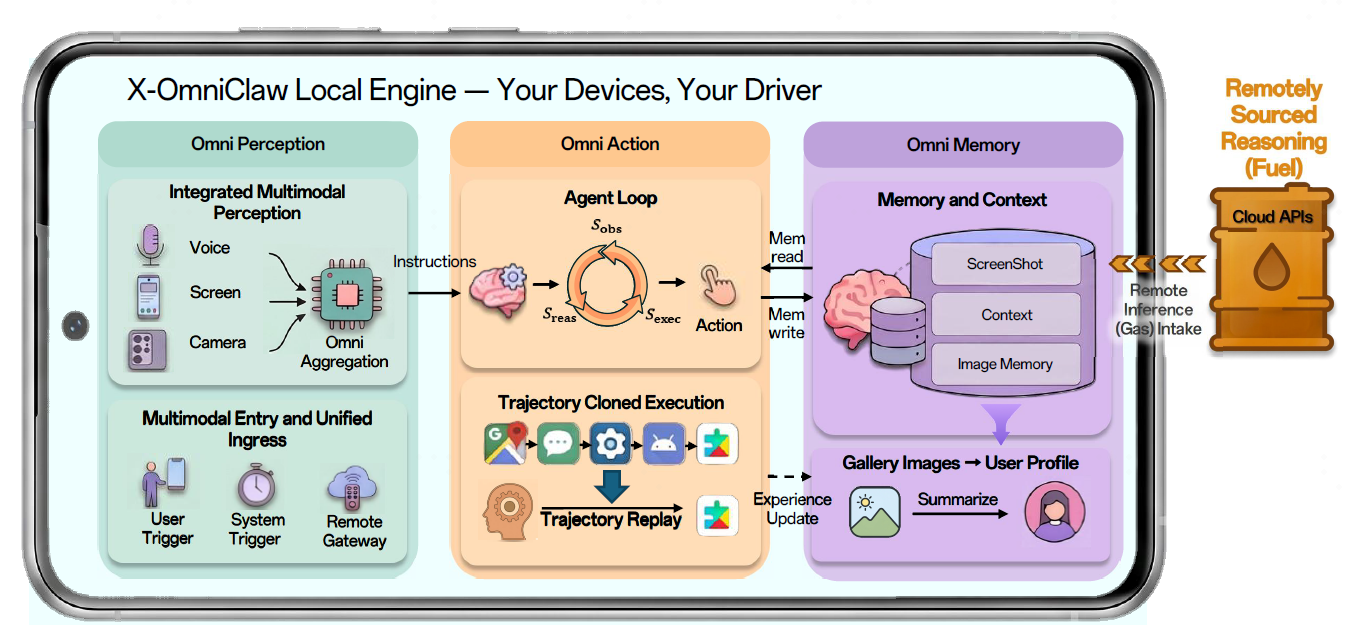
X-OmniClaw is an edge-native multimodal Android Agent deployed on mobile devices. In the following, we summarize its core execution methodology, four-layer system architecture, and three core capabilities in a table.
1. Core methodology: from “chat” to “execution”
To ensure task completion in complex mobile GUI environments, X-OmniClaw organizes every interface interaction as a minimal Observation → Reasoning → Execution loop during device manipulation. It first perceives the current screen interface and the outcome of the previous action, then infers the next optimal operation, and finally invokes atomic Android actions for actual execution. This loop repeats continuously until the task is accomplished or terminated.
| Stage | Description |
|---|---|
| observation | Build a unified observation stack from screenshots, XML metadata, and screen projection. The stack perceives the execution outcome of the previous step and provides decision evidence for subsequent action planning. |
| reasoning | LLM/VLM interprets the current page, checks the previous action state, retrieves relevant memory, selects skills/tools, and decides whether to answer directly or continue execution. |
| execution | Dispatch concrete operations through Android atomic actions, including taps, swipes, text input, and app switches. |
2. System architecture: four-layer closed loop
At the system level, X-OmniClaw forms a full closed loop through perceive → plan → act → verify. The perception layer aggregates multimodal inputs, the planning layer forms task plans, the execution layer dispatches device actions, and the verification layer checks results and decides whether to continue.
| Layer | Component | Role |
|---|---|---|
| Perception | Multi-modal Input | ASR, screenshot/recording frames, accessibility tree → unified context. |
| Planning | Agent Loop | Main agent loop: task decomposition; Kotlin bridge for dispatch. |
| Execution | Device Scheduler | Snapshots, simulated UI actions, app lifecycle. |
| Verification | Success Monitor | Post-action checks and loop detection for drift or completion. |
3. Three core capabilities
Beyond typical agents, X-OmniClaw strengthens perception depth, memory breadth, and action robustness.
| Capability | Focus | Implementation |
|---|---|---|
| Omni Perception | Unified multimodal ingress and intent understanding | Integrates UI states, real-world visual contexts, speech inputs, scheduled triggers, floating widgets, and external channels; uses temporal alignment and scene-grounded VLM understanding to convert raw streams into structured intent. |
| Omni Memory | Multimodal Personalized Memory | Combines working memory for task continuity with long-term personal memory distilled from local multimodal data, enabling personalized multi-turn interactions and memory-grounded automation. |
| Omni Action | Robust mobile execution and reusable skills | Runs an observation-reasoning-execution loop over hybrid UI evidence and converts user navigation into reusable deeplink/intent-based skills |
💡 Key features
- On-device executable agent loop: multi-turn tasks use budgeting and loop detection; failures converge and execution continues.
- Observable runs and cost: stream steps, thoughts, tool calls, and results; accumulate LLM usage for UI display.
- Unified device tools: one surface for UI understanding, tap/type, launch app, screenshots, clipboard—with stability and mis-click guards.
- Vision fallback & dual-track decisions: prefer structured understanding; fall back to vision on messy pages.
- Speech-to-action: ASR plus screen understanding; align “the frame when push-to-talk fired” with decision input.
- Gallery & media workflows: searchable, summarizable, actionable flows (e.g. theme-based photo search, memory tidy, CapCut-style one-tap video).
- Deep links & reproducible flows (when available): bookmarks and deep links compress long paths into one-shot commands (“record once, next time one sentence”).
- Parallel sessions & controlled stop: isolated sessions; interrupt per session.
🎬 Demos
Three demo tracks / four demos
| 📷 Demo A1 — Camera-informed execution | 📺 Demo A2 — ScreenAvatar execution / screen companion |
|---|---|
| User “How much is this bottle of water on Taobao?” |
User “Let’s start the exercises.” |
|
Behavior • Camera + voice to infer intent • Jump to target app search (e.g. Taobao) • Scroll results, capture prices/volumes |
Behavior • Follow the active screen as the primary context • Push-to-talk + screen understanding • Multi-step execution with live feedback |
| Camera-based item recognition → Camera object recognition. | Screen companion → Multi-step auto execution . |

|

|
| ✂️ Demo B — Memory-based one-tap video | 📦 Demo C — Instant portal to a Meituan flash-sale page ( Behavior cloning ) |
|---|---|
| User “Find parrot-themed photos and make a one-tap video.” |
User “Open Meituan flash deals.” |
|
Behavior • Build a searchable memory index; filter by “parrot” • Stage picks into a temp album (e.g. A_latest)• Jump to CapCut one-tap flow, batch select, export/share |
Behavior • Record once → reusable bookmark/skill • Later: one sentence to target page • Fallback if launch fails |
| Theme search → One-tap video. | Record once → One-shot navigation. |

|

|
🔧 Skills & tools
Skills load from app/src/main/assets/skills/; execution reaches the UI via tools (including device).
🗂️ Bundled skills (10)
Path: app/src/main/assets/skills/<skill>/SKILL.md.
| Category | Skill IDs |
|---|---|
| Search & apps | app-search, taobao-search |
| Gallery & media | gallery-qa, gallery-memory, capcut-theme-video, clipboard-to-shortcut |
| Configuration | model-config, channel-config |
| Skill management | skill-creator |
| Automation | scheduled-automation |
🧪 Example utterances (say to the agent)
| Skill ID | Example |
|---|---|
app-search |
“Search Xiaohongshu for Beijing travel tips and send me the summary.” |
taobao-search |
“On Taobao, search men’s light sunscreen shirts; recommend 3 by price band and sales.” |
gallery-qa |
“What photos did I take today? Briefly in time order.” |
gallery-memory |
“Sync gallery memory and refresh my profile—scan the latest 20 photos.” |
clipboard-to-shortcut |
“Turn the clipboard URL into a skill named Taobao quick link.” |
channel-config |
“Configure Feishu channel: app id xxx, secret xxx.” |
model-config |
“Add an OpenAI-compatible provider at URL xxx; default model xxx.” |
scheduled-automation |
“Every Wednesday 10:00 open Xiaohongshu, search AI news, summarize.” |
capcut-theme-video |
“Make a one-tap video from today’s landscapes.” |
skill-creator |
“Summarize what just worked as a new skill and write SKILL.md.” |
🤖 Models
Recommended: enter API keys in the APK and save; config is written to /sdcard/.xomniclaw/xomniclaw.json—usually no manual JSON editing.
In-app setup (recommended)
- Open the app → Model configuration (drawer / settings; wizard may appear on first launch).
- Agent model: pick provider → API Key (and Base URL if required) → default model → Save.
- Speech STT: open STT from the same area; set transcription API Key, endpoint, model (e.g. SiliconFlow SenseVoice Small); keys may differ from Agent.
- Vision VLM: VLM settings for screenshot/UI understanding (must support images); same or different provider as Agent.
- After save, disk persists; gateway port etc. live in Settings or related screens.
UI fields map to the JSON below; edit the file directly only for bulk migration, scripting, or debugging.
Built-in providers & example model IDs
| Provider ID | Example model ID |
|---|---|
openrouter |
Qwen 3.6 Flash |
anthropic |
claude-opus-4 |
openai |
gpt-4.1 |
moonshot |
kimi-k2.5 |
minimax |
MiniMax-M2.5 |
ollama |
No fixed ID (/api/tags) |
Config snippet: Agent model
Matches in-app provider / default model.
{
  "models": {
    "providers": {
      "openrouter": {
        "baseUrl": "https://openrouter.ai/api/v1",
        "api": "openai-completions",
        "apiKey": "<OPENROUTER_API_KEY>",
        "models": [
          {
            "id": "qwen/qwen3.6-flash",
            "name": "Qwen 3.6 Flash",
            "contextWindow": 131072,
            "maxTokens": 8192
          }
        ]
      }
    }
  },
  "agents": {
    "defaults": {
      "model": {
        "primary": "openrouter/qwen/qwen3.6-flash"
      }
    }
  }
}
Config snippet: Speech STT
Maps to STT screen. Example: SiliconFlow + FunAudioLLM/SenseVoiceSmall.
SiliconFlow signup: https://cloud.siliconflow.cn.
Free tiers depend on the vendor’s current policy.
{
  "models": {
    "providers": {
      "stt": {
        "baseUrl": "https://api.siliconflow.cn/v1/audio/transcriptions",
        "api": "openai-completions",
        "apiKey": "<SiliconFlow API Key>",
        "models": [
          {
            "id": "FunAudioLLM/SenseVoiceSmall",
            "name": "SenseVoice Small",
            "contextWindow": 1,
            "maxTokens": 1
          }
        ]
      }
    }
  }
}
Config snippet: Vision VLM
Maps to VLM. Example using OpenRouter with an OpenAI-compatible vision model:
{
  "models": {
    "providers": {
      "vlm": {
        "baseUrl": "https://openrouter.ai/api/v1",
        "api": "openai-completions",
        "apiKey": "sk-or-v1-xxx",
        "models": [
          {
            "id": "qwen/qwen3.6-flash",
            "name": "Qwen 3.6 Flash (via OpenRouter)",
            "contextWindow": 200000,
            "maxTokens": 16384
          }
        ]
      }
    }
  }
}
🚀 Quick start
📥 1) Download & install
Latest APK:
https://github.com/OPPO-Mente-Lab/X-OmniClaw/releases/latest
⚙️ 2) First-time setup (prefer in-app forms)
- Model configuration: set Agent API Key and a default model with multimodal (image) support; optionally configure STT and VLM separately.
- Grant permissions (seven, same as in-app checks): Accessibility, Overlay, Screen capture, Photos, All files access, Camera, Microphone.
- Optional: configure Feishu / Discord (and similar) in-app.
📄 3) Config file location (auto-generated)
After saving from the UI:
/sdcard/.xomniclaw/xomniclaw.json
Open this file directly mainly for backup, migration, or debugging.
🛠️ Build from source
📋 Requirements
- JDK 17 or newer
- Android SDK
- Gradle Wrapper (recommended)
🔨 Clone & build (example)
git clone <your GitLab repo URL>
cd X-OmniClaw
cp local.properties.example local.properties
# Edit local.properties: set sdk.dir to your Android SDK
./gradlew :app:assembleDebug
Upstream GitHub mirror (optional):
git clone https://github.com/OPPO-Mente-Lab/X-OmniClaw.git
cd X-OmniClaw
Windows PowerShell example:
$env:JAVA_HOME = "D:\path\to\jdk-17"
$env:ANDROID_HOME = "D:\path\to\android-sdk"
Set-Location "D:\path\to\X-OmniClaw"
Copy-Item local.properties.example local.properties
notepad local.properties
.\gradlew.bat :app:assembleDebug
Example output path:
releases/X-OmniClaw-v<version>-debug.apk
📄 License
Apache License 2.0: commercial use and modifications allowed; retain notices and describe changes.
🙏 Acknowledgments
AndroidClaw[commitid:9e474d0e358114be075ee75b990392811339dd39]: This project was inspired by HermesApp's AndroidClaw sub-branch. The main branch of HermesAPP is a downstream redistribution project built on Operit. Thanks to the Operit and AndroidClaw maintainers and communities.
Operit: We sincerely thank the Operit community for their kind reminders. The X-OmniClaw team takes this matter seriously, has completed a comprehensive self-review of the existing code at the earliest opportunity, and will continue to inspect and correct the related documentation, paper, and code.
OpenClaw: Thanks to the OpenClaw project and its maintainers and community.
Star History
📝 Citation
If you use X-OmniClaw in your research or projects, please cite our technical report:
@misc{ren2026xomniclawtechnicalreportunified,
  title = {X-OmniClaw Technical Report: A Unified Mobile Agent for Multimodal Understanding and Interaction},
  author = {Ren, Xiaoming and Zhen, Ru and Li, Chao and Song, Yang and Hou, Qiuxia and Zhang, Yanhao and Liu, Peng and Qi, Qi and Zheng, Quanlong and Wu, Qi and Liao, Zhenyi and Pan, Binqiang and Ji, Haobo and Lu, Haonan},
  year = {2026},
  eprint = {2605.05765},
  archivePrefix = {arXiv},
  primaryClass = {cs.CV},
  doi = {10.48550/arXiv.2605.05765},
  url = {https://arxiv.org/abs/2605.05765}
}
