Cowart
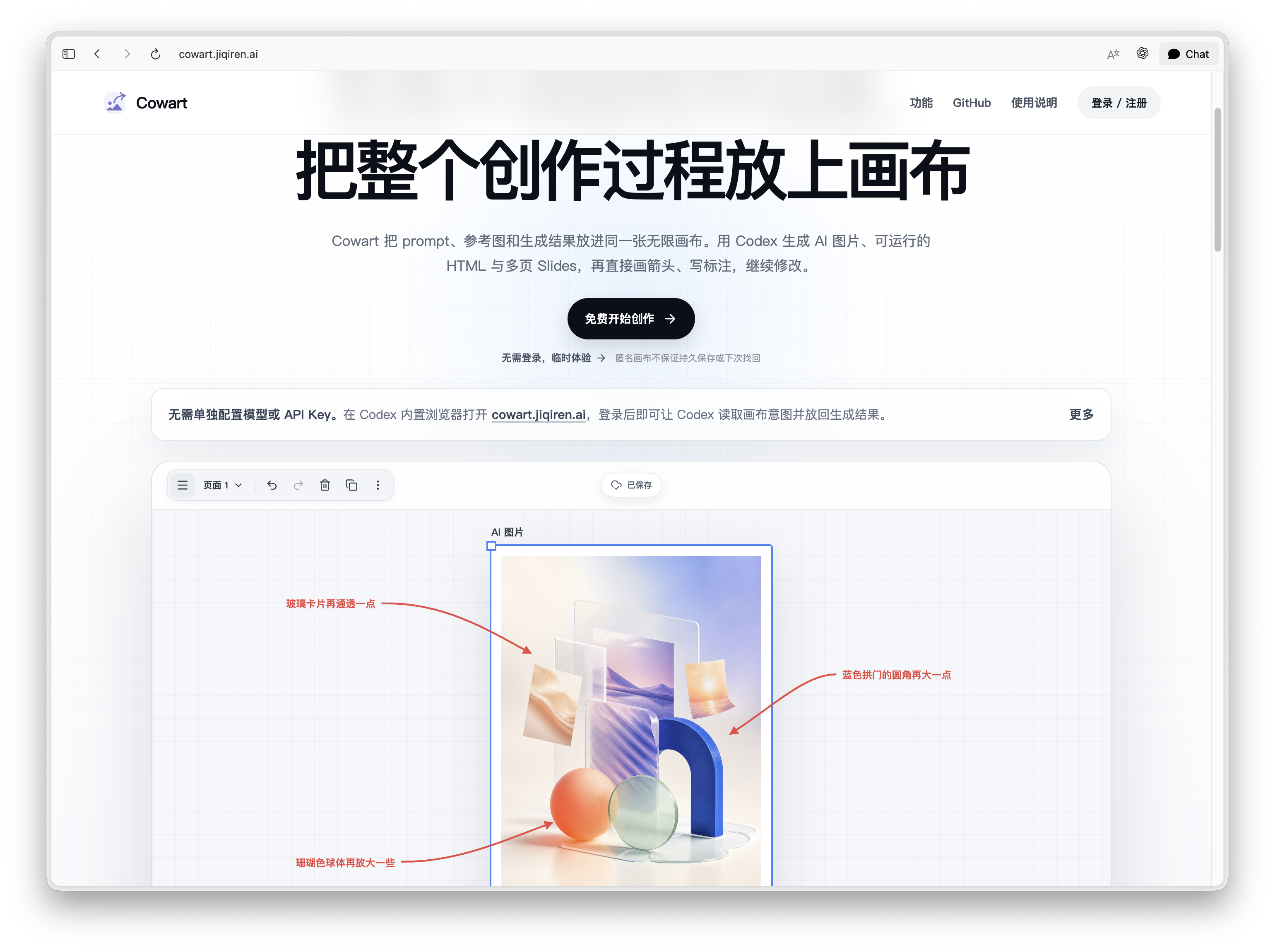
Cowart 是一个面向 Codex 的原生无限画布 widget 插件。它基于 tldraw 提供可视化画布,用于构思、标注、生成图片和根据标注图迭代图片。画布由 MCP widget 直接打开,数据默认保存到当前用户项目的 canvas/ 目录,而不是保存到插件仓库里。
仓库同时遵循 Agent Plugins v1.0.0:根目录的 plugin.json、skills/ 和 mcp.json 提供可移植插件入口;.codex-plugin/plugin.json、.mcp.json 和 .agents/plugins/marketplace.json 保留 Codex 专用的界面与安装元数据。
English README: README.en.md
体验网页版 Cowart
无需安装,直接开始。
在 Codex 内置浏览器中打开 cowart.jiqiren.ai,完成登录进入画布,然后开始你的创作。
功能
- 在 Codex 中打开一个原生 tldraw 无限画布 widget;正常使用不再通过网页浏览器或 in-app browser 打开本地页面。
- 在当前项目目录中持久化画布页面和图片资源。
- 在画布中创建 AI 图片框,直接输入 prompt、选择参考图,并让 Codex 按选中框的位置和比例生成图片后替换它。
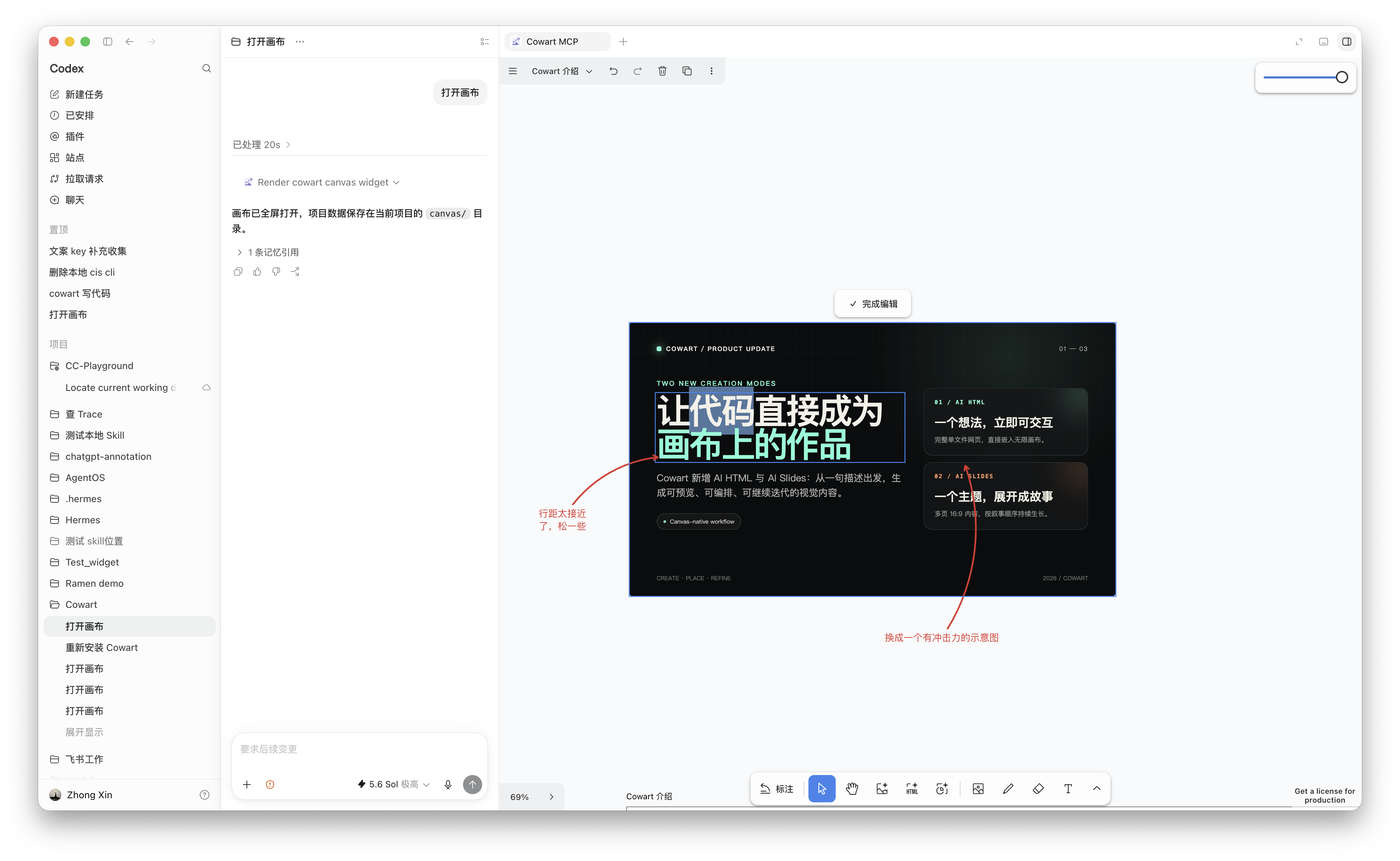
- 创建 16:9 的
AI HTML框,通过 prompt 和参考图生成可运行的单文件 HTML,并直接嵌入画布继续编辑或迭代。 - 创建
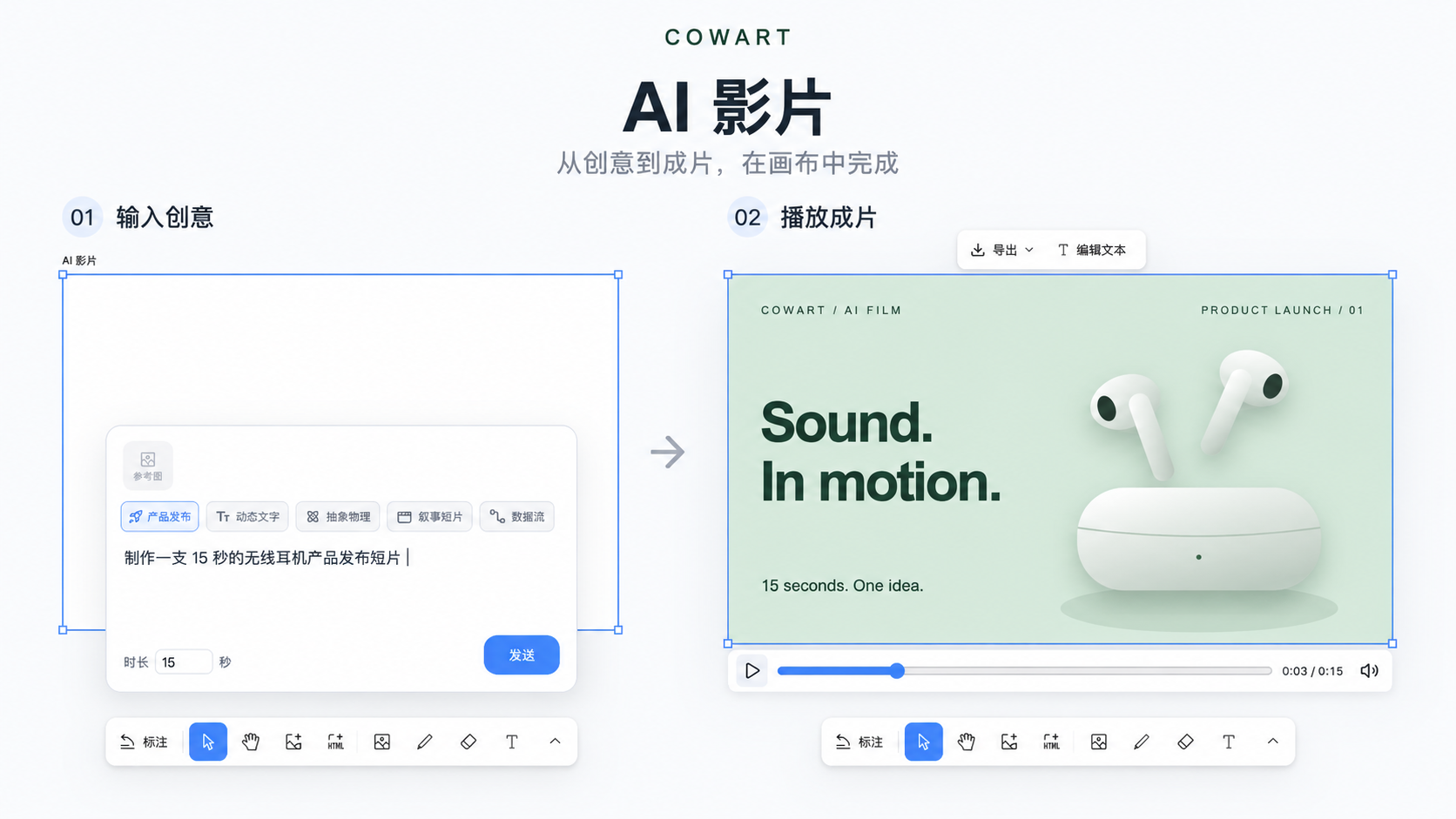
AI 影片,把 prompt 和参考图变成带分镜、运动、音乐与音效的 HTML/JS 动效影片;支持画布内预览、编辑文字和导出 MP4。 - 创建
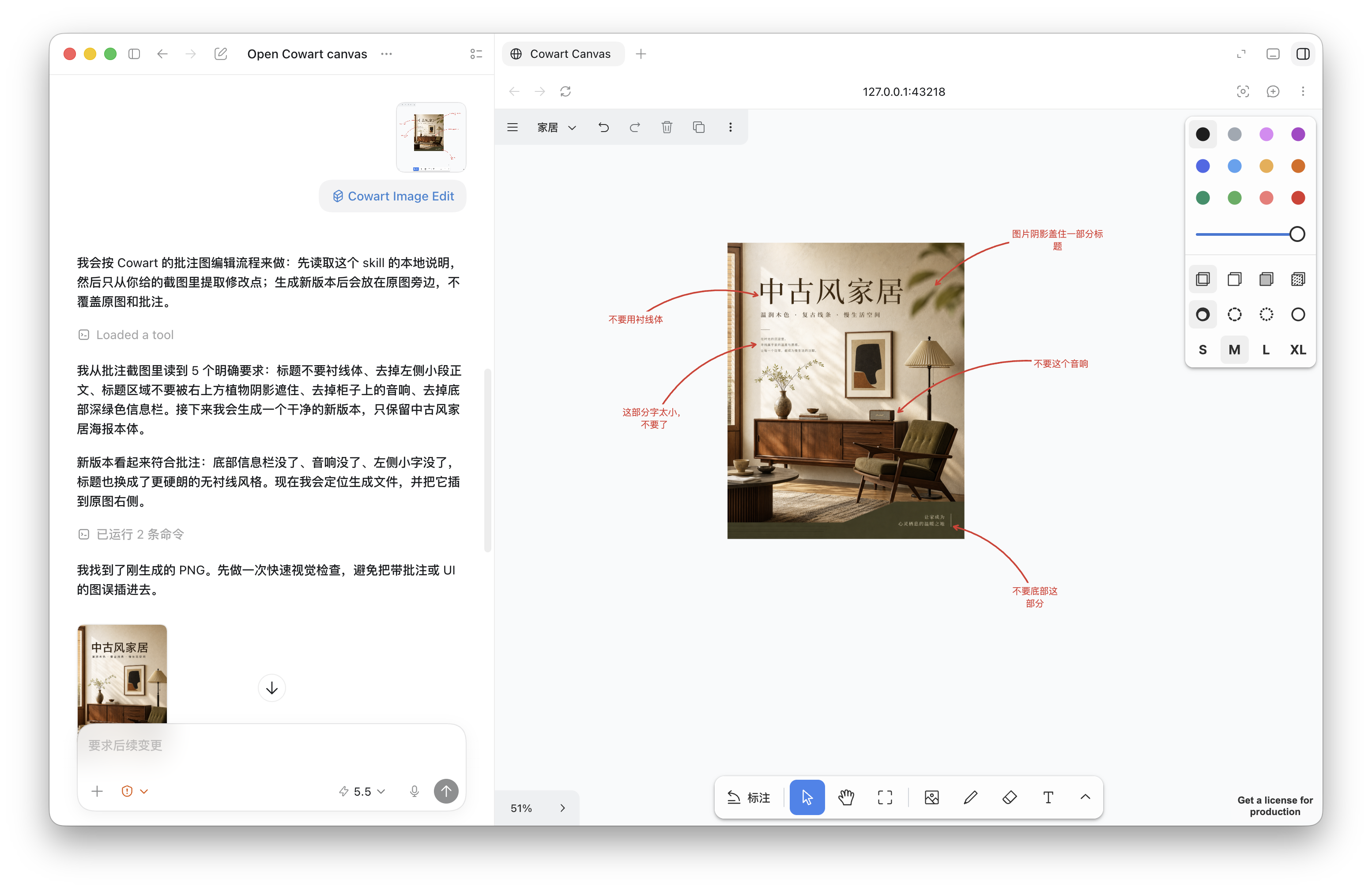
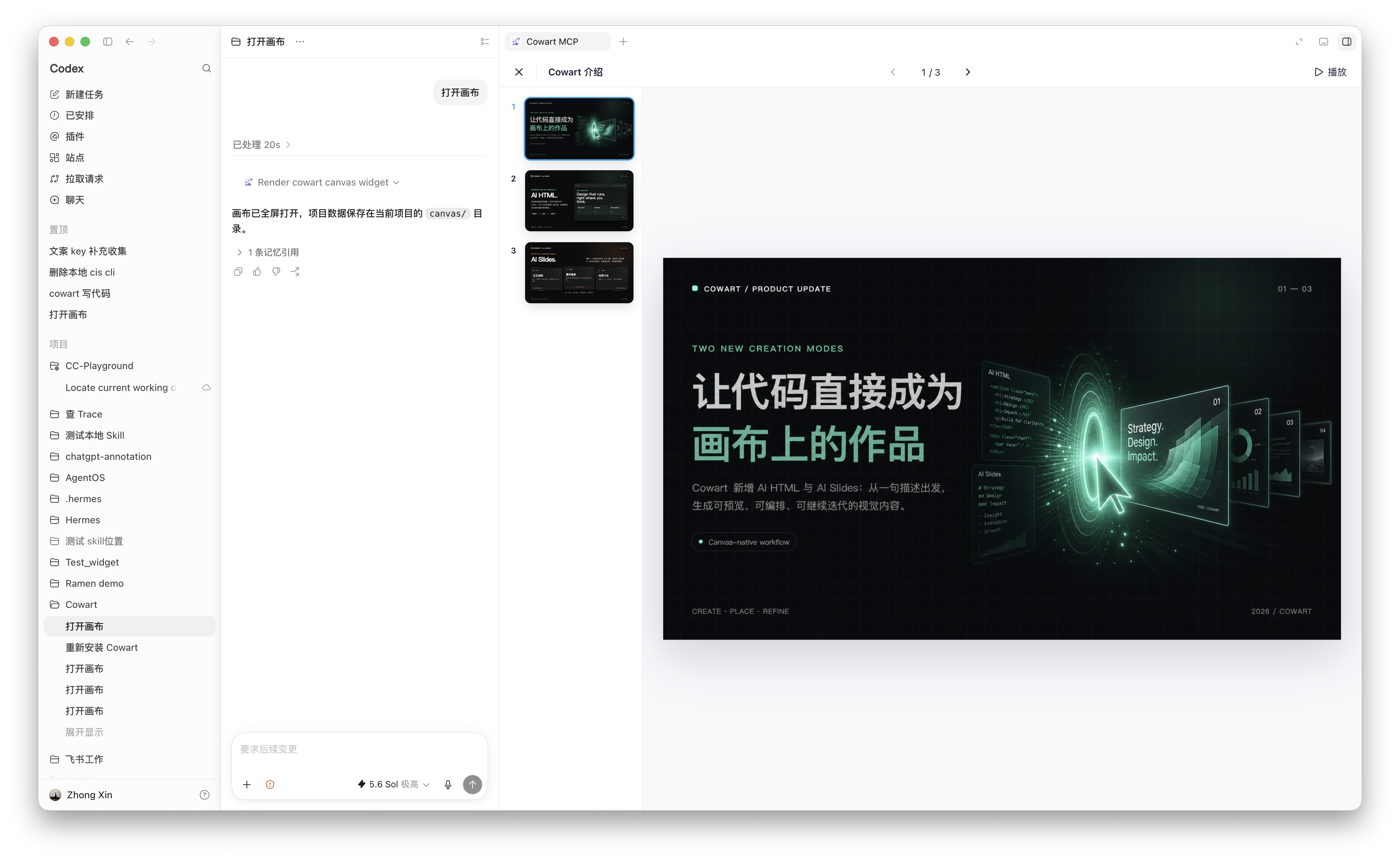
AI Slides,将图片和 HTML 组织成演示文稿,或让 Codex 按指定页数生成一组 16:9 HTML 页面;支持缩略图预览和全屏播放。 - 标注好图片后,可从画布里直接提交标注截图,让 Codex 根据标注生成干净的新图并放到原图旁边。
- 通过 Cowart MCP 工具读取选择状态、保存画布、插入图片或 HTML,并保存到页面本地资源目录。
安装
[!IMPORTANT] 安装完成后,请务必完全退出并重新启动一次 Codex,再开始使用 Cowart。重启后,Cowart 的新技能和 MCP 工具才能完整加载。
让 Codex 自动安装
把下面这段发给 Codex:
请通过 Cowart 仓库自带的 Git marketplace 安装 Cowart Codex 插件。
先运行 codex plugin marketplace add zhongerxin/Cowart --ref main,
再运行 codex plugin add cowart@cowart-github,并用 codex plugin list 确认插件已启用。
Cowart 发布包已经包含自包含 MCP 和预构建 Widget;安装后不会在插件缓存里执行 npm install,也不要求新用户预装 tldraw;
不要在当前仓库、插件缓存或 marketplace 快照目录手动安装依赖。
不要把仓库 clone 到 personal marketplace。安装完成后请明确提醒我:
必须完全退出并重新启动一次 Codex,再开始使用 Cowart。
手动安装
先把 Cowart 的 Git 仓库注册为 Codex marketplace:
codex plugin marketplace add zhongerxin/Cowart --ref main
再从这个 marketplace 安装并检查 Cowart:
codex plugin add cowart@cowart-github
codex plugin list
不需要手动查找插件缓存目录。Cowart 的 Git 版本已经跟踪自包含 MCP bundle 和预构建的单文件 Widget;Codex 可以直接发现 render_cowart_canvas_widget,运行时不会执行 npm install,也不依赖插件缓存中的 node_modules、tldraw、npm 或网络。开发依赖只用于 Cowart 维护者在发布前重新生成这些产物。
如果 cowart-github 已经注册,可以跳过第一条 marketplace add 命令。安装后请完全退出并重新启动一次 Codex,让新的 skill、MCP 工具和发布产物完整加载。
Codex 会在启动插件系统时自动检查这个 Git marketplace,并在远程 main 分支发生变化后刷新已安装的 Cowart。需要立即检查更新时,可以手动运行:
codex plugin marketplace upgrade cowart-github
更新可能会替换插件缓存。更新后请完全退出并重新启动 Codex;Cowart 会直接加载随版本发布的 MCP 和 Widget 产物,不会在新缓存中安装依赖。
使用
侧边栏与全屏入口
支持 OpenAI MCP Extensions 的 Codex 版本会在全局导航的「更多」菜单中显示 Cowart。可以使用宿主提供的图钉固定入口;点击后直接进入系统文稿目录下唯一的 Cowart/canvas/ 画布,不展示目录选择页。支持在同一画布内切换 page;没有 page 时自动创建第一个。
导航入口传入空参数,macOS 默认保存到 ~/Documents/Cowart/canvas/;Windows 使用系统实际的文稿位置,兼容 OneDrive/重定向。项目聊天中指定 projectDir 仍直接打开该项目的 canvas/,不依赖文稿目录,不迁移已有数据。侧边栏画布会向对话提供自己的存储路径,每次画布发送的 AI 请求也携带该路径。测试可用 COWART_DOCUMENTS_DIR 重定向文稿目录,避免触碰真实作品。
实现依据:全局入口和显示模式。导航入口由工具的 _meta["openai/ui"].entrypoints 注册;全屏偏好和支持模式由 HTML 资源的 _meta["openai/ui"] 声明。图钉与最终窗口布局由宿主控制。以上能力自 0.1.30 起提供;安装或更新后请完全退出并重启 Codex,以加载新的导航入口。
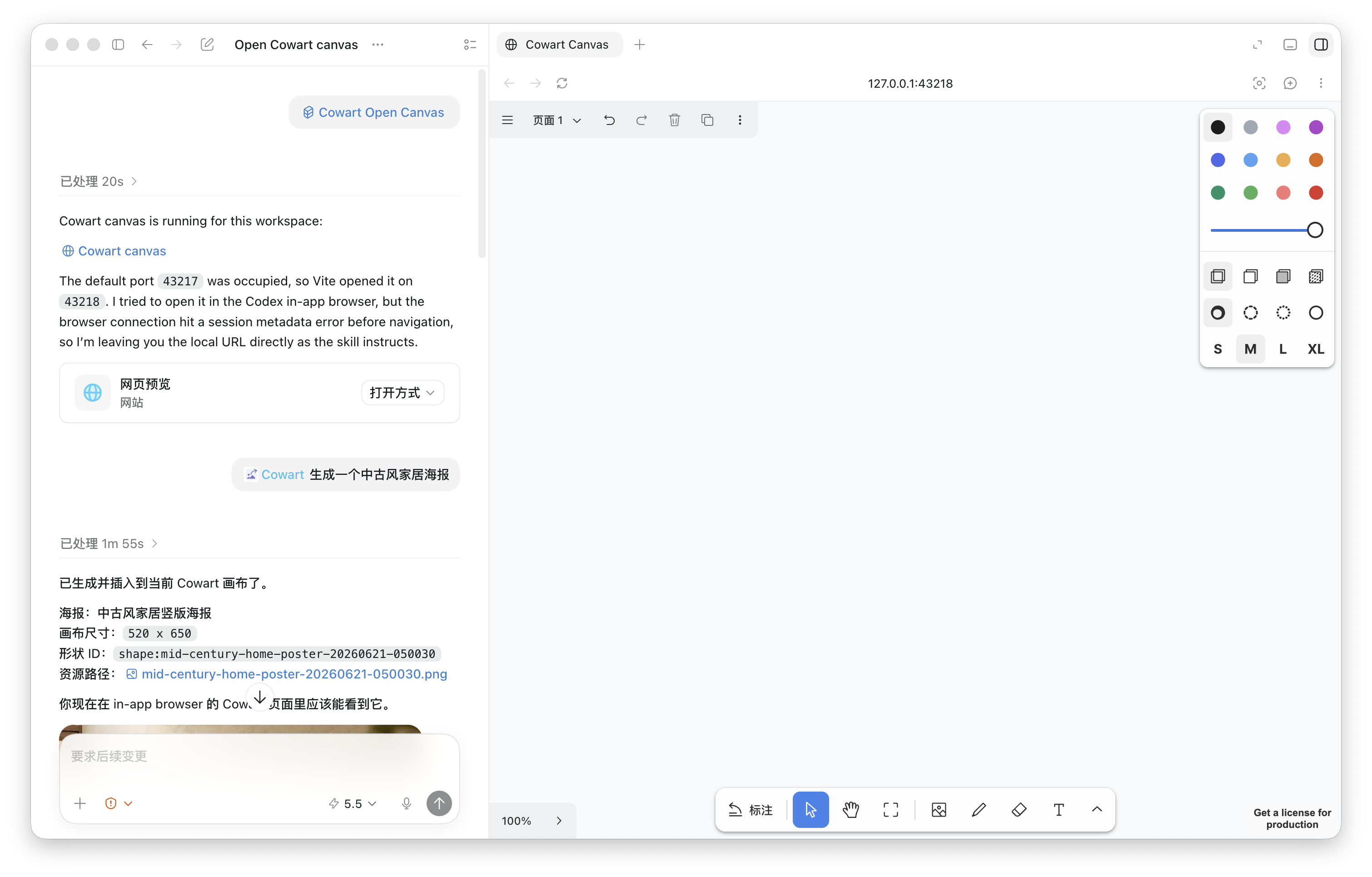
打开画布
在 Codex 中说:
Open the Cowart canvas for this project.
Cowart 会通过 render_cowart_canvas_widget 打开 Codex 原生 widget,不需要再启动本地网页服务或手动打开 in-app browser。scripts/start-canvas.sh 只保留为本地开发 fallback。
画布数据会保存在当前项目目录下:
canvas/pages/<page-id>/cowart-canvas.json
canvas/pages/<page-id>/assets/
生成新图
- 打开 Cowart 画布。
- 在画布里创建并选中一个
AI 图片框。 - 在弹出的生成面板里输入 prompt,也可以选择一张或多张参考图,然后点击发送。
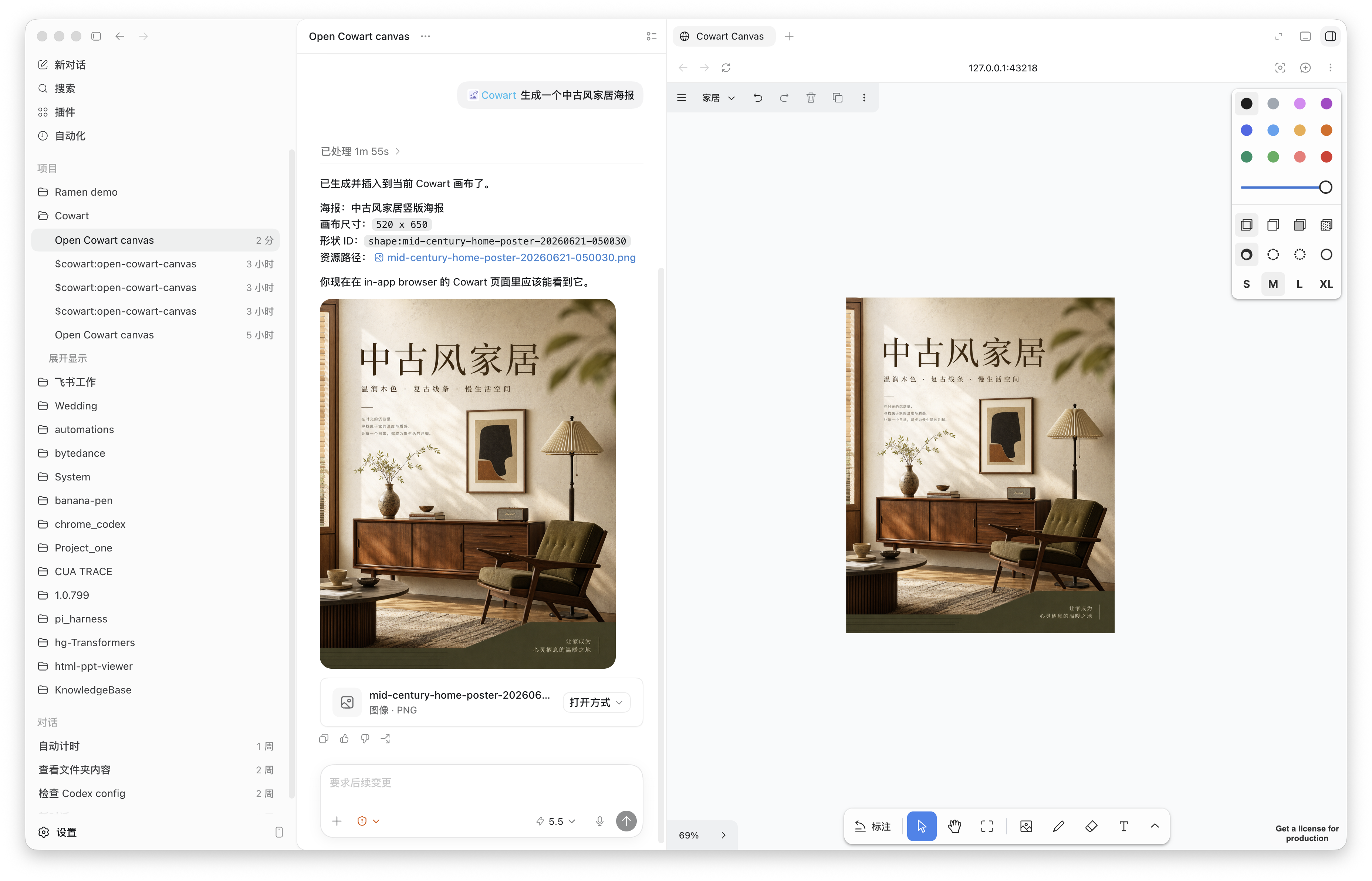
Cowart 会把 prompt、参考图和选中 AI 图片 框的尺寸信息发送给 Codex。Codex 会按这个框的位置和比例生成图片,然后把 AI 图片 框替换成普通图片形状。
根据标注图生成新图
- 在 Cowart 画布中对图片做标注。
- 选中被标注的图片,点击
按标注修改。 - Cowart 会导出包含原图、箭头和标注文字的截图,并通过 widget bridge 发送给 Codex。
Codex 会读取截图里的标注和箭头,生成去掉标注痕迹的新图,并把结果放在原图旁边。原图和标注不会被删除或移动。你也可以手动把 Cowart 标注截图发给 Codex,走同样的修订流程。
生成 AI HTML
- 在工具栏中创建并选中一个
AI HTML框;新建框默认是1024 × 576(16:9)。 - 在框下方的生成面板中输入 prompt,也可以选择或粘贴一张或多张参考图。
- 点击发送后,Codex 会生成完整可运行的单文件 HTML,并把它嵌入选中的
AI HTML框。
生成后的 HTML 会作为画布中的嵌入页面保存在当前 page 的 assets/ 目录。选中它后可以下载渲染图、直接编辑文本,也可以结合画布标注继续修改 HTML,或根据 HTML 和标注生成图片。
生成 AI 影片
把产品发布、动态文字、抽象物理、叙事短片或数据流的创意放进画布:选择风格与时长,输入描述并按需添加参考图,Codex 就会制作可播放的 AI 动效影片。你可以在原位预览镜头节奏、编辑文字,并导出含音乐与音效的 MP4。
创建和演示 AI Slides
- 在工具栏中创建一个
AI Slides。默认外框是1048 × 600,对应一页1024 × 576(16:9)内容和四周各12px的留白。 - 可以把画布中的图片或 HTML 拖入 Slides,也可以复制图片后选中 Slides,再粘贴进去;内容会自动按顺序横向排列。
- 空 Slides 被选中时会显示生成面板。输入整套演示的描述、按需添加参考图,并选择 3、5、10 页或自定义页数;默认是 5 页。
- 发送后,Codex 会生成指定数量、视觉与叙事连贯的独立 16:9 HTML 页面,并依次加入当前 Slides。Slides 已有内容时不再显示生成面板。
- 选中 Slides 后点击
演示 Slides,可以通过左侧缩略图预览和切换页面,也可以进入全屏播放。全屏时支持方向键、空格键和点击静态画面翻页;HTML 自身的按钮、链接和表单交互会保留,播放控制栏固定在顶部。
技能
cowart:cowart-open-canvas:打开 Cowart 原生画布 widget。cowart:cowart-image-gen:接收画布内 prompt 和参考图,用生成图片替换选中的AI 图片框;没有选中框时也可以把生成图插入当前页面。cowart:cowart-film-gen:根据选中的影片风格、prompt、尺寸和参考图生成可播放的 HTML/JS 动效影片。cowart:cowart-image-edit:根据画布提交或用户提供的 Cowart 标注截图生成修订图。
本地开发
npm install
npm run dev
npm run build
npm run build 会重新生成并校验 mcp/generated/ 下需要随 Git 版本提交的自包含 MCP 和 Widget 发布产物。提交源码改动前还应运行 npm run quality,其中包含一个没有 node_modules、使用全新临时目录且禁止调用 npm 的冷启动探针。
npm run probe:widget:startup 检查实际 MCP 资源中的启动脚本,并在隔离环境中测试宿主信息先于项目目录到达、超时、取消和桥接失败;它已纳入 npm run quality。这些测试不代替 Windows / macOS 上的 Codex 原生界面验证。
HTML 图片导出、标注截图和幻灯片导出共用 src/htmlDraftCapture.js。src/html2canvasClipFix.js 修正 html2canvas 1.4.1 中祖先裁切先于变换执行的问题,避免居中缩放的 HTML 只截到四分之一;因此固定该依赖版本。npm run probe:html:capture 已纳入质量检查。另可运行 npm run probe:html:capture:browser 并打开它打印的地址,检查真实浏览器中的像素、缩放与嵌套裁切;这是截图函数回归,不替代原生插件验证。
排查原生画布启动问题时,可在 Codex 客户端日志中搜索 [Cowart startup]。从 0.1.29 起,日志记录版本号、启动阶段和耗时,包括 html_loaded、bridge_connecting / bridge_ready、frontend_started、tool_result_received、storage_target_ready、canvas_state_loaded 和 canvas_mounted。它们的顺序可能随宿主时序变化;失败会记录对应的 *_failed、*_timeout 或脚本错误阶段。为兼容 Codex 26.928 只收集沙箱 warning/error 的行为,正常启动阶段使用 warning 级别,不代表故障。每个阶段最多记录一次,画布挂载后停止;不记录目录、画布内容或原始错误消息。
本地开发时仍可以直接启动 Vite 画布服务,并指定用户项目目录:
./scripts/start-canvas.sh /path/to/user/project
常用环境变量:
COWART_PORT:本地服务端口,默认43217。COWART_PROJECT_DIR:画布数据所属的用户项目目录。COWART_CANVAS_DIR:画布数据目录,默认是$COWART_PROJECT_DIR/canvas。
开发者
ZHONG XIN
zhongxin123456@gmail.com
https://www.jiqiren.ai
致谢
Cowart 的画布能力基于 tldraw/tldraw 实现。
赞助
Token Arena 是一个 Agent 游戏竞技场:你选游戏、发起对战,Agent 替你上场,每一步决策都能看到。目前开放免费练习赛。