wenyi


Bringing literature into your language.
A desktop app for translating books and long-form writing, with the whole work in view.
Whole-book understanding · Consistent terminology · Evidence-based review


Quick start · Supported formats · Interface preview · Documentation
English | 简体中文

Wenyi is designed for long-form texts — novels, social-science monographs, narrative nonfiction, and more.
- Whole-book context — chapter digests, a book-level synopsis, and rolling context help each batch stay connected to the rest of the work.
- Consistent terminology — names, terms, and recurring expressions are extracted during translation; conflicting translations are surfaced for resolution and feed back into subsequent batches.
- Translation and review — optional polishing and evidence-driven whole-book review complement paragraph editing with revision history.
- Resumable progress — completed batches and chapters are saved; reopen the project and continue from its checkpoints.
- Flexible models — use DeepSeek, OpenAI, OpenRouter, OrcaRouter, Google Gemini, Ollama, vLLM, or other OpenAI-compatible services. Choose models per operation and share request limits through model routing.
Supported formats
| Input | Output |
|---|---|
| EPUB, PDF, DOCX, FB2, TXT, Markdown, HTML | EPUB, PDF (BabelDOC projects), DOCX, TXT, HTML, Markdown |
- EPUB — translated text is written back into the original XHTML templates, preserving styles, images, table of contents, and anchors where possible. Vertical layout is converted to horizontal for Chinese reading.
- PDF — MinerU is the default input backend; the initial conversion requires its API key, and the resulting HTML is cached. For PDFs with a text layer, the optional BabelDOC bridge can preserve layout through translation and PDF export. PDF output is available only for saved BabelDOC projects; MinerU projects export to the other formats above. See PDF support.
- DOCX — headings, simple tables, lists, and common character/paragraph styles are preserved where possible; translated Chinese uses Song (宋体).
- Bilingual editions — export source-and-translation editions where supported; EPUB and HTML offer subdued source text with dark-mode support.
Quick start
Desktop (recommended)
- Download the
wenyi-desktop-*package for your system from GitHub Releases. - Open Settings → Models & connections, choose a provider, enter your API key if required, and save.
- Create a project, import a book, and start translating. Proofread in the app, then choose an export format and save destination.
The installer includes the translation engine and Python runtime. Projects stay in a local workspace; translation uses your configured model service. See the Desktop guide for platform requirements and setup.
CLI (PyPI)
No repository checkout is needed. With Python 3.10+ and uv, install wenyi-cli and preview the default model configuration:
uv tool install wenyi-cli
wenyi models list
The first models list creates config.yaml in the current directory if it is missing, without calling a model. Review it before translating. For the default DeepSeek provider, set your own key in your local terminal:
export DEEPSEEK_API_KEY="YOUR_DEEPSEEK_API_KEY"
wenyi translate book.epub
For Windows commands, other providers, upgrades, and resume/export options, see the CLI guide.
Web
For a self-hosted browser workspace, see Web deployment.
Interface preview
Desktop and Web share the proofreading workspace: live progress, paragraph editing with revision history, and whole-book review results. The screenshot below shows the Web Chinese interface; English is available in Settings.
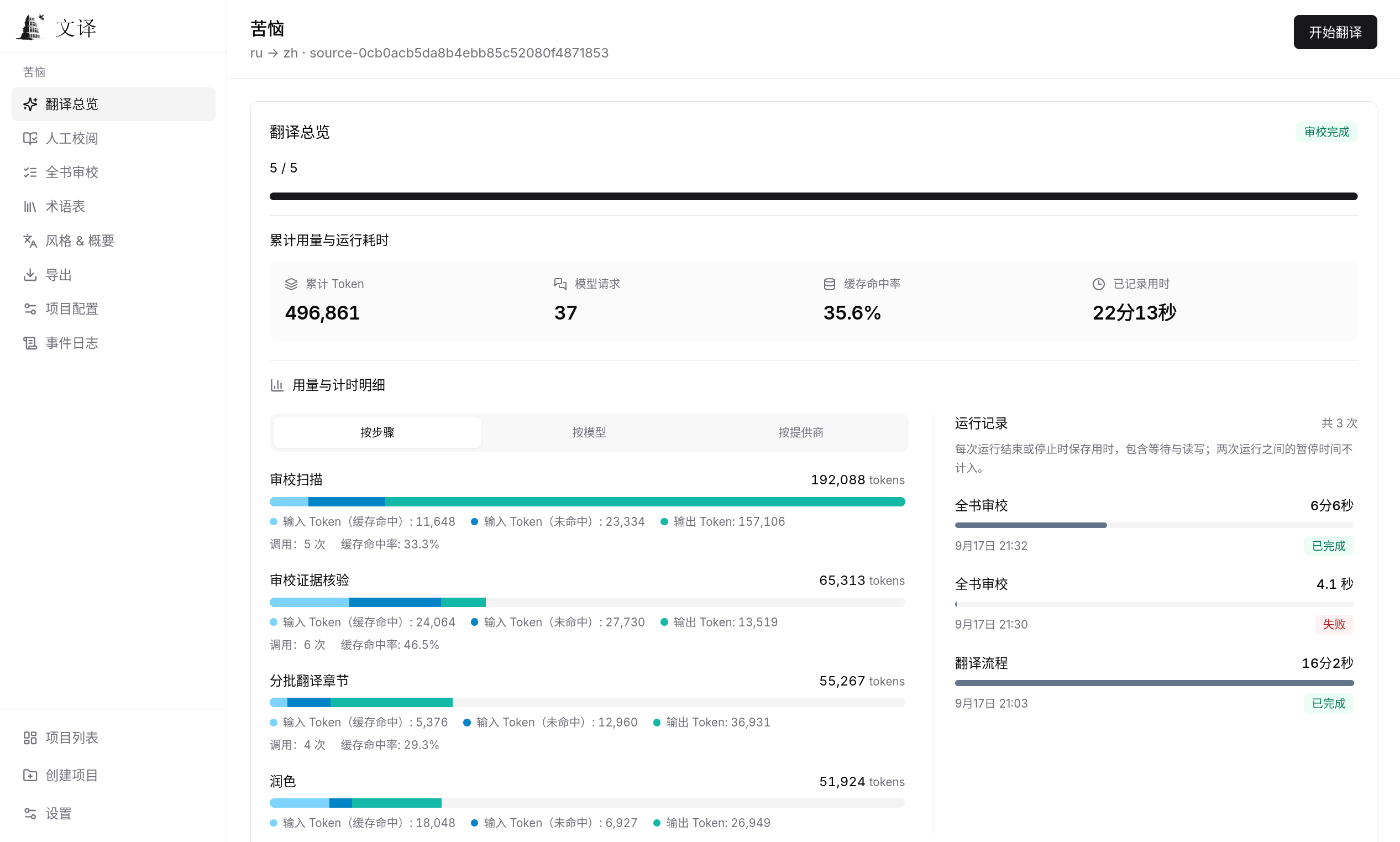
Translation overview: usage by step, cache hit rates, and run durations.
Translation examples: browse public-domain translations in wenyi-bookcase, or contribute your own. Do not share copyrighted text, private books, or sensitive workspace data without permission.
Limitations
- Translation quality — Results are bounded by the capabilities of the chosen LLM model.
- Token usage — Polishing and whole-book review can significantly increase token usage. Shadow fixing may trigger multiple full-book review passes and additional Fixer calls.
- Storage — Workspace size grows with book length; very long books may require substantial disk space.
Documentation
Documentation site: bigdawnghost.github.io/wenyi
The site groups user guides, reference material, and developer documentation in its sidebar. Switch between English and Simplified Chinese using the site's language menu. Contribution and review requirements remain in Contributing.
Community
Wenyi is a personal project created to help bring books and long-form writing across languages. Bug reports, ideas, and pull requests are welcome.
- Discord server
- QQ group: 1055065098
- GitHub Issues — bug reports and feature requests
- GitHub Discussions — ideas and questions
Star history
License
Wenyi is licensed under the GNU General Public License v3.0 (GPLv3).
The optional BabelDOC bridge is a separately licensed AGPL service, accessed over HTTP in a separate process. See PDF support.
AtomGit (China)
Wenyi is also hosted on AtomGit: https://atomgit.com/BigDawnGhost/wenyi
