PixelBoard
Supercharged Gboard Mod featuring Google Pixel 11 series's Rambler Voice Typing, AI Writing Assistant & Writing Tools V2 [No Root].






-v1.3.3_(79_MB)-00C853?style=for-the-badge&logo=android&logoColor=white)
-v1.3.3_(1.6_MB)-2979FF?style=for-the-badge&logo=android&logoColor=white)
First time? Download the ready-to-install APK (no root needed, installs side-by-side). Use the Morphe Patch if patching manually.
⬇️ Direct Download APK (v1.3.3) • 📦 Morphe Patch Bundle • Release Notes • Installation Guide • All Releases
📥 Release Assets (v1.3.3 / Gboard v18.5.3)
| Package | Type | Description |
|---|---|---|
| PixelBoard-1.3.3 | Signed APK (Recommended) | Ready to install. Installs side-by-side with stock Gboard without root (com.akshaykadam.pixelboard). Base Gboard v18.5.3 Release. |
| patches-1.3.3.mpp | Morphe Patch Bundle | Standalone patch file for Morphe Manager to patch your own base APK. |
| Stock Gboard v18.5.3 | Base APK | Official unmodified base APK from APKMirror (only required if patching manually with Morphe). |
Visual Tour & Screenshots
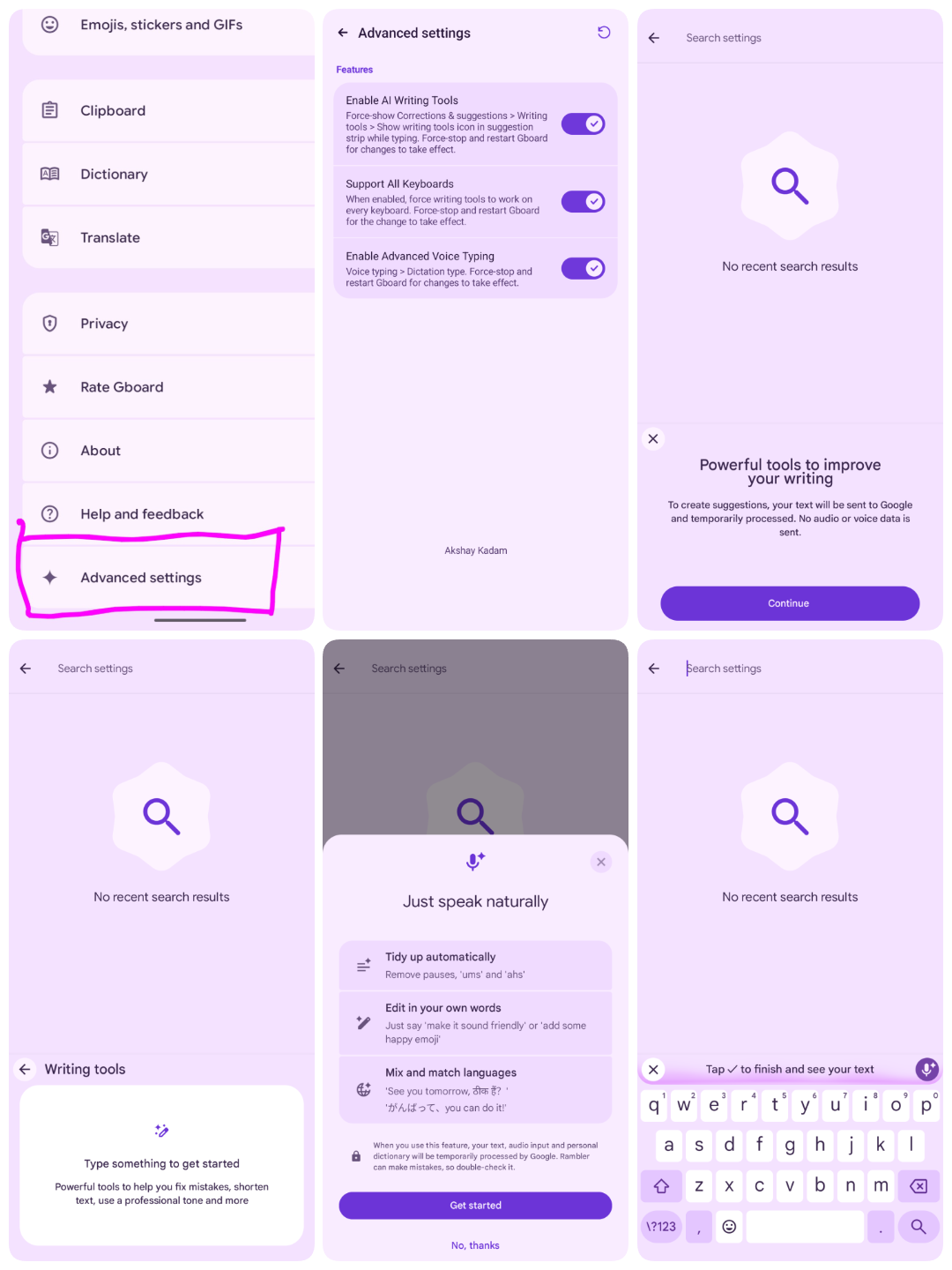
Overview
PixelBoard is a sleek, ultra-clean enhancement of Google's flagship keyboard. Tailored for pure productivity, PixelBoard strips away unnecessary bloatware and focuses strictly on powerhouse capabilities: Gemini Rambler Natural Voice Dictation, AI Writing Assistant, Modern Spell Checker Suggestion Chips & Grammar Checking, Scan Text Camera OCR, Screenshot Floating Suggestions, Material 3 Expressive Rounded Keys, Google Sans Flex Keycap Typography, Proactive Undo in Suggestion Strip, Emoji Palette V2, Super Insert Quick Hub, Restored Emoji Size Slider & Vibrant Emojis, Samsung & Vivo Clipboard History Sync, and Automatic Zero-Restart Instant Activation.
PixelBoard is engineered with an independent coexistence package ID (com.akshaykadam.pixelboard), allowing you to install and use it side-by-side with your factory Gboard without replacing, uninstalling, or risking system keyboard stability.
Key Features
1. Gemini "Rambler" Natural Voice Typing
Traditional voice-to-text transcribes every hesitation literally. PixelBoard unlocks Google's state-of-the-art Rambler model:
- Speech Cleanup: Speak naturally — stutters, false starts, and filler words ("um", "ah", "like", "you know") are filtered out in real-time.
- Thought Completion: Seamlessly fixes self-corrections on the fly (e.g., "let's meet at two no, three PM" → "Let's meet at 3:00 PM").
- Auto-Punctuation & Capitalization: Adds context-aware periods, commas, and proper noun capitalization without requiring voice commands.
- Multilingual Fluidity: Mix and match languages seamlessly in a single sentence.
- Voice Toolbar Minimize Key & TalkBack Labels (#108): Restored the voice toolbar minimize action key in Rambler dictation to smoothly minimize the expanded voice typing toolbar down to the end slot or floating widget, matching stock voice typing ergonomics, with dedicated TalkBack accessibility descriptions ("Minimize keyboard" and "Back to keyboard").
- Restored Predictive Suggestions & Fixed Idling Gradient Bar (#109): Enforces
enable_hide_rambler_al_idling_stateto properly hide the Assistant Light (AL) gradient toolbar during idle voice typing, unblocking the suggestion strip container and restoring predictive word suggestions. - Gboard 18.5.3 / 18.4.1 & Standalone Support: Seamlessly hooked into Gboard's obfuscated
VoiceSettingsFragmentselector, with automatic preference initialization (enable_jetson = true) ensuring Rambler works out-of-the-box on the standalone package (com.akshaykadam.pixelboard) without relying on Google Play Services Phenotype flag sync. - Battery-Friendly Lifecycle: Cleanly releases speech recognition bindings (
GoogleAsrService) as soon as the keyboard is hidden, eliminating screen-off battery drain (#3). - Cold Boot & Direct Boot Readiness: Powered by Device-Protected Storage (DE), ensuring Rambler voice typing is ready immediately after device reboots without needing manual Gboard restarts (#4).
2. In-Line AI Writing Assistant
Access Google's Gemini-driven writing suite directly above your keys across any app:
- One-Tap Proofread & "Fix it" Button (#109): Correct spelling, grammatical quirks, and punctuation in an instant with restored cooperative mode and inline "Fix it" action chips.
- Tone & Style Switcher: Rephrase sentences into Professional, Casual, Concise, or Emotive tones backed by reliable server model configs (
202504090000_writing_tools_config). - Smart Edit: Context-aware editing and quick rephrasing tailored to your conversation.
- Unrestricted App Support: All app package restrictions removed (
proofread_supported_apps), giving you AI writing tools across every text field and third-party application. - Android 16 Quick Insert Safeguard: Robust null-safety protection when expanding AI writing tool suggestions and quick-insert spans on Android 16.
- Universal Support: Works across all keyboard languages and input modes.
3. Modern Spell Checker & Grammar Checking
- Android 12+ System Spell Checker (
GboardSpellCheckerChipsPatch): Bytecode-level transformation hooking Gboard's spell checker compatibility check (lnz.cV), establishing full system spell checker compatibility on all Android 12+ devices. - Inline Spell Checker Chips UI (#109): Enforces
spellchecker_enable_chips_uiandspellchecker_enable_chips_ui_web_viewso grammar suggestions and spelling corrections display directly as clickable chips in the suggestion strip. - Red Squiggly Underline & Grammar Marking: Automatically initializes
enable_mark_misspelled_words=true,pref_key_enable_grammar_checker=true, andshow_suggestion_strip=trueso native red squiggly underlines on misspelled words appear reliably in text input fields. - Spell Checker Phenotype Flags: Enforces
enable_spell_checker_extension,writing_helper_chip_in_spellchecker,enable_spell_checker_highlight_on_web_input, andenable_spell_checker_training_cache. - System Rebranding: Full system spell checker service rebrand to PixelBoard Spell Checker across all system locales.
4. Scan Text / Camera OCR & Screenshot Floating Suggestion Banner
- Scan Text / OCR (Camera Viewfinder): Unlocks the dedicated "Scan text" camera tool in the toolbar (
enable_ocr,config_ocr,ocr_password_allowlist,enabled_ocr_language_tags = *). Enforcesandroid.permission.CAMERAinAndroidManifest.xmland opens a CameraX text-recognition viewfinder to capture and extract physical text directly at the cursor. - Screenshot & Clipboard Image Floating Banner: Forces
enable_clipboard_image_suggestion,enable_screenshot_notification_flow,enable_screenshot_chip,enable_clipboard_recent_screenshot, andclipboard_screenshot_enabled_at_least_once. EnforcesREAD_MEDIA_IMAGESandREAD_EXTERNAL_STORAGEpermissions. When enabled under PixelBoard Settings > Clipboard, screenshots appear instantly as a floating suggestion chip for 1-tap pasting.
5. Material 3 Expressive Rounded Keys (Belka UI) (#14)
- Modern Rounded Keycaps: Toggle Google's expressive Material 3 Belka pill-shaped keycaps on/off under Advanced Settings.
- Dynamic Flag Management: Automatically forces
belka_rounded_keyboard,belka_ui,belka_background,more_pill_keys, andenable_rounded_keysflags at runtime.
6. Google Sans Flex Keycap Typography
- Google Sans Flex Font: Activates Google Sans Flex variable font rendering across keycaps and labels on Android 12+ (API 31+).
- Material 3 Expressive Styling: Dynamically manages
google_sans_flex,platform_google_sans_flex, andgm3_expressiveflags at runtime with a user preference toggle under Advanced Settings.
7. Proactive Undo Button in Suggestion Strip
- 1-Tap Proactive Undo: Surfaces an interactive Undo suggestion chip directly in the suggestion strip after autocorrections, text replacements, or deletion operations.
- Cooperative Undo Engine: Activates
undo_proactive_post_correction,undo_proactive_auto_correction_cooperative,undo_enable_chunk_fusion,nga_enable_undo_delete, and threshold flags with a dedicated toggle under Advanced Settings.
8. Emoji Palette V2 & Dedicated Tabs
- Refined Emoji Drawer Layout: Unlocks
emoji_palette_v2,enable_frequent_emoji_recent_tab, andenable_emoji_frequent_recent_switch_option. - Dynamic Density & Grid: Enhances emoji grid responsiveness and provides a dedicated tab switch between recent emojis and frequent emojis.
9. Super Insert Quick Hub & Smart Compose Autocompletion
- Super Insert Drawer: Material 3 unified hub (
super_insert,super_insert_vk,super_insert_enable_dynamic_multi_view,enable_si_shortcut_keys), merging clipboard history, dynamic emojis, contacts, and saved phrases into a single quick-insert panel. - Smart Compose Ghost Predictions: Extends Gmail-style in-line ghost predictions across all Android apps (
enable_smart_compose,enable_inline_suggestions_on_all_fields,enable_inline_completion,enable_delight5_smart_compose,smart_compose_status = 1L).
10. Restored Emoji Size Slider, Quick Emoji & Magic Emoji Suggestions (#26, #97)
- Restored Emoji Size Slider: Unlocked the missing "Emoji size" slider preference and interactive preview row under Emojis, stickers & GIFs settings.
- Vibrant Suggestion Strip Emojis: Hooked candidate text view rendering to enforce full 100% paint opacity (
alpha = 255) for emoji glyphs, eliminating dull or washed-out emoji suggestions in the suggestion strip. - Emoji Fast-Access Row (Quick Emoji): Unlocked the native
enable_fast_access_barand bypassed Google's hardcoded 12-app whitelist (fast_access_bar_app_whitelist = *), placing the quick-emoji strip directly above the keyboard keys across all messaging apps and text fields. - Magic Emoji Suggestions Button (Emojify): Unlocked the native
enable_emojifyandenable_emojify_settings_optionwith global locale and app support (enable_emojify_language_tags = *,emojify_app_allowlist = *), surfacing the interactive magic wand (🪄) button in the suggestion strip to automatically stylize and pepper drafts with matching emojis.
11. Empty Clipboard History Fix for Samsung One UI & Vivo (#17)
- Foreground Clipboard Sync: Hooks
onStartInputViewto guaranteeClipboardManagerlistener initialization and sync copied text into clipboard drawer history when typing, overcoming OEM background clipboard suppression on Samsung One UI and Vivo devices.
12. Instant Word Learning & Accurate Autocorrect (#33)
- Instant Word Learning & 2-Letter Prefix Suggestions: Lowered out-of-vocabulary learning threshold from 4 to 1 (
intended_oov_min_count = 1) and activated Delight5 language model user history n-gram frequency, continuation scoring, and timestamp tracking (enable_pc_user_history_ngram_count,populate_ngram_count_with_context,enable_dynamic_lm_unigram_continuation_scoring). Frequently used words are learned instantly and suggested after typing just the first two letters. - Automatic Emoji Suggestions: Enabled the Delight5 concept prediction engine and emoji shortcut candidates (
enable_concept_prediction_engine,enable_rule_based_concept_prediction,enable_emoji_suggestion_from_top_candidate,enable_predictions_from_emoji_shortcuts,config_expression). Matching emojis are automatically suggested directly in the suggestion strip when typing relevant words. - Streaming Gesture Touch Tagging & Beam Decoder: Smooth glide typing with
update_streaming_touch_data_set_is_gesture, two-stage beam decoder (enable_two_stage_decoder), and spatial rescoring (enable_space_transposition_post_correction,enable_pk_spatial_model_features,enable_pk_auto_correction_trigger_predictor).
13. Multilingual UI (20+ Locales) & Bloat-Free Settings
- Native Localization in 20+ Languages: Fully translated Advanced Settings across English, Spanish, French, German, Italian, Portuguese, Russian, Hindi, Japanese, Korean, Chinese, Arabic, Indonesian, Turkish, Vietnamese, Polish, Dutch, Thai, and Ukrainian (
@string/pixelboard_patches_settings_title). - Cleaned Settings Tree & Dictionary Preservation: Removed unwanted promotional bloatware ("Rate Gboard" / "Help & feedback") via semantic string key resolution, strictly preserving the native Dictionary (
LatinDictionarySettingsFragment), Personal dictionary, and Physical keyboard preferences across all Gboard base updates (#91, #94).
14. Writing Tools V2 Support (Experimental)
- Suggested Style Chips & Prompt Bar: Pre-configured architecture for Google's modern "Suggested" style chips and the freeform "Describe your edit" prompt bar.
- Intelligent Hardware Gating: Integrated with hardware/model eligibility checks to prevent unexpected errors or crashes on unsupported devices.
15. Device-Gated AI Inference Backend Selector (New in v18.4)
On supported devices (such as Google Pixel 8 Pro / 9 series), choose your preferred inference pipeline directly under Advanced Settings:
GBOARD_SERVER(Google Cloud Server Inference)PRIVATE_INFERENCE_AICORE(On-Device Private Android AICore)PRIVATE_INFERENCE_ASTREA(On-Device Astrea Framework)- Dynamically hidden on unsupported hardware to maintain a clutter-free, native experience.
16. Automatic Live Activation — Zero Restarts Required
- Instant Hot-Reload: Toggling Rambler Voice Typing, switching AI Writing Tools preferences, or changing inference backend options applies automatically in real time without restarting Gboard, force-closing the app, or rebooting your phone.
- Zero-Friction Workflow: Features are synchronized across the keyboard process dynamically — simply configure your desired options and start typing or dictating right away.
- Optional Manual Reload: Advanced Settings retains an optional Restart (
↻) button solely as a convenience tool, but manual restarts are no longer mandatory.
17. Safe Coexistence & Instant Bypass
- Side-by-Side Installation: Installs with app label
PixelBoardalongside stock Google Keyboard. - Custom Adaptive Icon: Bundles PixelBoard's custom high-resolution Material You adaptive app icon for home launcher and settings.
- Signature Whitelist Bypass: Pre-patched bytecode ensures Google Play signature checks and integrity verifications pass cleanly without root.
- Inline Autofill & Password Manager Suggestions: Enables Android's
DeviceIntelligenceinline autofill chips for password managers (Bitwarden, 1Password, KeePass, etc.) in the renamed package (#24).
18. Extended Clipboard History Retention Duration (New Feature)
- Save Clips for Up to 30 Days or Permanently: Break free from stock Gboard's rigid 24-hour limit! PixelBoard lets you choose exactly how long copied text and items are saved in your clipboard history with 5 customizable tiers:
- 1 hour
- 24 hours (Stock default)
- 7 days (1 week)
- 30 days (1 month)
- Never (Permanent / Manual deletion only)
- Accessible Everywhere: Configurable directly under Gboard Settings > Clipboard and inside PixelBoard Settings.
- Crash-Free Migration: Automatically migrates previously saved retention preferences (e.g. stock 24h at index 6 → new index 1) and safely clamps slider values, eliminating layout crashes.
19. Comprehensive TalkBack & Screen Reader Accessibility Overhaul (#65, #66, #67)
- Unified Row Semantics: Introduces
AccessibleRowmerging switch, radio, and choice rows into single TalkBack controls with unified roles and states, eliminating redundant navigation stops. - Focus Preservation Across Dynamic Rebuilds: Automatically tracks and restores TalkBack focus across real-time screen rebuilds or smoothly shifts focus to the page title on new pages.
- Accessible Headings & Spoken Feedback: Marks section and toolbar titles as headings (API 28+), adds keyboard preview hints, announces spoken warnings, and speaks restart confirmations.
20. Complete Arabic (ar) Localization (#53)
- Full Arabic Translations: Complete Arabic language localization covering all Advanced Settings, AI Writing Tools, and Rambler dictation preferences.
[!NOTE] Google Pixel Device Requirement: New advanced features (such as Writing Tools V2 and the On-Device AI Inference Backend Selector) are available only on Google Pixel devices (e.g., Pixel 8 Pro / Pixel 9 series) due to system AICore and hardware model requirements. On non-Pixel Android devices, these specific options are automatically hidden or gated to ensure complete stability, while core features like Gemini Rambler Natural Voice Typing, AI Proofread, and Tone Rewriting work across all supported devices.
How to Enable Rambler Voice Typing
Follow these quick steps to activate Google's Gemini-powered Rambler natural voice typing:
- Open PixelBoard Settings:
- Tap the Gear (
⚙️) icon in the keyboard suggestion strip, or go to Android Settings > System > Languages & input > On-screen keyboard > PixelBoard.
- Tap the Gear (
- Select Rambler Dictation:
- Tap Voice typing.
- Under Dictation type, choose Rambler (switch selection from Standard to Rambler).
- Instant Automatic Activation (No Restart Needed):
- Your selection activates automatically in real-time — no app restart or device reboot required!
- (Optional): You can verify that Enable Advanced Voice Typing is toggled ON under ★ Advanced settings (enabled by default). The toolbar Restart (
↻) button remains available as an optional manual fallback if ever needed.[!TIP] Thanks to recent runtime enhancements, Rambler dictation initializes dynamically on the fly. You can immediately tap the microphone icon without needing to restart Gboard or kill the app process!
- Start Speaking Naturally:
- Tap any text box and hit the Microphone icon on PixelBoard.
- You will see the "Just speak naturally" setup screen.
- Tap Get started and speak freely — PixelBoard handles the cleanup automatically!
Where to Find & Use AI Writing Tools
Google's AI Writing Tools allow you to proofread, rephrase, and adjust the tone of any text on the fly.
1. Where to Configure
- In Advanced Settings:
- Open ★ Advanced settings from the bottom of PixelBoard Settings.
- Make sure Enable AI Writing Tools and Support All Keyboards are toggled ON (both ON by default).
- In Corrections & Suggestions:
- In PixelBoard Settings, go to Corrections & suggestions > Writing tools.
- Ensure Show writing tools icon in suggestion strip while typing is enabled.
2. Where to Access While Typing
- Suggestion Strip (Quick Bar):
- When typing in any text box across any app, the Writing tools icon (pen sparkle ✨) appears in the keyboard suggestion strip above your keys.
- Keyboard Tools Menu:
- If the icon is hidden, tap the 4-squares / arrow icon on the left of the suggestion strip to open the tools drawer and tap Writing tools.
- Actions Available:
- Proofread: One-tap fix for grammar and spelling.
- Rewrite / Rephrase: Adjust tone between Professional, Casual, Concise, and Emotive.
⚙️ Advanced Settings Screen
PixelBoard features a clean, minimal preference screen modeled directly after the native Material You Gboard UI:
- Enable AI Writing Tools: Force-shows the Writing tools icon in the suggestion strip across all apps and text views.
- Support All Keyboards: Extends AI writing assistance beyond English to all keyboard layouts.
- Inference Backend Type: On supported hardware, select between
GBOARD_SERVER,PRIVATE_INFERENCE_AICORE, andPRIVATE_INFERENCE_ASTREA. - Enable Advanced Voice Typing: Unlocks the Rambler dictation engine in Voice typing settings.
- Rounded Keys: Enable Google's Material 3 Expressive Belka pill-shaped keycaps.
- Multilingual Support: Fully localized in 20+ languages matching your device's system locale.
- Toolbar Restart Button (
↻): Optional one-tap process reload utility in the toolbar if you ever want to force a refresh, though all settings and toggles apply automatically in real time without restarts. - Cleaned Preferences: Promotional bloatware ("Rate Gboard" and "Help & feedback") has been completely removed.
- Custom Attribution: Dedicated credit footer (Akshay Kadam).
Installation Guide
Option A: Direct Download on Your Phone (Easiest)
- Download PixelBoard Stable APK (v1.3.3, 79 MB) (or view the v1.3.3 Release Page).
- Tap the downloaded
.apkin your notification drawer or Downloads folder. - If prompted, toggle "Allow from this source" and tap Install.
- Enable PixelBoard in Settings > System > Languages & input > On-screen keyboard.
Option B: Sideload via ADB (For Developers)
Connect your Android phone via USB with USB Debugging enabled:
adb install -r PixelBoard-1.3.3.apk
adb shell am force-stop com.akshaykadam.pixelboard
(If building from source locally, use adb install -r output/PixelBoard-1.3.3.apk)
Option C: Patch via Morphe Manager (On-Device Patcher)
You can patch your stock Gboard APK directly on your phone using Morphe Manager:
- Install Morphe Manager on your Android device.
- Get the two required files:
- Patch Bundle: PixelBoard.mpp (or versioned patches-1.3.3.mpp)
- Stock Base APK: Download the official base bundle from APKMirror (Gboard v18.5.3 Release).
- In Morphe Manager, select Storage, choose the stock Gboard APK, and load
PixelBoard.mppas the patch source. - Tap Patch and then Install!
[!TIP] You can also add PixelBoard as a custom auto-updating patch source in Morphe Manager by adding:
https://raw.githubusercontent.com/Akshayykadam/PixelBoard/main/patches-bundle.json
First-Time Setup on Device
- On your phone, go to Settings > System > Languages & input > On-screen keyboard (or Manage Keyboards).
- Toggle on PixelBoard.
- Tap the keyboard switch icon (or spacebar selector) and pick PixelBoard as your active input method.
- Follow the Rambler Setup Guide to select Rambler dictation (activates automatically — no restart needed!).
- Access the AI Writing Tools right from your suggestion strip!
📁 Project Structure
GBoardMod/
├── README.md                  # Project documentation & direct download links
├── build.sh                   # 1-click automated build & patching script (100% offline)
├── options.json               # Patch configuration profile
├── patches/
│   ├── PixelBoard.mpp         # Pre-bundled offline patch pack (~1.6 MB)
│   └── patches-bundle.json    # Morphe Manager repository metadata
├── input/
│   └── gboard.apk             # Base stock Gboard APK (v18.5.3 Release, ~67 MB)
├── output/
│   ├── PixelBoard.apk         # Compiled APK (local build output / hosted on GitHub Releases)
│   └── patching-result.json   # Patch verification report
├── tools/
│   ├── patcher.jar            # Standalone patch compiler CLI (Java 21)
│   └── patcher-data/          # Signing keystore & local storage
├── LICENSE                    # GNU General Public License v3.0
└── pixelboard-patches/        # PixelBoard patch source repository (Kotlin/Smali)
    ├── gradle/
    ├── patches/               # Patch definitions & Kotlin bytecode modifications
    └── extensions/            # Extension APK bytecode & runtime hooks
🛠️ Building & Patching
1. Instant 1-Click Build (100% Offline)
Place your stock Gboard APK at input/gboard.apk, then run:
./build.sh
This runs completely offline using the pre-bundled patches/PixelBoard.mpp and tools/patcher.jar. It automatically patches, aligns, and signs output/PixelBoard.apk.
2. Rebuilding Patch Bundle from Source (Optional)
If you modify any Smali or Kotlin patch code inside pixelboard-patches/:
./build.sh --rebuild
This recompiles the .mpp patch pack using Gradle and immediately applies it to the stock APK.
3. Running Test Suite
Verify patch bytecode transformations and contract integrity:
cd pixelboard-patches
JAVA_HOME=/opt/homebrew/opt/openjdk@21 ./gradlew test
4. Manual CLI Usage (Requires Java 21)
java -jar tools/patcher.jar patch \
  --patches=patches/PixelBoard.mpp \
  --options-file=options.json \
  --striplibs=arm64-v8a \
  -o=output/PixelBoard.apk \
  -r=output/patching-result.json \
  input/gboard.apk
Compatibility Matrix
| Property | Requirement |
|---|---|
| Target Package | com.google.android.inputmethod.latin |
| Primary Base Version | 18.5.3.993608717-release-arm64-v8a (Recommended) |
| Compatible Versions | 18.4.1.985164140-release-arm64-v8a18.3.1.977415014-release-arm64-v8a18.0.3.954559732-release-arm64-v8a |
| Architecture | arm64-v8a |
| Android Version | Android 10 (API 29) through Android 16 / 17 Preview |
| Root Required | No (Standalone side-by-side coexistence) |
[!NOTE] Google Pixel Device Support: Advanced features (Writing Tools V2 and On-Device Private AICore / Astrea inference) are available only on Google Pixel devices. Core Rambler Natural Voice Typing, AI Writing Assistant, proofreading, and tone rewrite work across all Android devices.
Developer & Maintainer
Akshay Kadam
- GitHub: @Akshayykadam
- Project Repository: PixelBoard
Acknowledgements & Credits
Special thanks and sincere appreciation to:
- JasonWu — The pioneering author of the original Gboard patch project whose foundational reverse-engineering research and Smali patch framework made this mod possible.
- AnhDuck (@AnhDuck) — For restoring the Rambler voice toolbar minimize key and contributing TalkBack accessibility labels for voice controls (#108).
- Akash Mahedy (@akashmahedy) — For diagnosing the settings ID collision on Gboard 18.5+ and contributing the string resource resolution patch preserving the native Personal Dictionary and Physical Keyboard preferences (#91, #94).
- Animesh Ahilya (@animeshahilya) — For contributing a comprehensive TalkBack accessibility overhaul across settings: merged row semantics (
AccessibleRow), TalkBack focus restoration across screen rebuilds, heading navigation, spoken warnings, and restart announcements (#65, #66, #67). - AbdulAziz Hatem (@AbdulAziz-Hatem) — For contributing complete Arabic (
ar) localization for all Advanced Settings, AI Writing Tools, and Rambler dictation preferences (#53). - Mohamed Technology (@mohamedtechnology) — For reporting the TalkBack / screen reader dead zone in the features menu and providing the root cause analysis on window focus and
TYPE_WINDOW_STATE_CHANGED(#48). - Andrew Matten (@andrewmatten) — For pinpointing the Gboard native dictation split readiness gate in
slc.a()and contributing the verified bytecode patch for fused APKs on Pixel 8 Pro (#50). - Benestin (@Benestinlinson) — For extensive multi-hour testing across releases, diagnosing spacebar auto-correction behavior (#52), and reporting screenshot chip synchronization and toolbar access point flow (#44, #47).
- Paolo Del Casale (@PaoloDelCasale) — For deep BatteryStats investigations and candidate fixes resolving background
GoogleAsrServicepersistence (#3) and the offline language pack download loop (#5). - Alin Cornel (@alincornel) — For identifying the root cause and implementing the fix for inline autofill suggestions from password managers (Bitwarden, 1Password, etc.) in the renamed package (#24).
- The ReVanced & Morphe Open-Source Android Modding Communities — For the open-source decompilation toolchains, patch compilers, and continuous ecosystem contributions.
Legal Disclaimer
[!CAUTION] PLEASE READ THIS LEGAL DISCLAIMER CAREFULLY BEFORE DOWNLOADING, COMPILING, OR USING THIS SOFTWARE.
- Non-Affiliation & Endorsement: PixelBoard is an independent, non-commercial open-source modification project developed for interoperability and accessibility research. It is not affiliated with, sponsored by, authorized by, maintained by, or in any way associated with Google LLC, Alphabet Inc., or any of their subsidiaries.
- Intellectual Property & Trademarks: "Google", "Gboard", "Pixel", "Android", "Gemini", and all related logos, product names, and brand identifiers are trademarks or registered trademarks of Google LLC. All trademarks, service marks, and trade names referenced herein remain the property of their respective owners. Their mention in this repository is strictly for product identification and nominative fair-use purposes.
- Personal & Educational Use Only: This software, including all patch definitions and compiled binaries, is provided solely for personal education, private study, and experimental research. It is not intended for commercial distribution or monetization.
- No Warranty ("AS IS"): This software is distributed under an open-source license on an "AS IS" BASIS, WITHOUT WARRANTIES OR CONDITIONS OF ANY KIND, either express or implied, including, without limitation, any implied warranties of merchantability, fitness for a particular purpose, non-infringement, or system stability.
- Limitation of Liability: Under no circumstances shall the author, contributors, maintainers, or distributors be held liable for any direct, indirect, incidental, special, exemplary, or consequential damages (including, but not limited to, data loss, device malfunction, service interruption, account penalties, or legal claims) resulting from the download, installation, execution, or misuse of this software.
- User Responsibility: Users assume all risks associated with sideloading or executing third-party modified software on their devices and are individually responsible for complying with applicable local laws, regulations, and third-party terms of service.
