AVault
High-Assurance, Hardware-Encrypted Call Management & Confidential Audio Vault for Android 12+






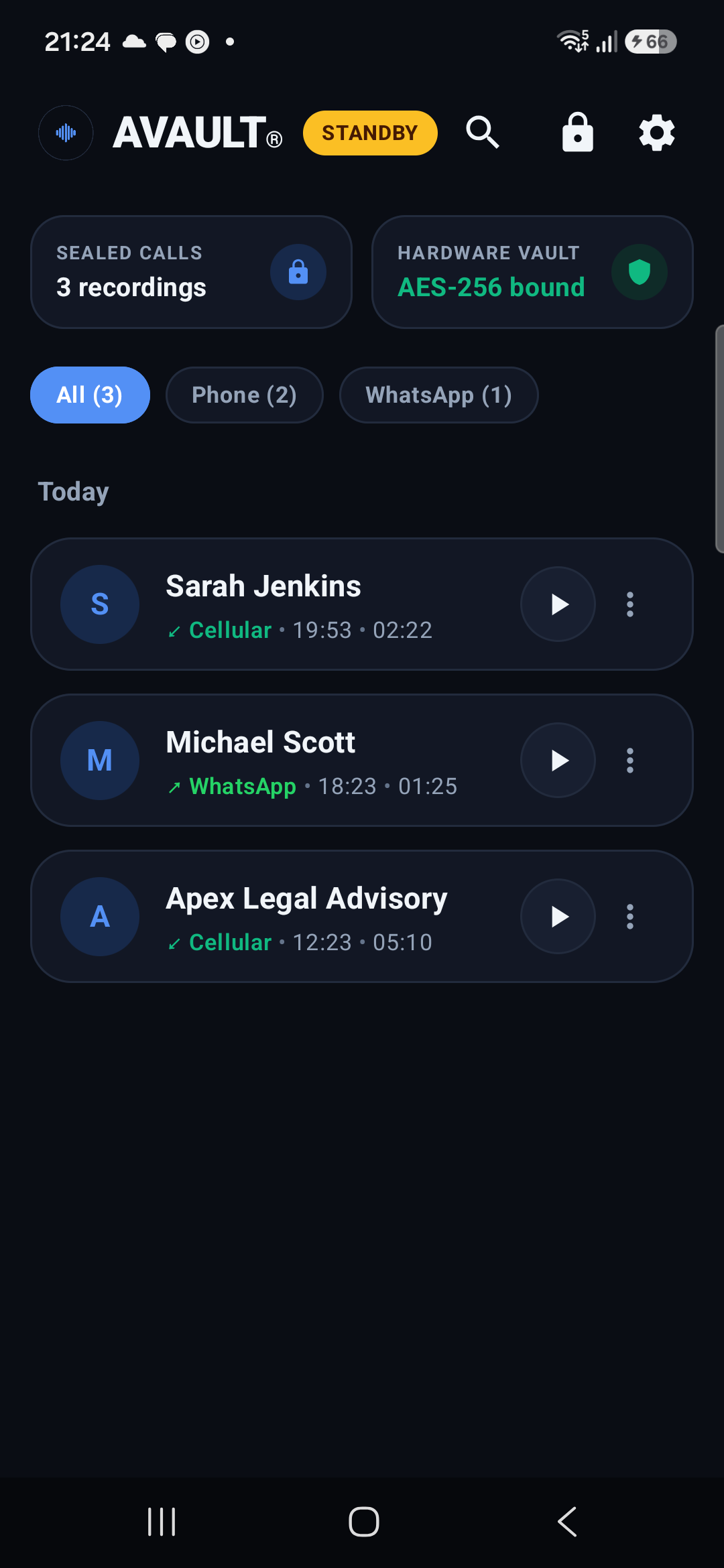
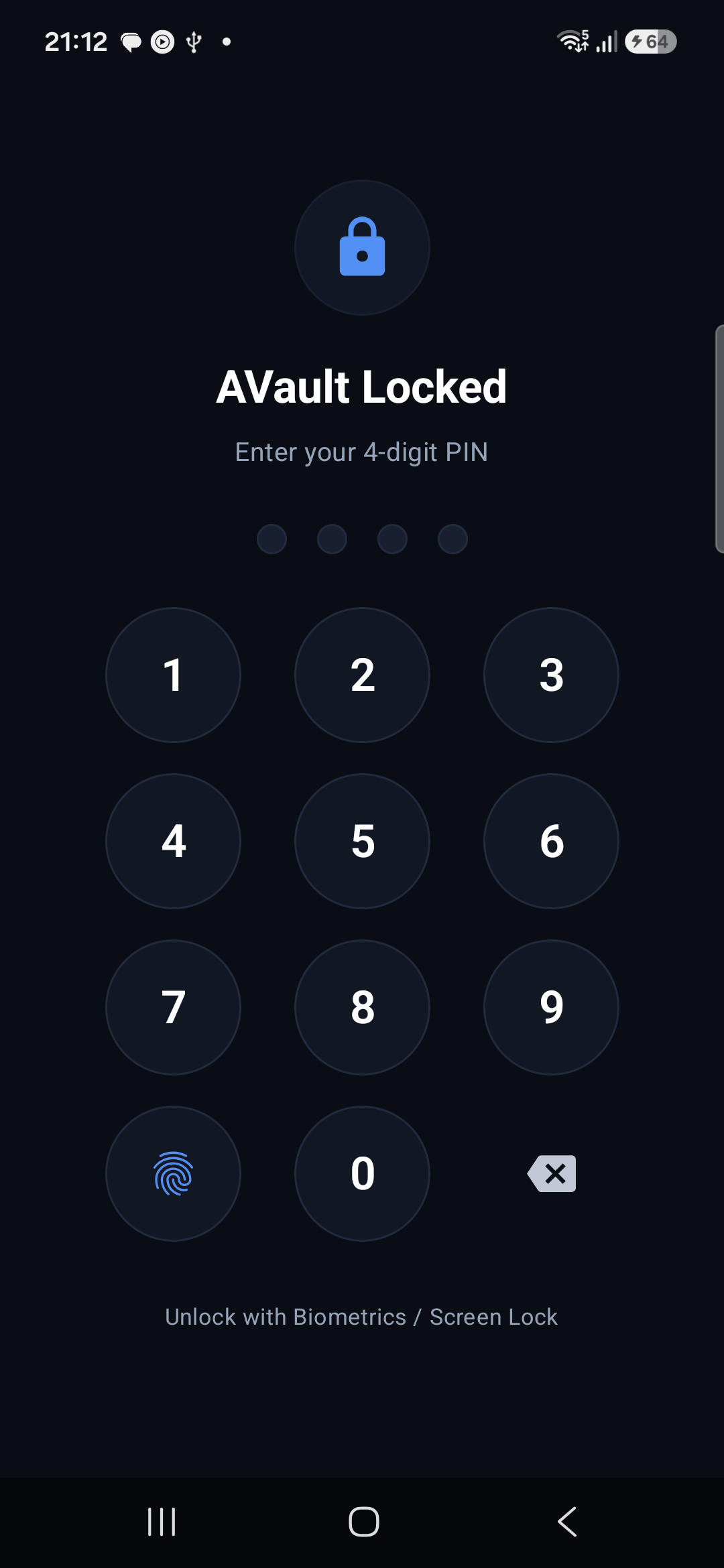
⚠️ Critical Academic & Security Research Notice
[!WARNING]
STRICTLY FOR ACADEMIC, SECURITY, AND EDUCATIONAL RESEARCH PURPOSES ONLY
LIMITATION OF LIABILITY & INDEMNIFICATION: The authors, maintainers, contributors, and copyright holders of AVault assume no liability or responsibility whatsoever for any damages, legal claims, criminal penalties, or civil lawsuits arising from the compilation, installation, execution, modification, or distribution of this software.
- Wiretapping & Telecommunications Compliance: Laws regarding recording telephone calls and intercepting digital communications differ significantly across sovereign nations, states, and provinces. Jurisdictions may enforce one-party consent (e.g., 18 U.S.C. § 2511 in the United States) or all-party consent (e.g., California Penal Code § 632, Germany StGB § 201, and GDPR Article 6).
- User Responsibility: The individual compiling or operating AVault is exclusively responsible for determining and complying with all applicable local, municipal, federal, and international privacy statutes.
- Prohibition of Malicious Surveillance: This codebase must never be deployed for unauthorized electronic surveillance, wiretapping, espionage, stalking, or harassment.
By cloning, building, or using this repository, you explicitly certify that you are solely accountable for your actions, and agree to the terms of the MIT License provided herein.
📑 Table of Contents
- Executive Summary & Architectural Highlights
- Capability & Security Matrix
- Binary Format & Cryptographic Specification
- Quick Start: 1-Prompt Automated Setup via AI Assistants (Claude, Codex, Gemini, Grok, Cursor)
- Alternative: Manual Build & Deployment Guide
- Shizuku Rootless Privilege Provider Setup
- System Architecture & Data Flow Diagrams
- Core Features in Detail
- Comprehensive Configuration Reference
- Threat Model & Security Analysis
- Diagnostic & Troubleshooting Guide
- Frequently Asked Questions & SEO Discoverability
- License
🏛️ Executive Summary & Architectural Highlights
AVault is an open-source, security-focused telecommunications management platform and cryptographic voice vault designed for modern Android devices (Android 12 to Android 16+).
Traditional call recording utilities store raw audio in unencrypted .mp3 or .m4a files within shared public storage directories, exposing sensitive voice communications to third-party apps with media reading permissions, media indexers, and unauthenticated physical extraction.
AVault solves this paradigm by pairing rootless system telecom integration (via privileged ADB shell Binder IPC) with hardware-backed AES-256-GCM encryption, zero-plaintext ephemeral playback, multi-factor biometric authentication, and automated lifecycle retention management.
Core Pillars
- Hardware-Isolated Master Keys: Cryptographic keys are generated inside the device's hardware security module (TEE / StrongBox Keymaster) via the Android KeyStore Provider. Raw key material never enters user-space RAM.
- Zero-Plaintext Ephemeral Playback: Decryption occurs on-the-fly directly in volatile memory into an isolated POSIX file descriptor (
0600access) with.nomediaindexing suppression. The temporary stream is cryptographically shredded the millisecond playback halts. - Multi-Factor Application Lock: Enforces biometric authentication (Fingerprint, Face Unlock, Device Credential) backed by a salted PBKDF2/SHA-256 PIN engine with exponential brute-force backoff protection.
- Automated Storage Lifecycle & Retention: Automatically prunes expired non-bookmarked recordings after a configurable interval (1d to 1y), while bookmarked calls remain permanently preserved and immune to cleanup.
- Stealth & Minimalist Presentation: Suppresses call-end toast notifications and uses discreet status alerts (
"Started","Saved"), paired withFLAG_SECUREto prevent screen scraping, screenshots, and task-switcher previews.
📊 Capability & Security Matrix
| Feature / Security Control | Standard Call Recorders | Root-Based Tools (Magisk / KSU) | AVault |
|---|---|---|---|
| Root Access Required | ❌ No | ⚠️ Yes (Unlocks Bootloader) | 🛡️ No (Rootless ADB / Shizuku) |
| Android 12 – 16+ Compatibility | ❌ Broken by Scoped Storage | ⚠️ Requires Custom Kernels | ✅ Native Support (API 31 – 36) |
| Disk Storage Format | Plaintext MP3 / M4A / WAV | Plaintext MP3 / WAV | 🔒 Authenticated AES-256-GCM (.vault) |
| Master Key Protection | None (Unencrypted) | None (Unencrypted) | 🔒 Hardware HSM / TEE / StrongBox |
| Plaintext Playback Exposure | Permanent Plaintext File | Permanent Plaintext File | 🛡️ Zero Plaintext (Ephemeral Stream) |
| Gallery / MediaStore Scraping | ⚠️ Readily Scraped by Apps | ⚠️ Readily Scraped by Apps | 🛡️ Blocked (.nomedia + Scoped Storage) |
| Screen Capture & Preview Protection | ❌ None | ❌ None | 🔒 Active (FLAG_SECURE Enforcement) |
| Vault Access Lock | ❌ None or Basic PIN | ❌ None | 🔒 BiometricPrompt + Salted SHA-256 PIN |
| Automated Retention Lifecycle | ❌ Manual Deletion Only | ❌ Manual Deletion Only | ⚡ Configurable Auto-Delete + Bookmarks |
| Stealth Operation | ⚠️ Intrusive Toasts & Labels | ⚠️ Variable | 🤫 Silent Alerts ("Started", "Saved") |
🔐 Binary Format & Cryptographic Specification
Every recording managed by AVault is packaged into a proprietary, tamper-resistant binary container format: .vault.
1. .vault Container Structure
+-------------------+--------------------+------------------------+------------------------------------+------------------------+
|  Magic Identifier |   Format Version   |  Initialization Vector |        Ciphertext Payload          |   Authentication Tag   |
|   (0x00 - 0x03)   |       (0x04)       |     (0x05 - 0x10)      |        (0x11 - EOF-16)             |       (EOF-15 - EOF)   |
|      4 Bytes      |       1 Byte       |        12 Bytes        |            Variable                |        16 Bytes        |
+-------------------+--------------------+------------------------+------------------------------------+------------------------+
|   "AVLT" (ASCII)  |    0x01 (UINT8)    |   CSPRNG Nonce (GCM)   |   Encrypted Opus/AAC Audio Stream  |   GCM Auth Tag (128b)  |
+-------------------+--------------------+------------------------+------------------------------------+------------------------+
- Magic Identifier (Bytes 0–3):
0x41 0x56 0x4C 0x54("AVLT"). Verifies container integrity and distinguishes valid encrypted containers from malformed files. - Format Version (Byte 4):
0x01. Enables backward-compatible cryptographic migrations. - Initialization Vector (Bytes 5–16): 12-byte (96-bit) cryptographically secure random nonce generated uniquely per recording session via
java.security.SecureRandom. An IV is never reused. - Ciphertext Payload (Bytes 17 to EOF-16): Audio bitstream compressed via Opus (default, 32–128 kbps) or AAC, encrypted using AES-256 in Galois/Counter Mode.
- Authentication Tag (Final 16 Bytes): 128-bit Galois Authentication Tag. Guarantees message integrity; any ciphertext modification or bit-flipping causes decryption failure before playback begins.
2. Key Management & Derivation Parameters
- Master Encryption Key: Generated within the Android KeyStore provider (
AndroidKeyStore), algorithmAES/GCM/NoPadding, 256-bit key length, bound to the app's UID. - PIN Hashing: PBKDF2 with HMAC-SHA256, 128-bit cryptographic salt, 100,000 iterations.
- Lockout Policy: 5 consecutive incorrect unlock attempts trigger a 30-second exponential hardware lockout.
🚀 Quick Start: 1-Prompt Automated Setup via AI Assistants (Recommended)
Building advanced Android security applications manually typically requires tedious environment setup: installing JDK 17/21, configuring Android SDK 36, cloning hidden framework stubs, resolving dependencies, and managing ADB connectivity.
Modern agentic AI coding assistants—such as Claude Code, OpenAI Codex, Google Gemini, xAI Grok, and Cursor—can automate this entire setup, compilation, and deployment pipeline in a single instruction.
Universal AI Agent Prompt
Simply open your AI coding environment (Claude, Codex, Gemini, Grok, or Cursor) and provide the following prompt:
Build and deploy AVault: resolve all hidden API stubs and Gradle dependencies, compile the debug APK, and install it directly onto my connected Android device via ADB.
What AI Coding Assistants Execute Automatically:
flowchart LR
    A["AI Agent Prompt\n(Claude / Codex / Gemini / Grok / Cursor)"] --> B["Sync Repositories & Submodules"]
    B --> C["Link Android Hidden API Stubs"]
    C --> D["Verify JDK 17 & Android SDK 36"]
    D --> E["Execute Gradle assembleDebug"]
    E --> F["Detect Connected ADB Device"]
    F --> G["Install APK & Verify Service"]
- Submodule & Hidden Stub Linking: Automatically clones and links the required
android-framework-hidden-stubslibrary, resolving framework stubs without manual path mapping. - Toolchain & SDK Validation: Verifies Java 17+ and ensures Android API 36 (
android-36) platform tools are present. - Deterministic Build Optimization: Executes
./gradlew assembleDebugusing parallel workers and build cache. - Automated ADB Device Deployment: Discovers connected Android devices (via USB or Wireless Debugging), installs the compiled APK (
adb install -r), and can verify runtime service state.
🛠️ Alternative: Manual Build & Deployment Guide
For developers building directly from terminal or continuous integration environments:
Prerequisites
- Git: Version 2.30+
- Java Development Kit (JDK): Version 17 or 21 (Eclipse Temurin or OpenJDK recommended)
- Android SDK: Platform API 36 (
android-36), Build-Tools36.0.0 - Android Device: Android 12 (API 31) through Android 16+
Step-by-Step Instructions
Clone Repository with Submodules:
git clone --recurse-submodules https://github.com/arpanjot-coding/AVault.git
cd AVault
Configure Local SDK Path: Create a
local.propertiesfile in the project root if not automatically configured:sdk.dir=/path/to/your/android/sdkAssemble Debug APK:
- Linux / macOS:
./gradlew assembleDebug - Windows PowerShell:
.\gradlew.bat assembleDebug
- Linux / macOS:
Install onto Device via ADB:
adb install -r app/build/outputs/apk/debug/app-debug.apkAssemble Release APK (Production Signing):
./gradlew assembleRelease(Configure signing credentials in
keystore.propertiesor environment variables prior to release compilation).
⚡ Shizuku Rootless Privilege Provider Setup
AVault relies on Shizuku to communicate with privileged Android OS system services (android.permission.CAPTURE_AUDIO_OUTPUT, android.permission.MANAGE_ONGOING_CALLS) without rooting the handset.
flowchart TD
    UserPhone["Android Handset\n(Android 12 – 16+)"] --> DevOpt["Enable Developer Options\n& Wireless Debugging"]
    DevOpt --> ShizukuApp["Launch Shizuku App"]

    subgraph Pairing Method
        ShizukuApp -->|Method A| WPair["Wireless Debugging Pairing\n(Enter 6-digit PIN on-device)"]
        ShizukuApp -->|Method B| USBRun["PC ADB Terminal Command\n(adb shell sh .../start.sh)"]
    end

    WPair --> ShizukuDaemon["Shizuku System Service Active\n(Running under UID 2000 'shell')"]
    USBRun --> ShizukuDaemon

    ShizukuDaemon --> AVaultReq["AVault Requests Authorization"]
    AVaultReq --> Grant["User Taps 'Allow'\n(Full Telephony & Capture Enabled)"]
Method A: On-Device Wireless Debugging (No PC Required, Android 11+)
- Ensure the handset is connected to an active Wi-Fi network.
- Navigate to Settings > System > Developer Options > Enable Wireless Debugging.
- Tap Wireless Debugging > Pair device with pairing code.
- Open Shizuku, tap Pairing, and input the 6-digit code shown in the system dialog.
- In Shizuku, tap Start. The service daemon will initialize immediately on-device.
Method B: Computer Terminal (via USB Cable)
- Enable USB Debugging in Developer Options and connect your phone to a computer.
- Execute the Shizuku launch script via ADB:
adb shell sh /sdcard/Android/data/moe.shizuku.privileged.api/start.sh - Shizuku will confirm "Shizuku is running" with version and API level.
Authorizing AVault
- Launch AVault.
- When prompted on the onboarding or dashboard screen, tap "Authorize" on the Shizuku permission dialog.
- AVault binds immediately to the background daemon via Android Binder IPC.
📊 System Architecture & Data Flow Diagrams
1. End-to-End Audio Capture & Encryption Pipeline
flowchart TD
    CallEvent["Call State Change\n(Incoming / Outgoing / Connected)"] --> InCall["InCallService / PhoneStateReceiver\n(Intercepts Telecom State)"]
    InCall --> DecisionEngine["RecordingDecisionEngine\n(Checks Filters, Contacts & Modes)"]

    DecisionEngine -->|Action: Start| FGS["RecordingForegroundService\n(Discreet Notification: 'Started')"]

    FGS --> BinderIPC["Shizuku Shell IPC Service\n(Runs in privileged UID 2000 context)"]

    subgraph Audio Capture Engine
        BinderIPC --> AudioRec["AudioRecord / AudioPlaybackCapture\n(Dual-Channel PCM: Uplink + Downlink)"]
        AudioRec --> VAD["VAD & Ducking Pre-Processor\n(Levels Microphone vs Downlink Volume)"]
        VAD --> Encoder["Opus / AAC Real-Time Encoder\n(Hardware-Accelerated Bitstream Compression)"]
    end

    subgraph Cryptographic Engine
        KeyStore["Android KeyStore TEE / StrongBox\n(Alias: 'avault_master_key')"] --> Cipher["AES-256-GCM Streaming Cipher\n(12-byte CSPRNG IV + 128-bit Auth Tag)"]
        Encoder --> Cipher
        Cipher --> VaultWriter["Direct Streaming Disk Writer\n(Outputs Encrypted .vault Container)"]
    end

    VaultWriter --> Index["Encrypted SQLite / Prefs Metadata Index\n(Contact, Timestamp, Duration, Bookmark State)"]
    Index --> Notification["Discreet Status Update\n('Saved')"]
2. Zero-Plaintext Ephemeral Playback Engine
sequenceDiagram
    autonumber
    actor User as User
    participant UI as CallsDashboardScreen
    participant Lock as AppLockManager
    participant Crypto as VaultEncryptionManager
    participant KeyStore as Android KeyStore (TEE)
    participant Pipe as Volatile Internal Pipe (0600)
    participant Player as MediaPlayer

    User->>UI: Taps call card to listen
    UI->>Lock: Verify Authenticated Session
    alt Session Locked
        Lock->>User: Request Biometric Prompt / Salted PIN
        User->>Lock: Authentic Input Provided
        Lock-->>UI: Grant Session Token
    end
    UI->>Crypto: Stream Decrypt Request [call_id.vault]
    Crypto->>KeyStore: Request Master Secret Key
    KeyStore-->>Crypto: AES-256 Reference
    Crypto->>Crypto: Validate GCM 128-bit Auth Tag
    alt Auth Tag Invalid (Tampered)
        Crypto-->>UI: Abort & Signal Cryptographic Integrity Error
    else Auth Tag Valid
        Crypto->>Pipe: Stream Decrypted PCM/Opus Chunk into Volatile Descriptor
        Pipe-->>Player: Deliver Ephemeral Local Content URI
        Player->>User: Audio Playback Begins
    end
    User->>Player: Pause / Stop / Exit App
    Player->>Pipe: Terminate Playback Handle
    Pipe->>Pipe: Cryptographic Memory Zero-Fill & Unlink
    Note over Pipe: Zero Plaintext Left on Disk
3. Auto-Delete Retention & Bookmark Exemption State Machine
flowchart TD
    Trigger["Periodic Retention Worker\n(Executes on App Start & Daily Alarm)"] --> CheckEnabled{"Auto-Delete Retention\nPolicy Active?"}
    CheckEnabled -- Disabled --> KeepAll["Retain All Records\n(Storage Untouched)"]

    CheckEnabled -- Active --> ReadConfig["Read Retention Horizon\n(1d, 7d, 14d, 30d, 60d, 90d, 180d, 1y)"]
    ReadConfig --> ScanRecords["Query All Encrypted .vault Containers"]

    ScanRecords --> RecordLoop{"Iterate Each Container"}

    RecordLoop --> CheckBookmark{"Is Recording\nBookmarked ('Saved')?"}
    CheckBookmark -- YES --> Protected["PERMANENTLY PROTECTED\n(Bypasses Auto-Delete Indefinitely)"]

    CheckBookmark -- NO --> CheckAge{"Container Age > Retention Horizon?"}
    CheckAge -- No --> InWindow["Retain File\n(Within Valid Horizon)"]
    CheckAge -- Yes --> Shred["Secure Shred & Unlink\n(Overwrite & Delete .vault + Metadata)"]

    Shred --> MetricUpdate["Recalculate Vault Metrics & Storage Savings"]
    Protected --> MetricUpdate
    InWindow --> MetricUpdate
4. Multi-Tier Modular Software Architecture
graph TD
    subgraph Presentation_Layer["Presentation Tier (Jetpack Compose & Material 3 Expressive)"]
        UI_Dash["CallsDashboardScreen\n(Search, Audio Visualizer, Filter Tabs)"]
        UI_Lock["LockScreen\n(BiometricPrompt & Custom Salted PIN Keypad)"]
        UI_Set["SettingsScreen\n(Auto-Delete, Codecs, Storage & App Lock Config)"]
        UI_Theme["AVaultTheme\n(Material 3 Dark Palette & Dynamic Color Support)"]
    end

    subgraph Security_Domain["Security & Cryptographic Domain"]
        S_Vault["VaultEncryptionManager\n(Hardware AES-256-GCM Streaming Cipher)"]
        S_Lock["AppLockManager\n(PBKDF2 Salted PIN & Exponential Lockout)"]
        S_Ret["RetentionPolicyEngine\n(Auto-Delete Evaluator & Bookmark Preservation)"]
        S_Dec["RecordingDecisionEngine\n(Real-Time Rule Evaluator & Contact Matcher)"]
    end

    subgraph System_Tier["System & IPC Integration Tier"]
        I_InCall["InCallService (Non-UI Telecom Controller)"]
        I_Phone["PhoneStateReceiver (Dual-SIM State Tracker)"]
        I_FGS["RecordingForegroundService (Lifecycle Manager)"]
        I_Shizuku["ShizukuConnectionManager (Binder IPC Bridge)"]
        I_Storage["HierarchicalStorageManager (Scoped Storage Engine)"]
    end

    subgraph Hardware_OS["Hardware & Linux Kernel Tier"]
        H_TEE["Android KeyStore (Hardware HSM / TEE / StrongBox)"]
        H_Bio["Biometric Service (Fingerprint / Face Unlock Hal)"]
        H_Audio["AudioFlinger & ALSA Kernel Subsystem"]
    end

    Presentation_Layer --> Security_Domain
    Security_Domain --> System_Tier
    Security_Domain --> Hardware_OS
    System_Tier --> Hardware_OS
🔒 Core Features in Detail
1. Hardware AES-256-GCM Cryptographic Vault
- Every audio file is sealed using AES-256 in authenticated Galois/Counter Mode (GCM).
- Cryptographic keys reside exclusively within the device's hardware-isolated security module (TEE / StrongBox Keymaster), guaranteeing protection against offline disk extraction, memory dump attacks, and user-space exploits.
- Authenticated encryption ensures that any byte tampering or corruption is caught and rejected before audio data can ever reach the decoder.
2. Zero-Plaintext Ephemeral Playback
- Audio streams are decrypted on demand into volatile memory pipes without creating persistent unencrypted files on storage.
- Storage descriptors use Linux permissions
0600in isolated app cache directories protected by.nomedia. - Halting playback, pausing, or backgrounding the application immediately triggers an in-memory zero-fill overwrite and file descriptor destruction.
3. Multi-Factor Vault Lock & Biometrics
- Fully integrated with Android's native
BiometricPromptframework (supporting capacitive fingerprint sensors, optical under-display readers, and 3D Face Unlock). - Secondary PIN protection utilizes a salted PBKDF2/SHA-256 derivation engine with random cryptographic salt generation.
- Brute-force protection automatically applies exponential backoff delays and temporary lockout timers upon repeated failed unlock attempts.
4. Storage Optimization: Auto-Delete with Bookmark Protection
- Configurable auto-cleanup automatically purges non-bookmarked recordings after a chosen lifespan (1 Day, 7 Days, 14 Days, 30 Days, 60 Days, 90 Days, 180 Days, or 1 Year).
- One-Touch Bookmarking: Tap the bookmark icon on any conversation card to flag it as permanently protected. Bookmarked conversations are strictly exempt from all automated cleanup routines.
- Real-time dashboard indicators display active auto-delete status, cleanup threshold, and storage reclaimed.
5. Stealth Mode & Anti-Screen Scraping
- Discreet Notifications: Suppresses intrusive terminology like "Recording Call". Notifications display minimal, ambiguous terminology:
"Started","Saved", or"AVault Active". - Zero Toast Incursions: On-screen toast notifications upon call completion are silenced.
- Window Protection (
FLAG_SECURE): Enforces screen capture blocking across the entire application, preventing third-party malware from capturing screenshots or reading app state from the Android Recents app switcher.
6. Dual-Source Rootless Capture
- Leverages Shizuku's privileged shell bridge to capture both uplink (microphone) and downlink (remote party) channels on modern Android versions without rooting, flashing custom ROMs, or unlocking the bootloader.
⚙️ Comprehensive Configuration Reference
| Setting Key | Supported Values | Default | Purpose & Behavioral Impact |
|---|---|---|---|
app_lock_mode |
BIOMETRIC_OR_PIN, PIN_ONLY, DISABLED |
DISABLED |
Enforces multi-factor authentication before granting vault access. |
auto_delete_retention |
DISABLED, 1D, 7D, 14D, 30D, 60D, 90D, 180D, 1Y |
DISABLED |
Automated retention horizon for non-bookmarked recordings. |
audio_codec |
OPUS, AAC |
OPUS |
Compression codec. Opus offers superior voice fidelity at low bitrates. |
audio_bitrate |
24000, 32000, 64000, 128000 bps |
32000 |
Voice audio bitrate. 32 kbps provides crystal clarity with minimal storage footprint. |
call_detection_mode |
IN_CALL_SERVICE, PHONE_STATE |
IN_CALL_SERVICE |
Method used to detect call lifecycle events. InCallService is recommended for Android 12+. |
storage_location |
RECORDINGS_AVAULT (External), INTERNAL_SANDBOX |
RECORDINGS_AVAULT |
Directory where encrypted .vault files are stored. |
screen_security_flag |
true, false |
true |
Enforces FLAG_SECURE to block screenshots and screen scraping. |
show_toasts |
true, false |
false |
Suppresses on-screen toast notifications for stealth operation. |
🛡️ Threat Model & Security Analysis
| Threat Vector | Potential Impact | AVault Technical Mitigation |
|---|---|---|
| Physical Handset Extraction | Forensic acquisition of stored audio from device storage. | All recordings are encrypted on disk via hardware AES-256-GCM. Without the hardware TEE master key and user PIN/biometrics, disk bytes appear as cryptographically random entropy. |
| Malicious App Media Scraping | Rogue apps reading unencrypted media files via READ_EXTERNAL_STORAGE. |
Encrypted containers use .vault extensions with .nomedia indexing flags, preventing Android's MediaStore gallery indexer from parsing or exposing files. |
| Cold Boot / Memory Dumps | Recovery of decrypted audio chunks from app memory. | Plaintext audio is never written to public storage. Decryption uses ephemeral in-memory pipes with instant cryptographic zero-fill upon playback completion. |
| Spyware Screen Capture | Malware taking screenshots or video recording of call history. | Application window strictly enforces WindowManager.LayoutParams.FLAG_SECURE, preventing screen capture and blanking the app preview in Android Recents. |
| Brute-Force PIN Attacks | Automated automated dictionary attacks against the lock screen. | Keypad enforces cryptographic PBKDF2/SHA-256 verification with exponential backoff timers (30s lockouts) after 5 failed attempts. |
🔧 Diagnostic & Troubleshooting Guide
| Symptom / Error | Root Cause | Step-by-Step Remediation |
|---|---|---|
| "Shizuku Not Running" | Shizuku service was killed by OEM aggressive battery manager. | Open Shizuku and restart via Wireless Debugging. In system settings, set Battery Usage for Shizuku and AVault to "Unrestricted". |
| Downlink (Remote Caller) Audio Silent | Carrier routing or OEM audio path restriction. | In AVault Settings, switch Audio Source from VOICE_CALL to VOICE_COMMUNICATION or enable the AudioPlaybackCapture engine. |
| Recordings Missing After Period | Auto-Delete Retention policy pruned expired records. | If you wish to retain calls permanently, disable Auto-Delete in Settings, or tap the Bookmark icon on any call card to exempt it from cleanup. |
| Decryption Failed on Playback | KeyStore master key invalidation or file corruption. | Ensure the app has not been reinstalled with clean data (KeyStore keys are UID-bound). Verify storage container integrity. |
| Samsung One UI Background Kill | Samsung Sleeping Apps putting service to sleep. | Add AVault to Settings > Battery > Background usage limits > Never sleeping apps. |
🔍 Frequently Asked Questions & SEO Discoverability
Can I record phone calls on Android 14, Android 15, and Android 16 without rooting?
Yes. Google introduced strict restrictions on raw call recording in modern Android releases. AVault bypasses these restrictions cleanly without requiring root (su), Magisk, or unlocked bootloaders by pairing standard Android Telecom APIs with Shizuku's rootless ADB shell bridge. This allows the app to capture both local microphone audio (uplink) and the remote caller voice (downlink) with crystal clarity.
How does AVault protect call recordings compared to traditional apps?
Standard call recorders save recordings as unencrypted .mp3, .m4a, or .wav files directly into shared storage folders where any application with storage or media permissions can read or upload them. AVault seals every audio bitstream inside a tamper-resistant .vault container encrypted with AES-256-GCM using keys generated in your device's Hardware Security Module (HSM / TEE / StrongBox). Audio is decrypted strictly on-the-fly in volatile RAM during playback with zero plaintext persistence on disk.
Does AVault support Samsung Galaxy, Google Pixel, Xiaomi, and OnePlus devices?
Yes. AVault is engineered to work across leading OEM Android distributions:
- Samsung Galaxy (One UI): Full cellular and VoLTE capture. (Remember to exempt AVault from Samsung "Sleeping Apps").
- Google Pixel (Stock Android): Native InCallService integration with hardware StrongBox key protection.
- Xiaomi / Redmi / POCO (HyperOS / MIUI): Rootless audio capture via Shizuku.
- OnePlus / OPPO / Vivo (OxygenOS / ColorOS): Dual-channel stereo recording support.
How does the Auto-Delete and Bookmark feature optimize storage?
AVault allows you to configure an automated retention policy (1 Day to 1 Year). The background retention worker automatically prunes non-bookmarked recordings when they surpass the expiration window. To preserve vital conversations permanently, tap the Bookmark icon near any call card—bookmarked calls are strictly exempt from all cleanup routines and remain in the vault forever.
⚖️ License
AVault is released under the MIT License.
MIT License

Copyright (c) 2026 AVault Project

Permission is hereby granted, free of charge, to any person obtaining a copy
of this software and associated documentation files (the "Software"), to deal
in the Software without restriction, including without limitation the rights
to use, copy, modify, merge, publish, distribute, sublicense, and/or sell
copies of the Software, and to permit persons to whom the Software is
furnished to do so, subject to the following conditions:

The above copyright notice and this permission notice shall be included in all
copies or substantial portions of the Software.

THE SOFTWARE IS PROVIDED "AS IS", WITHOUT WARRANTY OF ANY KIND, EXPRESS OR
IMPLIED, INCLUDING BUT NOT LIMITED TO THE WARRANTIES OF MERCHANTABILITY,
FITNESS FOR A PARTICULAR PURPOSE AND NONINFRINGEMENT. IN NO EVENT SHALL THE
AUTHORS OR COPYRIGHT HOLDERS BE LIABLE FOR ANY CLAIM, DAMAGES OR OTHER
LIABILITY, WHETHER IN AN ACTION OF CONTRACT, TORT OR OTHERWISE, ARISING FROM,
OUT OF OR IN CONNECTION WITH THE SOFTWARE OR THE USE OR OTHER DEALINGS IN THE
SOFTWARE.
AVault Project · High-Assurance Cryptographic Engineering & Privacy Research · Built for Modern Android
