InfoGradleProcess
Includes information about Gradle processes in the Build Scans or in the build output. The plugin is compatible with configuration cache.
[!NOTE] Since version 0.3.1
io.github.cdsap.gradleprocesscan be applied in eithersettings.gradle(.kts)or a build script. Applying it in settings is recommended so process observation is configured once for the whole build (including multi-project builds). Existing build-script usage keeps working without changes.
Usage
Settings (recommended)
Apply the plugin in the main settings.gradle(.kts) configuration file:
Kotlin
plugins {
  id("io.github.cdsap.gradleprocess") version "0.3.1"
}
Groovy
plugins {
  id "io.github.cdsap.gradleprocess" version "0.3.1"
}
Build script
The same plugin id can be applied in the root build.gradle(.kts):
Kotlin
plugins {
  id("io.github.cdsap.gradleprocess") version "0.3.1"
}
Groovy
plugins {
  id "io.github.cdsap.gradleprocess" version "0.3.1"
}
Applying the plugin from both settings and a build script is safe: processes are reported once per build.
Output
Build Scans
If you are using Develocity, the information about the Gradle processes will be included as custom value in the Build Scan:
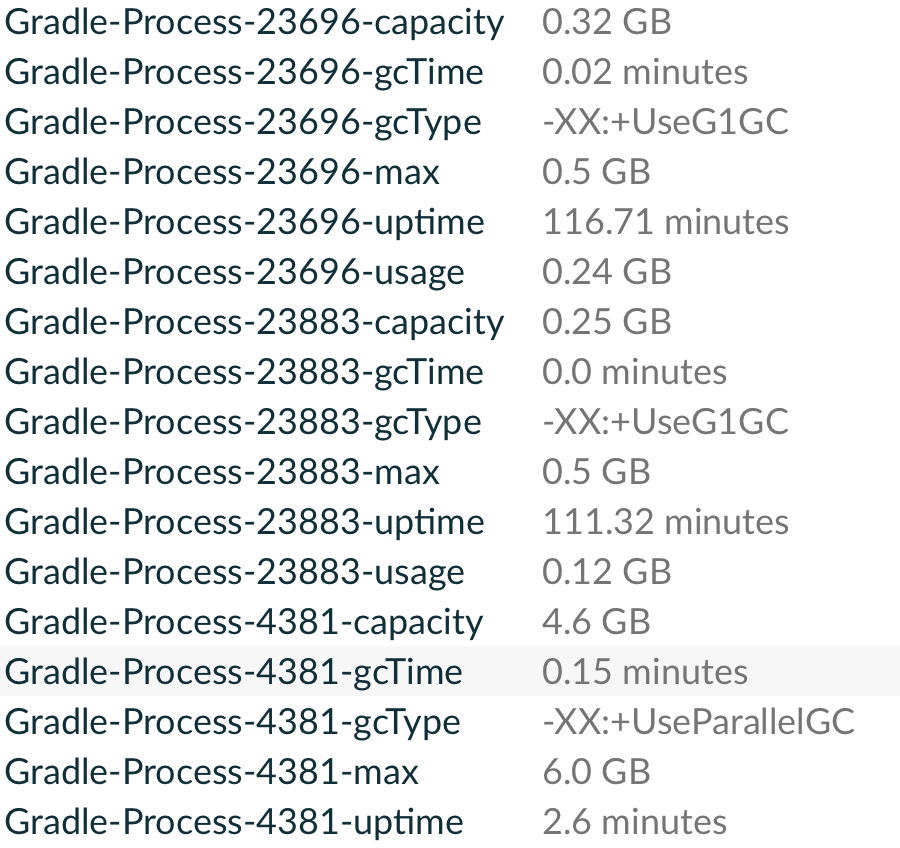
The field Usage represents the value obtained at the end of the build using jstat on the JVM process.
GBOS observations
GBOS output is disabled by default. Enable all GBOS sinks this plugin supports with a single Gradle property:
infoGradleProcess.gbos.enabled=true
When enabled, the plugin writes both build/info-gradle-process/gbos.json and
build/info-gradle-process/gbos.ndjson. JSON is a GBOS report envelope and NDJSON
contains one observation per line. Files are replaced after a successful build and
are not appended or timestamped.
With Develocity present, the same property also publishes the GBOS Build Scan
custom values and replaces legacy Gradle-Process-* custom values.
gbos.enabled |
Files | Custom values (Develocity present) |
|---|---|---|
| off (default) | none | Gradle-Process-* only |
| on | JSON and NDJSON | GBOS only |
Without Develocity, the property only controls the file sinks; no Build Scan custom values are registered.
[!NOTE] Develocity 2024.2 provides new resource usage endpoints with detailed information about the different build and child processes during the execution: https://docs.gradle.com/develocity/api-manual/ref/2024.2.html#tag/Builds/operation/GetGradleResourceUsage
Build Output
If you are not using Develocity, the information about the Gradle processes will be included at the end of the build:
> Task :core:ui:compileProdDebugKotlin
┌─────────────────────────────────────────────────────────────────────────────┐
│  Gradle processes                                                           │
├─────────┬──────────┬───────────┬────────────┬───────────────┬───────────────┤
│  PID    │  Max     │  Usage    │  Capacity  │  GC Time      │  Uptime       │
├─────────┼──────────┼───────────┼────────────┼───────────────┼───────────────┤
│  10865  │  1.0 Gb  │  0.66 Gb  │  1.0 Gb    │  0.0 minutes  │  0.0 minutes  │
├─────────┼──────────┼───────────┼────────────┼───────────────┼───────────────┤
│  9011   │  0.5 Gb  │  0.2 Gb   │  0.5 Gb    │  0.0 minutes  │  0.0 minutes  │
└─────────┴──────────┴───────────┴────────────┴───────────────┴───────────────┘
BUILD SUCCESSFUL in 35s
Requirements
- Gradle 7.5+
Libraries
com.gradle:develocity-gradle-pluginio.github.cdsap:build-observability-corecom.jakewharton.picnic:picnic
