pokedaisy
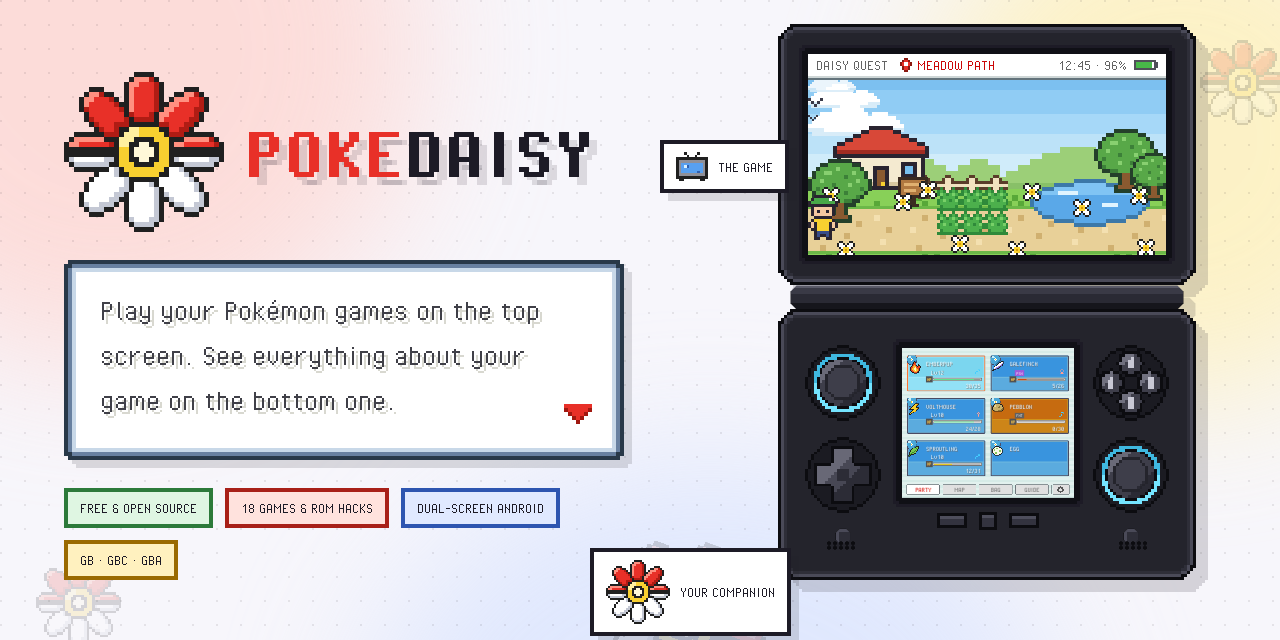
Play your Pokemon games. See everything about them on your second screen, or right beside the game.


Download · Features · Supported games · Manual · Report a problem · r/PokeDaisy · Ko-fi · Patreon · Buy me a coffee
PokeDaisy is a Game Boy, Game Boy Color, GBA and Nintendo DS player for Android handhelds with two screens or one, made for Pokemon FireRed, LeafGreen, Emerald, Ruby, Sapphire, Red, Blue, Yellow, Gold, Silver, Crystal, Platinum, HeartGold, SoulSilver and popular ROM hacks of every generation. Next to the game runs a live companion that reads it as you play: your party, your bag, the map, battle matchups, your Pokedex, and a spoiler-free guide. Everything is drawn in the game's own menu style.
- Two screens (AYN Thor, Retroid Pocket Duo, ...): the game on the top screen, the companion gets the bottom one to itself.
- One screen (Retroid Pocket 6, phones, ...): the companion opens as a window over the game or a panel beside it (under it on a phone held upright), and a HUD keeps your party, a minimap and your bag on the game screen. The quick menu, one button away, opens your PC, flies, rides your bike or fishes, and battle buttons fight, switch or run right beside the battle.
- A phone and a TV: cast or plug in a TV and the game goes on the big screen, the companion stays in your hand.
- DS games (Platinum, HeartGold, SoulSilver): on a two-screen handheld the DS's touch screen goes on the bottom screen, and one tap there swaps it for the companion and back. The companion also opens over the game, like on one screen.
| Device | Status |
|---|---|
| AYN Thor | Tested, made for it |
| Retroid Pocket Duo Lite | Supported: its 4:3 bottom screen (1280x960) has its own layout |
| Retroid Pocket Duo | Should work, not yet tested on real hardware |
| Anbernic RG DS | Should work, not yet tested on real hardware |
| Retroid Pocket 6 | Single screen: tested |
| Other one-screen handhelds | Should work, held sideways like the Pocket 6 |
| Android phones (portrait) | Should work, checked in screenshots only |
| A phone cast to a TV | Should work: the game on the TV, the companion on the phone |
Any Android 8.0+ device runs the games.
Single-screen devices and phones
On a device with one screen, Settings > COMPANION VIEW picks how the companion shares it:
- WINDOW (the default): press BACK and the companion opens in the middle of the screen, over the game, which keeps running underneath. Your buttons work it like the game's own menus: the D-pad and A pick, L / R change tabs, B goes back, START closes it.
- SIDE PANEL: BACK slides it in beside the game; tap the padlock on its edge to lock it there (the game moves over), and drag that tab sideways to resize it.
Hold BACK to leave the game.
Hold a phone upright and the game sits across the top with the companion docked under it. Drag the grip on the companion's top edge to pick its height, or tap the grip to step through small, normal and full. Without a controller, the touch controls fill the space between the game and the companion.
On a dual-screen device, SINGLE SCREEN (Settings > SCREEN) plays it the one-screen way and hands the second screen back to Android, for a video or a chat app while you play.
Install
- Download
PokeDaisy-<version>.apkfrom the latest release on the device. - Open it. If Android asks, allow your browser or file manager to install apps.
- Open PokeDaisy. A short setup helps you:
- Link your ROMs folder (optional). Every supported game in it shows up in your library, played right where it is. New games are picked up every time you open the app.
- Choose where saves go. Use PokeDaisy's own folder, or point it at another emulator's (like RetroArch's) to keep playing the same saves.
- Add cover art (optional) with a free SteamGridDB API key.
You can change all of this later in Settings. The full manual is at pokedaisy.com/docs, and inside the app under Settings > HELP.
No games are included. Use your own legally dumped ROMs.
Updates
PokeDaisy checks for a new version each time you open it and offers to install it. You can also check from Settings > VERSION.
Features
The companion
- PARTY - your team with HP, levels and status, in your game's own party screen. Tap one for its full summary: stats, moves, EXP, and what it's weak or resistant to. STATS shows its exact IVs and EVs, nature and Hidden Power. LEARN lists the moves it learns next and the TMs in your bag it can use, each rated LEARN / FORGET a move / SKIP, with the reasons (original games so far).
- BAG - every pocket, with item icons and descriptions. Pick a TM to see who can learn it, and who it suits best (original games so far).
- BATTLE - opens by itself when a battle starts.
- INFO: both battlers, your moves rated SUPER / RESISTED / NEUTRAL / IMMUNE, and the foe's weaknesses. Scroll down for the foe's ability, held item, stats (with any boosts) and moves, or tap the corner button to give the foe the whole page.
- SUGGESTIONS: who to send out and which move to use.
- FOE TEAM: the rest of the trainer's team.
- STATS: the foe's IVs, EVs and nature next to yours (off by default: turn on FOE IVS in Settings).
- Touch buttons to fight, switch or run without reaching for the controls (FireRed and Emerald).
- MAP - the game's region map with you on it. Tap any place to name it, or search the list of every town and route.
- DEX - seen / caught marks and full entries: sprite, types, stats, abilities, dex text, plus how it evolves (and from what, the whole family, method by method), where it's caught in the wild (by route and method, with levels and odds) and the moves it learns (level-up, and TMs / HMs where the game's tables are read), all from the game's own data.
- GUIDE - hints first, answers on a second tap:
- HERE: wild encounters, items, gifts and trades in the area you're in, with what you already have ticked off.
- NEXT BOSS: the next gym leader's team.
- EVOLUTIONS, plus TIPS, WHERE IS and STUCK? pages.
- CARD - your trainer card, drawn exactly like the game's, front and back.
- STATES - 10 save-state slots with screenshots.
Pick which tabs sit in the tab bar in the companion's Settings; the rest wait as app icons in the MORE tab, left of the gear.
On the game screen
Made for one screen, handy on two:
- HUD (Settings > HUD, on by default): your party (levels, HP, status), a minimap, your Poké Balls, the steps a keep-away spray has left, and PC / BAG / WILD buttons on the game screen while you walk around, like a modern Pokémon game. A tap opens a Pokémon's summary, the whole map (with FLY), your game's own PC, a compact bag with USE, or the area's wild Pokémon; the game keeps running under them. Four layouts (two kinds of corners, side rails, a bottom dock), three looks (dark or white see-through glass, or the app's windows), three sizes, and each part can be hidden. It steps aside for battles and menus.
- Quick menu (L3, the left stick's click; Settings > QUICK MENU): PC, FLY, the keep-away spray, BIKE, ROD, WILD encounters on / off, SAVE STATE, LOAD STATE, fast-forward and the companion, as a ring you aim with the left stick (or rows of tiles). Pick which actions show; each one shows in the games it works in, and anything that can't be used right now is greyed out and says why.
- Battle buttons (one screen, Settings > BATTLE BUTTONS, on by default): FIGHT, POKéMON and RUN at the top right, beside the battle. FIGHT lists your moves with how well each one hits, POKéMON your party with the best pick tagged, sliding in from the screen's edge.
- EXPAND (Settings > ASPECT): the map drawn past the GBA's edges to fill a wide screen; see below.
Languages
The app's own text comes in English, Japanese, French, German, Italian, Spanish and Portuguese (Brazil's and Portugal's). By default it follows the ROM's language (the device's in the Library; no game is in Portuguese, so a Portuguese device keeps Portuguese over an English game); pick another under LANGUAGE in either Settings screen. Species, move and item names and the GUIDE pages stay as the game has them (a translated hack's in its language; Quetzal's in the ones its own IDIOMA options pick).
The player
- Fast-forward with a speed cap (1.5× to 10×, or no cap), plus slow motion. Smart fast-forward drops to normal speed in menus and on the map, and keeps battles fast. Game speed (on the bottom screen's Settings) sets a pace that stays, per game: 0.25×, 0.5×, 1×, 1.5×, 2×, 3× or 4×.
- Real-time clock for the games that use one (Ruby, Sapphire, Emerald and ROM hacks): day and night, berries, tides and daily events follow the device's clock, and saves keep it.
- Fast-forward music that keeps playing the song at its normal speed, instead of chipmunk sound.
- Save states on hotkeys, with undo.
- Rewind (optional, Settings > REWIND): hold the REWIND HOLD hotkey (R on a keyboard; pick a pad button in HOTKEYS) to play the last ~20 seconds backwards. It never touches your save file.
- Status bar (optional): game, location, money, clock and battery above the game.
- Aspect: the game's own shape (the GBA's 3:2, the Game Boy's 10:9), stretched to fill a 16:9 top screen, or EXPAND: the overworld drawn past the GBA's edges - beside the game on a wide screen, above and below it on a phone held upright - so the screen shows more of the map with the pixels kept square (FireRed, LeafGreen, Emerald, Ruby and Sapphire, every language and revision, plus Unbound, Radical Red, Lazarus, SoulGold, Heart and Soul, Gaia, Odyssey, Amethyst 1.3.0, Glazed, Seaglass, Emerald Imperium, Emerald Rogue, Too Many Types 2, Recharged Yellow, Super Mariomon, Ultra Violet, FireRed Rocket Edition, Ash Gray, Ghost Grey, Elite Redux, Sword and Shield Ultimate Plus, GS Chronicles and Celia's hack; on the Game Boy, Pokémon Yellow, English, and Crystal, their field only; on the DS, Platinum, HeartGold and SoulSilver, their 3D overworld drawn past the screen's edges and their battles too). The extra strips are rebuilt every frame from the game's own map, tiles and sprites. Battles are wide too: their scenery runs on past the edges and the battlers, trainers and healthboxes slide in from off screen. Fog, ash and rain reach the screen's edges, and dark caves stay dark around Flash's light. On the title screen and in menus the strips glow with the colours at the game's edges, crossfading as you go in and out. Settings shows a preview of each. With EXPAND on, ZOOM (R3, the right stick's click; any button under HOTKEYS) steps out to see more of the surroundings, easing back in for battles, conversations and menus, and the right stick looks around (the view stays put until you walk; held while walking, it looks ahead with your character kept on screen).
- Shaders (optional): an LCD grid (plain or on paper), scanlines or a CRT look, and the colours as the GBA's own screen showed them - on the game and, if you like, the companion screen too. Edge smoothing (xBRZ, xBR, ScaleFX) on the game, alone or under any of them. UNLIT SCREEN shows the first GBA's screen with no light behind it: white is the screen's grey-green backing and dark pixels cast a soft shadow onto it.
- Overlays (optional, Settings > OVERLAY): a frame around the game - two of PokeDaisy's own, or your
own RetroArch overlays (a
.cfgwith its PNG, a.zipof them, or any PNG with a see-through screen). None come bundled: bring the ones you already use. Pick them from either screen. - Controls: remap every game button and hotkey, or turn hotkeys off. X and Y are a second START and SELECT, like the menu and registered-item buttons in the DS games. TURBO A and TURBO B can go on any button (GAME BUTTONS): held, they press A / B over and over, in game time, so they keep up with fast-forward. TOUCH CONTROLS appear when no controller is connected, and hide once a controller is used: ready-made layouts (SIDES keeps them in the bars beside the game), size, opacity, extra FF / QUICK MENU / turbo / state buttons, and EDIT LAYOUT to drag and resize each button, with a preview, upright and sideways apart. Bluetooth and USB controllers (8BitDo, GameSir, Xbox, ...) connect while a game is running without restarting it, and HOME / guide works like a BACK tap for the companion.
- Settings search: type what you're after ("key bindings", "rebind", "turbo", "box art") and the matching settings show, whatever PokeDaisy calls them. First-time setup also walks through the game buttons.
- Themes: PokeDaisy (the default, the website's light backdrop with floating logos) or one of eight game-coloured ones (FireRed, LeafGreen, Emerald, ...) for the library and settings, in Settings > THEME.
Library
- List or grid view, recently played, and cover art from SteamGridDB or RetroAchievements box art (or pick your own image).
- Dual-screen launcher: with two screens, the game list is on one and the game you're on on the other: its cover, when you last played it and whether it has a save. X swaps the screens (animated), A opens the game, B its options, Y Settings - a legend in the corner shows them. Settings > DUAL-SCREEN LAUNCHER turns it off.
- ROMs can be plain
.gba,.gb,.gbcor.ndsfiles or zipped (.zip/.7z), in your ROMs folder or imported with +. - Refresh rescans your ROMs folder and tells you what it found.
- Long-press a game to:
- Rename or hide it.
- Load a save file into it (your current save is kept as a dated backup).
- See its info: ROM, save file and save states.
- Give it its own save folder (another emulator's, so both keep playing the same save).
- Games the companion can't read yet are tagged NOT SUPPORTED. Their INFO, and the companion's own notice, have an ASK FOR SUPPORT button that opens a game request with the ROM's file name and SHA-1 (never the ROM).
- Best effort for those: in game, PokeDaisy reads the ROM as each game it knows, by itself, and keeps the one that fits. A different build of a supported version is then just supported; a hack that shares a supported game's memory gets party, bag, map and battles (tagged PARTIALLY SUPPORTED, with whatever didn't match - dex, guide, item text - switched off). When no game clearly fits, the companion asks WHICH GAME IS THIS? with the likely ones first (also under the library's INFO > PICK A GAME). It's remembered for that ROM; INFO > FORGET MATCH undoes it. Unsupported hacks of FireRed, LeafGreen, Emerald, Ruby or Sapphire in your ROMs folder are listed (tagged) so you can try them.
- Works with frontends like ES-DE, Cocoon and iiSU. They can launch a game straight into PokeDaisy. Setup guides for iiSU and ES-DE; the technical details are for other frontends.
Saves
Saves are standard .sav / .srm files, the same format as mGBA and RetroArch,
so you can move them between emulators freely. A game finds its save by the ROM's
file name (for a zipped game, the name of the ROM inside the archive, as in RetroArch).
To share saves with RetroArch, add its save folders under Settings > FOLDERS > ALSO LOOK IN
(e.g. RetroArch/saves/mGBA and RetroArch/saves/gpSP): a save found there is played and written
right there, so RetroArch keeps seeing it. New saves go to PokeDaisy's saves folder. A single game
can also have its own folder (its library menu > SAVE FOLDER). Only the folders themselves are
searched, never their subfolders, so a synced folder's version history (Syncthing's .stversions)
is left alone.
Supported games
Any Game Boy, Game Boy Color, GBA or DS game plays. The companion needs one of the games below, in the exact version listed (ROM hacks are recognized by their file, so another version shows a "not supported" notice).
✅ works · ◐ partly · — not yet
| Game | Version | Party | Bag | Battle | Map | Dex | Guide |
|---|---|---|---|---|---|---|---|
| Red / Blue (GB) | USA/Europe | ✅ | ✅ | ◐ | ✅ | ✅ | — |
| Yellow (GB) | USA/Europe | ✅ | ✅ | ◐ | ✅ | ✅ | — |
| Yellow (GB) | DE / FR / IT / ES | ✅ | ✅ | ◐ | ✅ | ✅ | — |
| Gold / Silver (GBC) | USA/Europe | ✅ | ✅ | ◐ | ✅ | ✅ | — |
| Crystal (GBC) | USA, USA/Europe rev 1, AU | ✅ | ✅ | ◐ | ✅ | ✅ | — |
| Crystal Clear (GBC) | 2.5.11, 2.6.0 (4 builds) | ✅ | ✅ | ◐ | ✅ | ✅ | — |
| Prism (GBC) | 0.95 build 254 | ✅ | ✅ | ◐ | ✅ | ✅ | — |
| Polished Crystal (GBC) | 3.2.0-3.2.3 (16 builds) | ✅ | ✅ | ◐ | ✅ | ✅ | ✅ |
| FireRed | USA/Europe, rev 0 and 1 | ✅ | ✅ | ✅ | ✅ | ✅ | ✅ |
| FireRed | ES / DE / FR / IT / JP | ✅ | ✅ | ✅ | ✅ | ✅ | ✅ |
| LeafGreen | USA/Europe, rev 0 and 1 | ✅ | ✅ | ◐ | ✅ | ✅ | ✅ |
| LeafGreen | ES / DE / FR / IT / JP | ✅ | ✅ | ◐ | ✅ | ✅ | ✅ |
| Emerald | USA/Europe | ✅ | ✅ | ✅ | ✅ | ✅ | ✅ |
| Emerald | ES / DE / FR / IT / JP | ✅ | ✅ | ✅ | ✅ | ✅ | ✅ |
| Ruby | USA, rev 0, 1 and 2 | ✅ | ✅ | ◐ | ✅ | ✅ | ✅ |
| Ruby | ES/DE/FR/IT/JP, rev 0-1 | ✅ | ✅ | ◐ | ✅ | ✅ | ✅ |
| Sapphire | USA, rev 0, 1 and 2 | ✅ | ✅ | ◐ | ✅ | ✅ | ✅ |
| Sapphire | ES/DE/FR/IT/JP, rev 0-1 | ✅ | ✅ | ◐ | ✅ | ✅ | ✅ |
| Platinum (DS) | USA rev 1 | ✅ | ✅ | ◐ | ✅ | ✅ | ✅ |
| HeartGold (DS) | USA | ✅ | ✅ | — | ✅ | ✅ | ✅ |
| SoulSilver (DS) | USA | ✅ | ✅ | — | ✅ | ✅ | ✅ |
| Unbound | 2.1.1.1 | ✅ | ✅ | ◐ | ✅ | ✅ | ✅ |
| Unbound | 2.1.1.1 French | ✅ | ✅ | ◐ | ✅ | ✅ | ✅ |
| Radical Red | 4.1 | ✅ | ✅ | ◐ | ✅ | ✅ | ✅ |
| Gaia | 3.2 | ✅ | ✅ | ◐ | ✅ | ✅ | ✅ |
| Odyssey | 4.1.1 | ✅ | ✅ | ◐ | ✅ | ✅ | ✅ |
| Heart and Soul | 2.0.6 | ✅ | ✅ | ✅ | ✅ | ✅ | ✅ |
| Amethyst | 1.3.0, 1.4.1 | ✅ | ✅ | ◐ | ✅ | ✅ | ✅ |
| Celia's Stupid Romhack | 1.1.4 | ✅ | ✅ | ◐ | ✅ | ✅ | ✅ |
| Orange Islands | Beta 5.7, an older beta | ✅ | ✅ | ◐ | ✅ | ✅ | ✅ |
| Ultra Violet | 1.22 | ✅ | ✅ | ◐ | ✅ | ✅ | ✅ |
| FireRed Rocket Edition | the one release | ✅ | ✅ | ◐ | ✅ | ✅ | ✅ |
| Ash Gray | 4.5.3, Fork Bug Fix 1.0 | ✅ | ✅ | ◐ | ✅ | ✅ | ✅ |
| Ghost Grey | 1.0.1, 1.0.2, 1.0.4 | ✅ | ✅ | ◐ | ✅ | ✅ | ✅ |
| Sword and Shield Ultimate Plus | 1.2.1.2 + its 3 patches | ✅ | ✅ | ◐ | ✅ | ✅ | ✅ |
| GS Chronicles | 2.7.6 | ✅ | ✅ | ◐ | ✅ | ✅ | ✅ |
| Recharged Yellow | 1.8.0, 1.9.0, 1.9.4, 1.9.7 | ✅ | ✅ | ◐ | ✅ | ✅ | ✅ |
| Emerald Legacy | 1.1.4 | ✅ | ✅ | ◐ | ✅ | ✅ | ✅ |
| Lazarus | 2.0 | ✅ | ✅ | ◐ | ✅ | ✅ | ◐ |
| Emerald Seaglass | 3.0 | ✅ | ✅ | ◐ | ✅ | ✅ | ◐ |
| Too Many Types 2 | 1.5.2 | ✅ | ✅ | ◐ | ✅ | ✅ | ◐ |
| Glazed | 9.2.0 | ✅ | ✅ | ◐ | ✅ | ✅ | ◐ |
| Emerald Imperium | 1.3.1 | ✅ | ✅ | ◐ | ✅ | ✅ | ◐ |
| Quetzal | English Alpha 9 v0 | ✅ | ✅ | ◐ | ✅ | ✅ | ◐ |
| Quetzal | Spanish Alpha 9 v0 | ✅ | ✅ | ◐ | ✅ | ✅ | ◐ |
| Quetzal | Alpha 9 v1 (EN / ES) | ✅ | ✅ | ◐ | ✅ | ✅ | ◐ |
| Quetzal | Alpha 0.8.4 (EN / ES) | ✅ | ✅ | ◐ | ✅ | ✅ | ◐ |
| Moemon Quetzal | Alpha 0.8.4 Hotfix (EN/ES) | ✅ | ✅ | ◐ | ✅ | ✅ | ◐ |
| Super Mariomon | 1.2.1-1.3, 1.5.1, 1.5.2 | ✅ | ✅ | ◐ | ✅ | ✅ | ◐ |
| Recharged Emerald | 2.2.5, 2.2.8, Rebalanced | ✅ | ✅ | ◐ | ✅ | ✅ | ◐ |
| Elite Redux | 2.65.3b, 2.65.4.1b | ✅ | ✅ | ◐ | ✅ | ✅ | ◐ |
| Emerald Rogue | 2.2.1-EX | ✅ | ✅ | ✅ | ✅ | ✅ | — |
| SoulGold | 1.1.4, 1.2 (3 builds) | ✅ | ✅ | ◐ | ✅ | ✅ | ◐ |
| R.O.W.E. | 2.1.9.1 Experimental | ✅ | ✅ | ◐ | ✅ | ◐ | — |
Notes on the table
Red, Blue, Yellow, Gold, Silver, Crystal and the Crystal hacks Crystal Clear, Prism and Polished Crystal are the Game Boy games the companion reads, each in the game's own look (its font, icons and town maps, rebuilt from your ROM; Red and Blue in the colours a Super Game Boy gives them). The German, French, Italian and Spanish Yellows show their own names, Pokédex pages and battle words. Prism shows its own Pokémon, moves, types, six town maps and its own Pokédex (its 253 in the game's order). Polished Crystal shows its own Pokémon (regional forms included), moves, types, items, its Johto, Kanto and Orange Islands maps and its 289 in National order; its faithful builds keep the original games' types and moves, as the game does. Platinum, HeartGold and SoulSilver are the DS games the companion reads, in the USA release listed (Platinum's revision 1); their pictures, Pokédex pages and maps come from your cart. Platinum's battles show in the BATTLE tab, HeartGold's and SoulSilver's not yet, and on the DS the battle buttons don't press the game's menus yet. On a one-screen device a DS game shows its top screen; the touch screen needs a second screen for now. Map ◐ means place names only, without the map picture. Guide ◐ means the live pages only (the wild encounters here and the next boss), without the area lists. Battle ◐ means the battle panes work but haven't been checked in every kind of battle. The guides were written from each game's own data and may contain mistakes; the app says so the first time you open one.
Want another game supported? Ask in Game requests, and upvote the ones you want.
Privacy
PokeDaisy has no accounts, ads or analytics. It only goes online to:
- check this page for a new version, and download it if you say so;
- fetch cover art from SteamGridDB or RetroAchievements, only if you add your own API key;
- RetroAchievements, only if you sign in;
- share a BEST EFFORT match, only if you tap SHARE when asked. The window lists every value sent, and that's all of it: the ROM's SHA-1, size, game code and revision, the game it was read as and how well, and the app version - no file name, account or device details. It goes to PokeDaisy's own Firebase database, where nobody can read it back through the API;
- send a crash report (Firebase Crashlytics) when the app crashes, only if you turn CRASH REPORTS on in Settings. It's off until you do; after a few days of use the app asks once, and never again. A report holds the device model, Android version and where the app crashed; while it's on, Crashlytics also notes each app start, to count the sessions that didn't crash. Turning it off drops any report not yet sent.
Your games and saves never leave your device.
AI tooling note
This project may use AI-assisted development tools, such as Claude Code, to help with code generation, refactoring, and documentation. All changes are still reviewed by the maintainer and validated with the project's existing checks before release.
Building from source
See docs/DEVELOPMENT.md.
Support PokeDaisy
PokeDaisy is free, with no ads and nothing locked. If it made a playthrough better and you'd like to say thanks, you can support it on Ko-fi, Patreon or Buy Me a Coffee. It's completely optional and doesn't unlock anything; it just helps cover the time that goes into mapping new games and ROM hacks. It pays for PokeDaisy's own code only: no games, ROMs or game content are sold or handed out.



Bug reports, game requests and a star on the repo help just as much. Come say hi, share your runs and ask questions on r/PokeDaisy.
Credits
mGBA, melonDS, rcheevos, fonts, shaders, the pret decomps, cover art sources
- mGBA by Vicki Pfau (endrift) and contributors runs the Game Boy, Game Boy Color and GBA games (MPL 2.0;
source in
third_party/mgba), with its bundled blip_buf (LGPL 2.1) and inih (BSD). - melonDS by the melonDS team runs the DS games (GPL 3.0; source in
third_party/melonds, PokeDaisy's changes inthird_party/patches), with its bundled FatFs, Teakra (MIT), xxHash (BSD 2-Clause), tiny-AES-c (Unlicense), blip_buf (LGPL 2.1) and Dolphin's ARM64 emitter (GPL 2.0+). - rcheevos by RetroAchievements.org (MIT) for achievements.
- Pixel Operator font by Jayvee Enaguas (CC0), and Atkinson Hyperlegible by the Braille Institute (OFL 1.1) for the manual's text.
- PixelMplus (M+ FONT LICENSE, M+ FONTS PROJECT) for Japanese text, converted to Pixel Operator's pixel grid by
scripts/gen_jp_font.py. - The pret decompilation projects (pokered, pokeyellow, pokegold, pokecrystal, pokefirered, pokeemerald, pokeruby, pokeplatinum, pokeheartgold), pokeemerald-expansion and Polished Crystal's source, which the game data and guides were checked against.
- Screen shaders: LCD and scanlines from mGBA's (MIT), the GBA colours by Pokefan531 and hunterk, LCD PAPER after RetroArch's simpletex_lcd and zfast_lcd (GPL 2.0+), and libretro's xBR, xBRZ and ScaleFX for edge smoothing (MIT, xBRZ GPL 3.0).
- PokeAPI (BSD 3-Clause) for the National Dex species list.
- AndroidX, Jetpack Compose, Kotlin and Apache Commons Compress (Apache 2.0), XZ for Java (0BSD).
Every license is in NOTICE and, in the app, under Settings > LICENSES.
- Cover art from SteamGridDB and its contributors, and box art from RetroAchievements.
License
PokeDaisy is free software under the GNU GPL v3, with one additional term: if you share PokeDaisy or anything built from it, keep the credit "Based on PokeDaisy by Lidor Itzhari - https://github.com/lidor30/pokedaisy" in its documentation and credits. Forks must stay open source under the same license.
PokeDaisy is a fan project, not affiliated with or endorsed by Nintendo, Game Freak, Creatures or The Pokemon Company. Pokemon and all related names are trademarks of their respective owners; Game Boy, Game Boy Color and Game Boy Advance are trademarks of Nintendo. Device names (AYN Thor, Retroid, Anbernic) belong to their makers, and RetroAchievements and SteamGridDB are independent services; none of them endorse PokeDaisy. ROM hacks belong to their creators. No games, BIOS or game art are included: use your own legally dumped ROMs.
