planetiler
Planetiler is a tool that generates Vector Tiles from geographic data sources like OpenStreetMap. Planetiler aims to be fast and memory-efficient so that you can build a map of the world in a few hours on a single machine without any external tools or database.
Vector tiles contain raw point, line, and polygon geometries that clients like MapLibre can use to render custom maps in the browser, native apps, or on a server. Planetiler packages tiles into an MBTiles (sqlite) or PMTiles file that can be served using tools like TileServer GL or Martin or even queried directly from the browser. See awesome-vector-tiles for more projects that work with data in this format.
Several full-featured basemaps are built using planetiler:
You can also create your own custom base maps or overlays using YAML or Java.
See the live demo of vector tiles created by Planetiler and hosted by OpenStreetMap US.
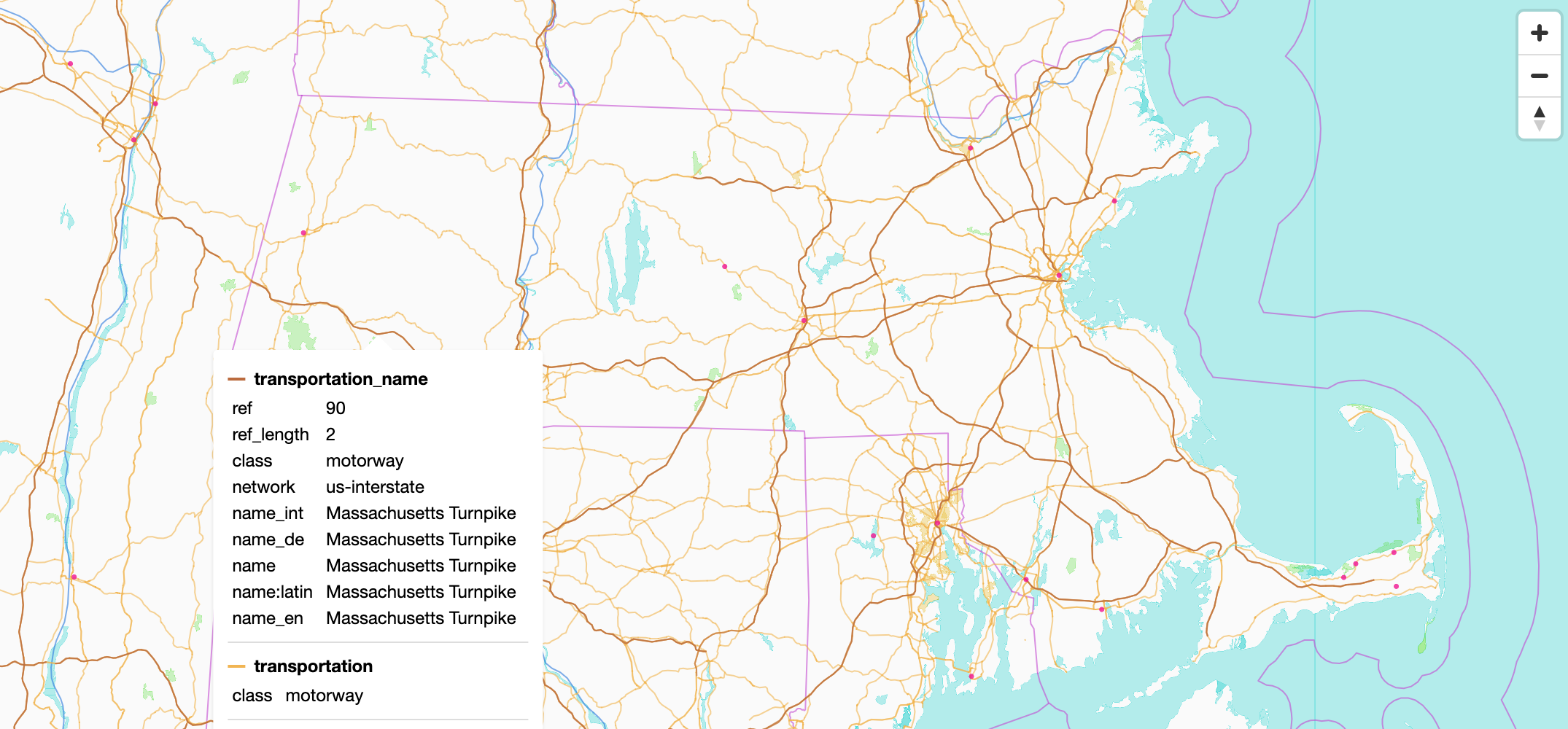 © OpenMapTiles © OpenStreetMap contributors
Quick start
Install (macOS or Linux with Homebrew, other options below):
brew install planetiler
Build a map of Monaco:
planetiler --download --area=monaco --output=monaco.pmtiles
View it by dragging monaco.pmtiles onto pmtiles.io.
:warning: The first run downloads about 1GB of data sources required by the OpenMapTiles profile, including ~750MB for ocean polygons and ~240MB for Natural Earth Data. To try it out with much smaller downloads, add these arguments (they only work for Monaco):
planetiler --download --area=monaco --output=monaco.pmtiles \
  --water-polygons-url=https://github.com/onthegomap/planetiler/raw/main/planetiler-core/src/test/resources/water-polygons-split-3857.zip \
  --natural-earth-url=https://github.com/onthegomap/planetiler/raw/main/planetiler-core/src/test/resources/natural_earth_vector.sqlite.zip
Install
| Method | Needs Java? | Good for | Command to run |
|---|---|---|---|
| Homebrew | no | macOS and Linux desktops | planetiler |
| Single-file launcher | no | supported platforms or servers (experimental) | ./planetiler (.\planetiler.exe on Windows) |
| Jar | Java 25+ | existing Java setups, custom profiles | java -jar planetiler.jar |
| Docker | no | containers | docker run ... ghcr.io/onthegomap/planetiler |
Homebrew
brew install planetiler
planetiler --help
Single-file launcher
An experimental single executable that bundles planetiler.jar and a minimal Java runtime, so you don't need to
install Java. Download the one for your platform from the
latest snapshot release, extract it, and run it.
macOS (Apple Silicon)
curl -fL https://github.com/onthegomap/planetiler/releases/download/latest-main/planetiler_snapshot_darwin_arm64.tar.gz | tar -xz
./planetiler --help
macOS (Intel)
curl -fL https://github.com/onthegomap/planetiler/releases/download/latest-main/planetiler_snapshot_darwin_amd64.tar.gz | tar -xz
./planetiler --help
Linux (x86-64):
curl -fL https://github.com/onthegomap/planetiler/releases/download/latest-main/planetiler_snapshot_linux_arm64.tar.gz | tar -xz
./planetiler --help
Linux (ARM64):
curl -fL https://github.com/onthegomap/planetiler/releases/download/latest-main/planetiler_snapshot_linux_arm64.tar.gz | tar -xz
./planetiler --help
Windows (x86-64, PowerShell):
curl.exe -fLo planetiler.zip https://github.com/onthegomap/planetiler/releases/latest/download/planetiler_snapshot_windows_amd64.zip; Expand-Archive planetiler.zip .
.\planetiler.exe --help
Notes:
- On macOS, files downloaded with
curlrun directly. Files downloaded in a browser are quarantined by Gatekeeper, so runxattr -d com.apple.quarantine ./planetilerfirst. - On Windows, SmartScreen may warn about the unsigned executable.
- To extract the bundled
planetiler.jarback out, runplanetiler --extract-jar.
Jar
Requires Java 25+ (see CONTRIBUTING.md).
wget https://github.com/onthegomap/planetiler/releases/latest/download/planetiler.jar
java -jar planetiler.jar --help
Docker
docker run -v "$(pwd)/data":/data ghcr.io/onthegomap/planetiler:latest --help
Write output under /data (for example --output=/data/monaco.pmtiles) so it lands in the data folder on your
machine.
Run
The examples in this README use planetiler as the command. Substitute the command for the way you installed it:
| Installed with | Replace planetiler with |
|---|---|
| Homebrew | planetiler |
| Launcher | ./planetiler (or .\planetiler.exe on Windows) |
| Jar | java -jar planetiler.jar |
| Docker | docker run -v "$(pwd)/data":/data ghcr.io/onthegomap/planetiler:latest |
Common arguments
--outputtells planetiler where to write output to, and what format to write it in. For example--output=australia.pmtilescreates a pmtiles archive namedaustralia.pmtiles. It is best to specify the full path to the file. With Docker, use/data/australia.pmtiles.--downloaddownloads input sources automatically and--only-downloadexits after downloading--area=monacodownloads a.osm.pbfextract from Geofabrik--osm-path=path/to/file.osm.pbfpoints Planetiler at an existing OSM extract on disk--forceoverwrites the output file--helpshows all of the options and exits
Memory
Give the JVM about 0.5x the size of the input .osm.pbf file, leaving the rest of your RAM for memory-mapped files.
How you set it depends on how you installed planetiler (shown here for 1GB):
| Installed with | Set memory to 1GB |
|---|---|
| Homebrew | JAVA_TOOL_OPTIONS="-Xmx1g" planetiler ... |
| launcher | planetiler --memory=1g ... |
| Jar | java -Xmx1g -jar planetiler.jar ... |
| Docker | docker run -e JAVA_TOOL_OPTIONS="-Xmx1g" ... |
The launcher also accepts --jvm-args="..." for other JVM options, and reads the JAVA_TOOL_OPTIONS environment
variable.
Requirements
- at least 1GB of free SSD disk space plus 5-10x the size of the
.osm.pbffile - at least 0.5x as much free RAM as the input
.osm.pbffile size
View tiles locally
Generate a pmtiles tile archive by adding --output=output.pmtiles then
drag and drop output.pmtiles to pmtiles.io.
Or with the default mbtiles output format, use tileserver-gl-light:
npm install -g tileserver-gl-light
tileserver-gl-light output.mbtiles
Then open http://localhost:8080 to view tiles.
Generating a Map of the World
See PLANET.md.
Generating Custom Maps
Planetiler supports custom vector tile maps in two ways, depending on how much control you need:
- YAML configuration (no Java required) – for simple custom maps
- Java profiles – for advanced logic and full control
Both approaches generate standard Mapbox Vector Tiles (MVT) that can be used with MapLibre GL, Mapbox GL, and other vector-tile clients.
Option 1: Custom Maps Using YAML (No Java Required)
For many use cases, you can define a custom vector tile map using a YAML configuration file. This approach does not require writing Java code and is ideal for:
- Simple or moderately complex maps
- Prototyping
- Users who prefer declarative configuration
YAML-based maps are powered by the planetiler-custommap module. See examples and documentation:
https://github.com/onthegomap/planetiler/tree/main/planetiler-custommap.
Example YAML configuration
schema_name: Roads
attribution: <a href="https://www.openstreetmap.org/copyright">© OpenStreetMap contributors</a>
sources:
osm:
type: osm
url: geofabrik:rhode-island
layers:
- id: roads
features:
- source: osm
geometry: line
min_zoom: 6
include_when:
highway: [primary, secondary, tertiary]
attributes:
- key: class
tag_value: highway
To run:
planetiler roads.yaml --download --output=roads.pmtiles
Option 2: Custom Maps Using Java Profiles
For more complex use cases, Planetiler supports custom Java profiles that allow full control over feature processing, attributes, zoom logic, and geometry handling. Java profiles are recommended when you need:
- Complex conditional logic
- Advanced attribute derivation
- Non-trivial feature interactions
- Maximum performance tuning
See examples and documentation: https://github.com/onthegomap/planetiler-examples/.
Example Java profile
import com.onthegomap.planetiler.*;
import com.onthegomap.planetiler.config.*;
import com.onthegomap.planetiler.reader.*;
import java.nio.file.Path;
public class Roads implements Profile {
@Override
public String attribution() {
return """
<a href="https://www.openstreetmap.org/copyright">© OpenStreetMap contributors</a>
""".trim();
}
@Override
public void processFeature(SourceFeature feature, FeatureCollector features) {
if (feature.canBeLine() && feature.hasTag("highway", "primary", "secondary", "tertiary")) {
features.line("roads").setAttr("class", feature.getTag("highway"));
}
}
public static void main(String[] args) {
Planetiler.create(Arguments.fromArgs(args)).addOsmSource("osm", Path.of("ri.osm.pbf"), "geofabrik:rhode-island")
.overwriteOutput(Path.of("roads.pmtiles"))
.setProfile(new Roads())
.run();
}
}
This can be run without any compile step or build tools. With the launcher (which includes a Java 25 runtime):
./planetiler Roads.java --download --output=roads.pmtiles
Or with the jar and Java 22 or later:
java -cp planetiler.jar Roads.java --download --output=roads.pmtiles
Use as a library
For larger projects with other dependencies, Planetiler can be used as a maven-style dependency in a Java project using the settings below:
Maven
Add this repository block to your pom.xml:
<repositories>
  <repository>
    <id>osgeo</id>
    <name>OSGeo Release Repository</name>
    <url>https://repo.osgeo.org/repository/release/</url>
    <snapshots>
      <enabled>false</enabled>
    </snapshots>
    <releases>
      <enabled>true</enabled>
    </releases>
  </repository>
</repositories>
Then add the following dependency:
<dependency>
  <groupId>com.onthegomap.planetiler</groupId>
  <artifactId>planetiler-core</artifactId>
  <version>${planetiler.version}</version>
</dependency>
Gradle
Set up your repositories block:
mavenCentral()
maven {
    url "https://repo.osgeo.org/repository/release/"
}
Set up your dependencies block:
implementation 'com.onthegomap.planetiler:planetiler-core:<version>'
Features
- Supports OpenStreetMap .osm.pbf, Natural Earth, geopackage, GeoJson Esri Shapefile, and GeoParquet (ie. Overture Maps) input data sources
- Writes to MBTiles or PMTiles output archives.
- Generates Mapbox Vector Tiles (MVT)
or MapLibre Tiles (MLT) by running with
--tile-format=mlt - Java-based Profile API to customize how source elements map to vector tile features, and post-process generated tiles using JTS geometry utilities
- YAML config file format that lets you create custom schemas without writing Java code
- Merge nearby lines or polygons with the same tags before emitting vector tiles
- Robust geometry handling that automatically fixes self-intersecting polygons and avoids invalid geometries when snapping tiles to a grid
- Built-in OpenMapTiles profile
- Optionally download additional name translations for elements from Wikidata
- Export real-time stats to a prometheus push gateway using
--pushgateway=http://user:password@ipargument (and a grafana dashboard for viewing) - Automatically downloads region extracts from Geofabrik
using
geofabrik:australiashortcut as a source URL - Unit-test profiles to verify mapping logic, or integration-test to verify the actual contents of a generated mbtiles file (example)
Limitations
- It is harder to join and group data than when using database. Planetiler automatically groups features into tiles, so you can easily post-process nearby features in the same tile before emitting, but if you want to group or join across features in different tiles, then you must explicitly store data when processing a feature to use with later features or store features and defer processing until an input source is finished (boundary layer example)
- Planetiler only does full imports from
.osm.pbfsnapshots, there is no way to incorporate real-time updates.
Benchmarks
Some example runtimes for the OpenMapTiles profile (excluding downloading resources):
| Input | Version | Machine | Time | output size | Logs |
|---|---|---|---|---|---|
| s3://osm-pds/2026/planet-260302.osm.pbf (92GB) | 0.10.1 | h4d-standard-192 (192cpu/720GB) | 19m cpu:37h59m avg:117 | 81GB pmtiles | logs |
| s3://osm-pds/2024/planet-240108.osm.pbf (73GB) | 0.7.0 | c7gd.16xlarge (64cpu/128GB) | 42m cpu:42m28s avg:52 | 69GB pmtiles | logs |
| s3://osm-pds/2022/planet-220530.osm.pbf (69GB) | 0.5.0 | c6gd.16xlarge (64cpu/128GB) | 53m cpu:41h58m avg:47.1 | 79GB mbtiles | logs, VisualVM Profile |
| s3://osm-pds/2022/planet-220530.osm.pbf (69GB) | 0.5.0 | c6gd.8xlarge (32cpu/64GB) | 1h27m cpu:37h55m avg:26.1 | 79GB mbtiles | logs |
| s3://osm-pds/2022/planet-220530.osm.pbf (69GB) | 0.5.0 | c6gd.4xlarge (16cpu/32GB) | 2h38m cpu:34h3m avg:12.9 | 79GB mbtiles | logs |
Merging nearby buildings at z13 is very expensive, when run with --building-merge-z13=false:
| Input | Version | Machine | Time | output size | Logs |
|---|---|---|---|---|---|
| s3://osm-pds/2024/planet-240115.osm.pbf (69GB) | 0.7.0 | c3d-standard-180 (180cpu/720GB) | 16m cpu:27h45m avg:104 | 69GB pmtiles | logs |
| s3://osm-pds/2024/planet-240108.osm.pbf (73GB) | 0.7.0 | c7gd.16xlarge (64cpu/128GB) | 29m cpu:23h57 avg:50 | 69GB pmtiles | logs |
| s3://osm-pds/2024/planet-240108.osm.pbf (73GB) | 0.7.0 | c7gd.2xlarge (8cpu/16GB) | 3h35m cpu:19h45 avg:5.5 | 69GB pmtiles | logs |
| s3://osm-pds/2024/planet-240108.osm.pbf (73GB) | 0.7.0 | im4gn.large (2cpu/8GB) | 18h18m cpu:28h6m avg:1.5 | 69GB pmtiles | logs |
| s3://osm-pds/2022/planet-220530.osm.pbf (69GB) | 0.5.0 | c6gd.16xlarge (64cpu/128GB) | 39m cpu:27h4m avg:42.1 | 79GB mbtiles | logs, VisualVM Profile |
Alternatives
Some other tools that generate vector tiles from OpenStreetMap data:
- OpenMapTiles is the reference implementation of
the OpenMapTiles schema that
the OpenMapTiles profile
is based on. It uses an intermediate postgres database and operates in two modes:
- Import data into database (~1 day) then serve vector tiles directly from the database. Tile serving is slower and requires bigger machines, but lets you easily incorporate realtime updates
- Import data into database (~1 day) then pregenerate every tile for the planet into an mbtiles file which takes over 100 days or a cluster of machines, but then tiles can be served faster on smaller machines
- Tilemaker uses a similar approach to Planetiler (no intermediate database) using lua scripts to customize handling.
- Tippecanoe generates vector tiles directly from GeoJSON and is designed for visualizing all features across all zoom levels, but unlike Planetiler it is not built for filtering and processing raw OpenStreetMap planet files at global scale.
Some services that generate and host tiles for you:
- Mapbox - data from the creator of vector tile technologies
- Maptiler - data from the creator of OpenMapTiles schema
- Stadia Maps - reasonably priced hosted OpenMapTiles tiles
- OpenFreeMap - free API serving OpenMapTiles tiles generated by planetiler weekly
Contributing
Pull requests are welcome! See CONTRIBUTING.md for details.
Git submodules
Planetiler has a submodule dependency
on planetiler-openmaptiles. Add --recurse-submodules
to git clone, git pull, or git checkout commands to also update submodule dependencies.
To clone the repo with submodules:
git clone --recurse-submodules https://github.com/onthegomap/planetiler.git
If you already pulled the repo, you can initialize submodules with:
git submodule update --init
To force git to always update submodules (recommended), run this command in your local repo:
git config --local submodule.recurse true
Learn more about working with submodules here.
Support
For general questions, check out the #planetiler channel on OSM-US Slack (get an invite here), or start a GitHub discussion.
Found a bug or have a feature request? Open a GitHub issue to report.
This is a side project, so support is limited. If you have the time and ability, feel free to open a pull request to fix issues or implement new features.
Acknowledgement
Planetiler is made possible by these awesome open source projects:
- OpenMapTiles for the schema and reference implementation that the openmaptiles profile is based on
- Graphhopper for basis of utilities to process OpenStreetMap data in Java
- JTS Topology Suite for working with vector geometries
- Geotools for shapefile processing
- SQLite JDBC Driver for reading Natural Earth data and writing MBTiles files
- MessagePack for compact binary encoding of intermediate map features
- geojson-vt for the basis of the stripe clipping algorithm that planetiler uses to slice geometries into tiles
- java-vector-tile for the basis of the vector tile encoder
- imposm3 for the basis of OSM multipolygon processing and tag parsing utilities
- HPPC for high-performance primitive Java collections
- Osmosis for Java utilities to parse OpenStreetMap data
- JNR-FFI for utilities to access low-level system utilities to improve memory-mapped file performance.
- cel-java for the Java implementation of Google's Common Expression Language that powers dynamic expressions embedded in schema config files.
- PMTiles optimized tile storage format
- Apache Parquet to support reading geoparquet files in java (with dependencies minimized by parquet-floor)
- MapLibre Tile Java for writing tiles using the new MapLibre Tile format.
See NOTICE.md for a full list and license details.
Author
Planetiler was created by Michael Barry for future use generating custom basemaps or overlays for On The Go Map.
License and Attribution
Planetiler source code is licensed under the Apache 2.0 License, so it can be used and modified in commercial or other open source projects according to the license guidelines. The single-file launcher also bundles a Java runtime built from OpenJDK under its own license, see NOTICE.md.
Maps built using planetiler do not require any special attribution, but the data or schema used might. Any maps generated from OpenStreetMap data must visibly credit OpenStreetMap contributors. Any map generated with the profile based on OpenMapTiles or a derivative must visibly credit OpenMapTiles as well.
