compose-nav-graph

Compose Navigation Graph




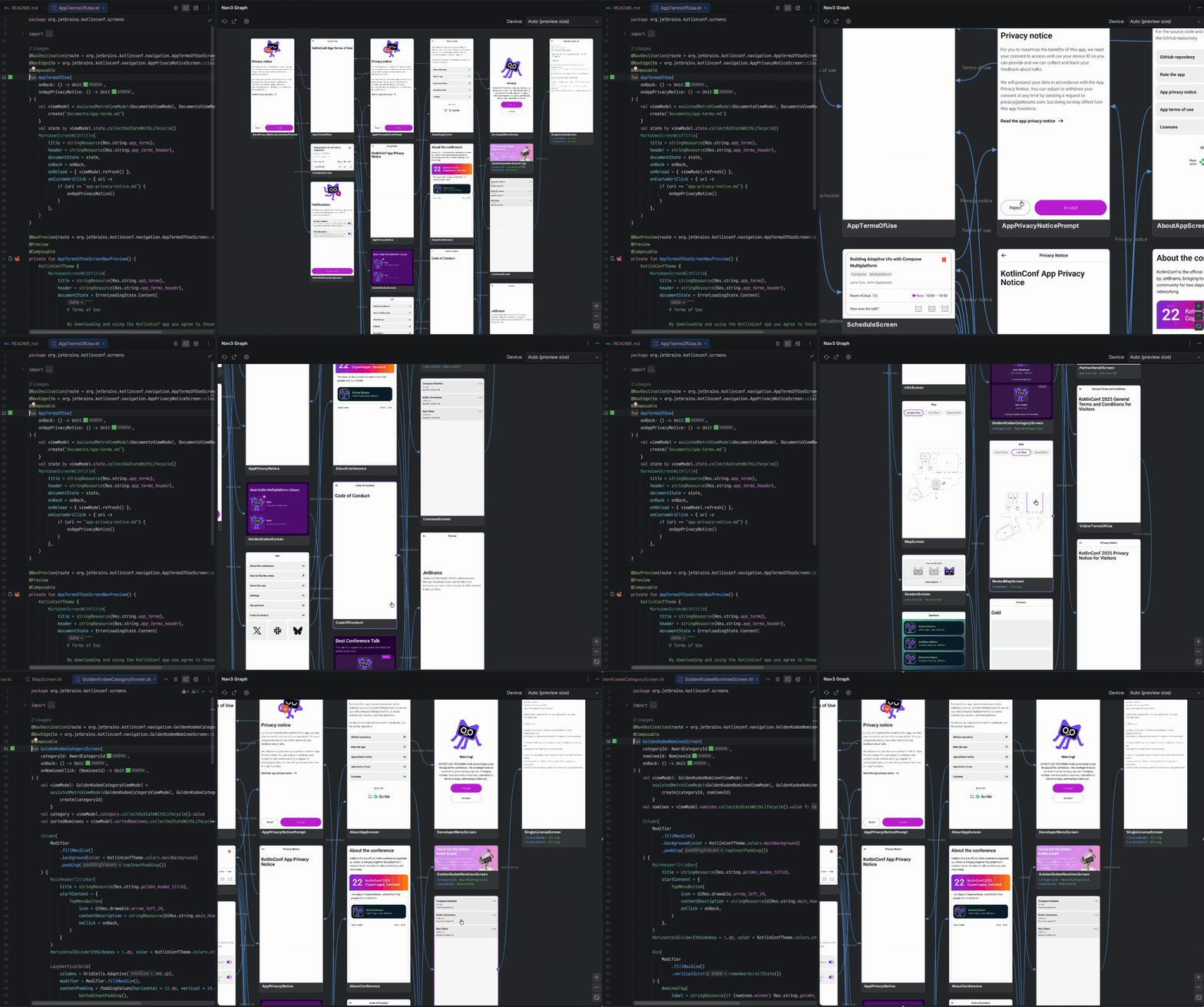
Compose Navigation Graph turns your entire app flow into one living map: every screen as a rendered existing
@Preview thumbnail, every transition an arrow you can follow. It works with Navigation 3,
Navigation 2, any other Compose navigation libraries, and even plain Activities.
You annotate your
screens, and a Gradle plugin and KSP processor statically extract the navigation graph and render a
device free thumbnail of every screen, with no emulator. An IntelliJ / Android Studio plugin then draws
your whole app's navigation, merged across modules, in a tool window where you jump to the source and add
transitions. You can even validate navigation changes in pull requests with a committed .nav baseline,
so no destination or transition changes unreviewed.
The full documentation, covering the annotations, the navgraph { } DSL, the .nav baseline, the exports, and the
IDE plugin, is available at skydoves.github.io/compose-nav-graph.
[!TIP] Want to set everything up in one shot with AI? Throw plugin-agent-guides.md at your LLM (Claude Code, Cursor, Gemini CLI, ...) as-is, and it will apply the Gradle plugin, annotate your screens, and generate your first graph for you.
The sponsors listed below made it possible for this project to be released as open source. Many thanks to all of them for their support!

CodeRabbit is an AI-powered code review platform that integrates directly into pull-request workflows and IDEs, examining code changes in context and suggesting improvements.
📗 Jetpack Compose Mechanisms Book
Jetpack Compose Mechanisms takes you from "how to use Compose" into "how Compose actually works," tracing the AOSP source line by line through the compiler, runtime, and UI layers beneath every Composable, with practical, production-ready examples from the author's own Compose tooling and libraries. It then ties all three layers together into deep, real-world performance tuning, from stability inference to the skip decision. Fully updated for Kotlin 2.4.0 and Compose Compiler 2.4.0.
📖 Article
For a guided tour of the whole toolkit, read the walkthrough article Compose Navigation Graph: Visualize Your Entire App Flow in Android Studio, which goes from annotating your first screen to validating navigation in pull requests.
Compose Navigation Graph Plugin
The Compose Navigation Graph IntelliJ plugin brings your app's whole navigation flow directly into Android Studio
or IntelliJ IDEA. Instead of reconstructing the flow in your head from entry<Route> { } lambdas and
backStack.add(...) call sites scattered across modules, you get one interactive canvas: every destination with its
rendered thumbnail and typed arguments, every transition between screens, and a double click to jump straight to the
code.
The toolkit is made of four cooperating pieces. You apply the Gradle plugin (which adds the annotations and the KSP processor for you) and install the IDE plugin:
- Annotations (
com.github.skydoves:compose-nav-graph-annotations):@NavDestination,@NavEdge,@NavPreview, and@NavGraphRootdescribe your graph in code. Added automatically. - KSP processor (
com.github.skydoves:compose-nav-graph-ksp): statically extracts each module's graph tonav-graph.jsonat compile time. Added automatically. - Gradle plugin (
id("com.github.skydoves.navgraph")): renders device free Layoutlib thumbnails, infers the transitions KSP can't read from your navigation call sites, merges the graph across modules, and provides thegenerateNavGraph,navDump,navCheck, and export tasks. - IDE plugin (
compose-nav-graph-idea): draws the merged flow graph and the preview gallery in the NavGraph Graph tool window.
How to Install in Android Studio
You can install the plugin directly from the JetBrains Marketplace:
Open Android Studio (or IntelliJ IDEA) > Settings > Plugins > Marketplace > search for Compose Navigation Graph > Install.
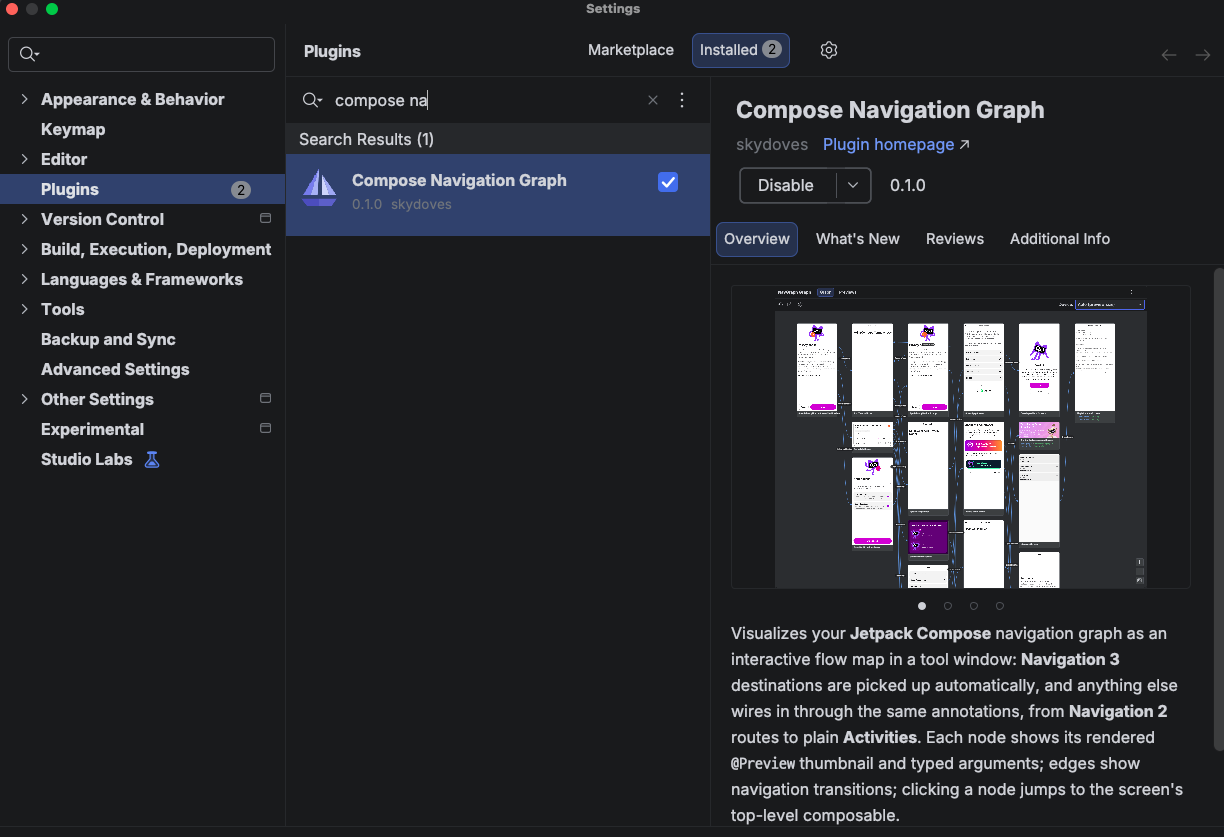
Once installed, open View → Tool Windows → NavGraph Graph. If you see the Graph, Previews, and Author tabs, you're all set! 🎉
Gradle Plugin
Make sure mavenCentral() is in your plugin repositories:
// settings.gradle.kts
pluginManagement {
    repositories {
        google()
        mavenCentral()
        gradlePluginPortal()
    }
}
Then apply the plugin and KSP to the module that holds your screens. That's all.
// build.gradle.kts
plugins {
    id("com.google.devtools.ksp") version "<matching your Kotlin version>"
    id("com.github.skydoves.navgraph") version "0.3.0"
}
Configure
navgraph {
    renderThumbnails.set(true)  // device free Layoutlib thumbnails (default true)
    variant.set("demoDebug")  // pin a flavor; blank auto detects the debug KSP variant
    inferEdges.set(true)  // read transitions from your navigation call sites (default true)
    failOnNavChange.set(true)  // navCheck fails the build when the graph drifts (default true)
    galleryEnabled.set(true)  // the preview gallery pipeline (default true)
}
Navigation Graph
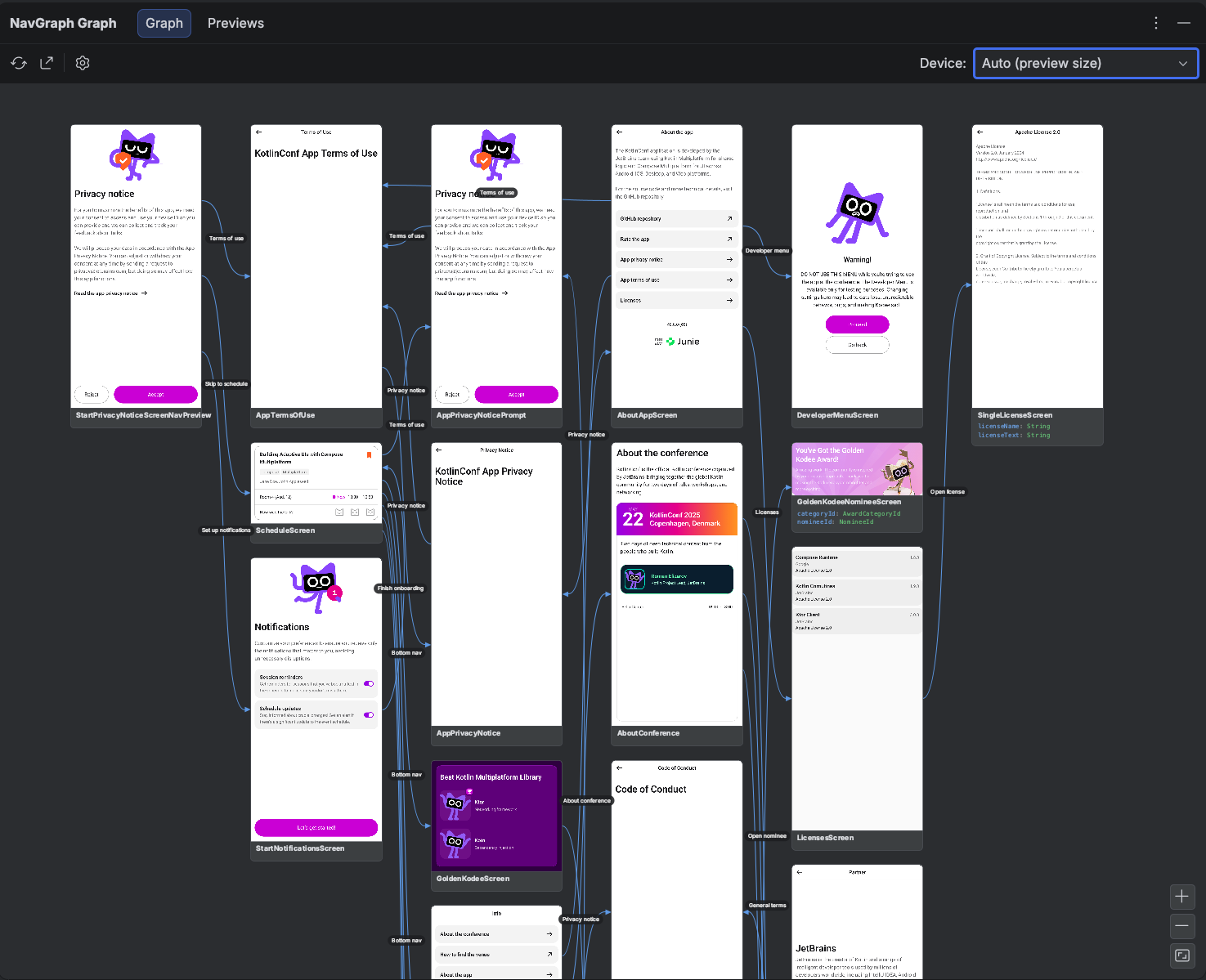
The Graph tab supports multi-module architecture, and merges every module's graph into one canvas, even when the :app module itself isn't annotated. Also it shows screen thumbnails, typed argument nodes, and the transitions between them. You double click a node to jump to its source, add a transition straight from the graph, and reframe the thumbnails with the device selector. The refresh button runs generateNavGraph for you, so the canvas always reflects your latest code.
Annotate your screens
@NavGraphRoot  // marks the start destination
@NavDestination(route = HomeRoute::class)  // this composable is the node for HomeRoute
@NavEdge(to = DetailRoute::class, label = "Open")  // a transition (repeatable)
@Composable
fun HomeScreen(/* … */) { /* … */ }

@NavPreview(route = HomeRoute::class, primary = true)
@Preview
@Composable
fun HomeScreenPreview() { /* … */ }
Each annotation plays one role in the graph:
@NavDestination(route = ...): declares the composable that renders a route. The route class becomes a node in the graph, its serializable properties become the node's typed arguments, and double clicking the node in the IDE jumps to this composable.@NavEdge(to = ..., from = ..., label = ...): declares a transition between two routes, drawn as an arrow in the graph. It's repeatable, so one screen can declare several outgoing transitions. Whenfromis omitted, it's inferred from the annotated declaration, andlabelnames the arrow (for example, the button that triggers it).@NavGraphRoot: marks the start destination, where the flow begins. The IDE highlights it with a star.@NavPreview(route = ..., primary = ...): links a@Previewcomposable to a route so its rendered thumbnail appears on the node. When a route has several previews,primary = truepicks the one shown on the graph.
A route can be any class. It does not need to implement NavKey, so an existing app (Navigation 2 routes, or even
plain Activities referenced by @NavEdge) lights up without refactoring.
You don't have to annotate every transition
KSP reads declarations only. It can't see inside a function body, so entry<Home> { … backStack.add(Feed) } is
invisible to it, and a 40 screen app would mean writing out 80 @NavEdges by hand. So the plugin also reads your
navigation call sites and adds what it finds, drawn dashed so it's never mistaken for one you declared:
entryProvider {
    entry<Home> {                                        // scope: Home
        HomeScreen(
            onOpenFeed = { backStack.add(Feed) },        // inferred: Home ⇢ Feed
            onOpenSettings = { backStack.add(Settings) }  // inferred: Home ⇢ Settings
        )
    }
}
Matching is by method name rather than by receiver, so a custom navigator (navigator.add(SessionScreen(it))) works
with only the plugin applied. A reference that doesn't resolve to a route already in the graph is dropped, so
inference never invents a destination, and an explicit @NavEdge always wins over an inferred duplicate — that's how
you attach a label. Inferred transitions stay out of the committed .nav baseline by default, so switching this
on never breaks an existing navCheck.
navgraph {
    inferEdges.set(false)  // only what you declared
    baselineIncludesInferred.set(true)  // review the inferred graph too
}
The full guide, including what it can and can't read, lives in the Annotations documentation.
Add destinations and transitions from the IDE
You don't even have to write the annotations by hand: the graph canvas is editable. Drag the connector handle on a
node's right edge and drop it onto another screen, and the plugin inserts the matching @NavEdge(to = ...) into your
source code, refreshes the graph, and draws the new arrow. Adding a destination works the same way: the plugin
scaffolds a new route class plus its @NavDestination screen stub, and the node appears on the canvas:
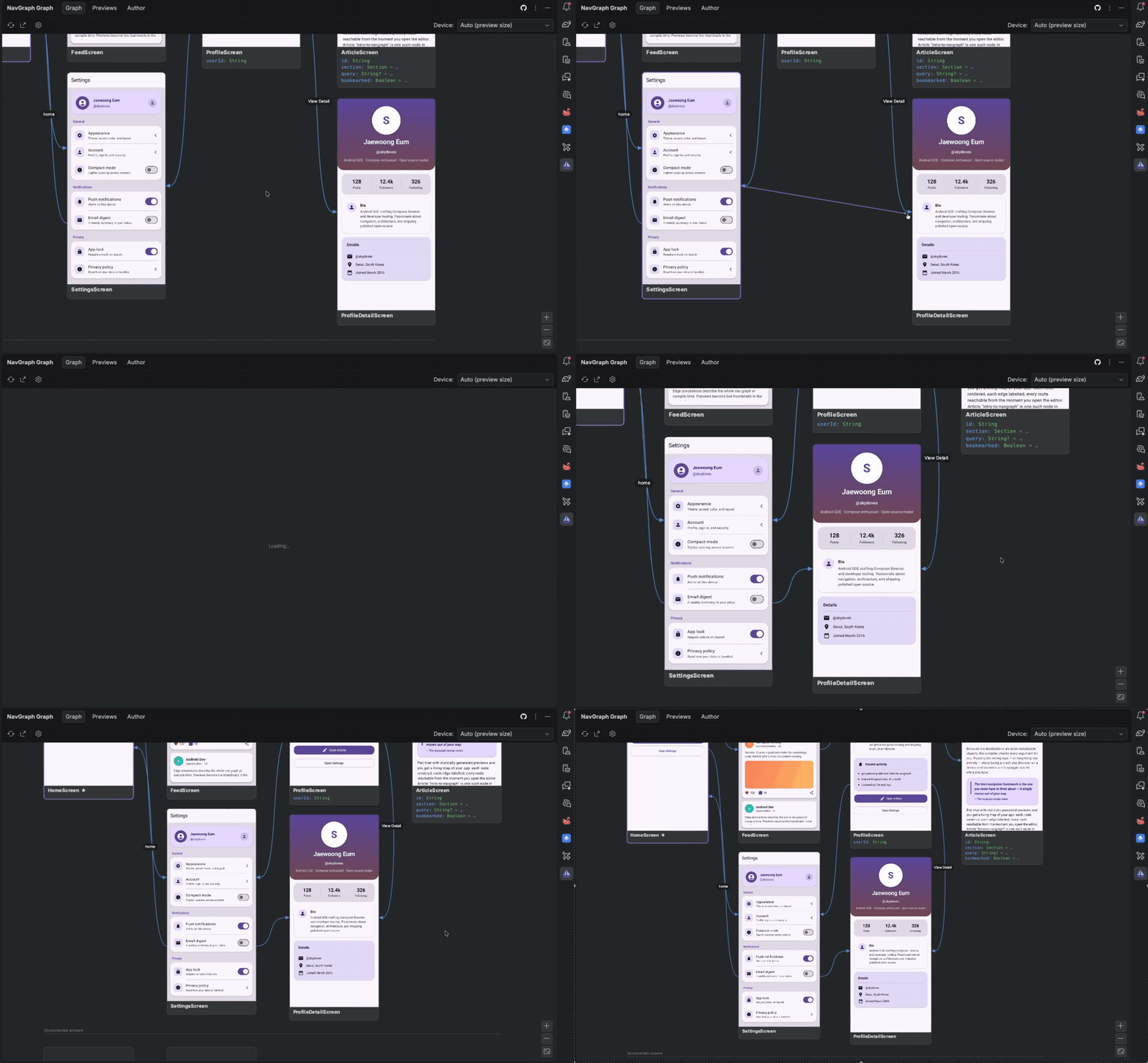
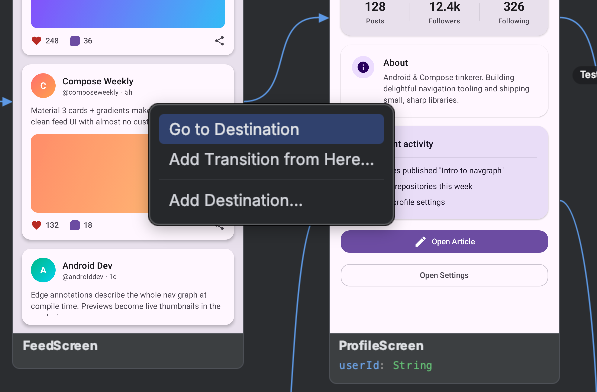
The same edits are available from the right click menu. Add Transition from Here… lists every screen, and picking
one writes the annotation and re-renders the result. Add Destination… scaffolds a new destination, Wire This
Up… scaffolds the @NavDestination screen for an orphan route, and Go to Destination jumps to the code:
Generate the graph
On the IDE side, you can generate the whole navigation graph by clicking the refresh icon, and you can also generate the graph with the Gradle task below:
./gradlew :app:generateNavGraph
This writes nav-graph.json plus a device free Layoutlib thumbnail per screen. You open the NavGraph Graph tool
window to explore it, or export it as a standalone artifact.
Preview Gallery
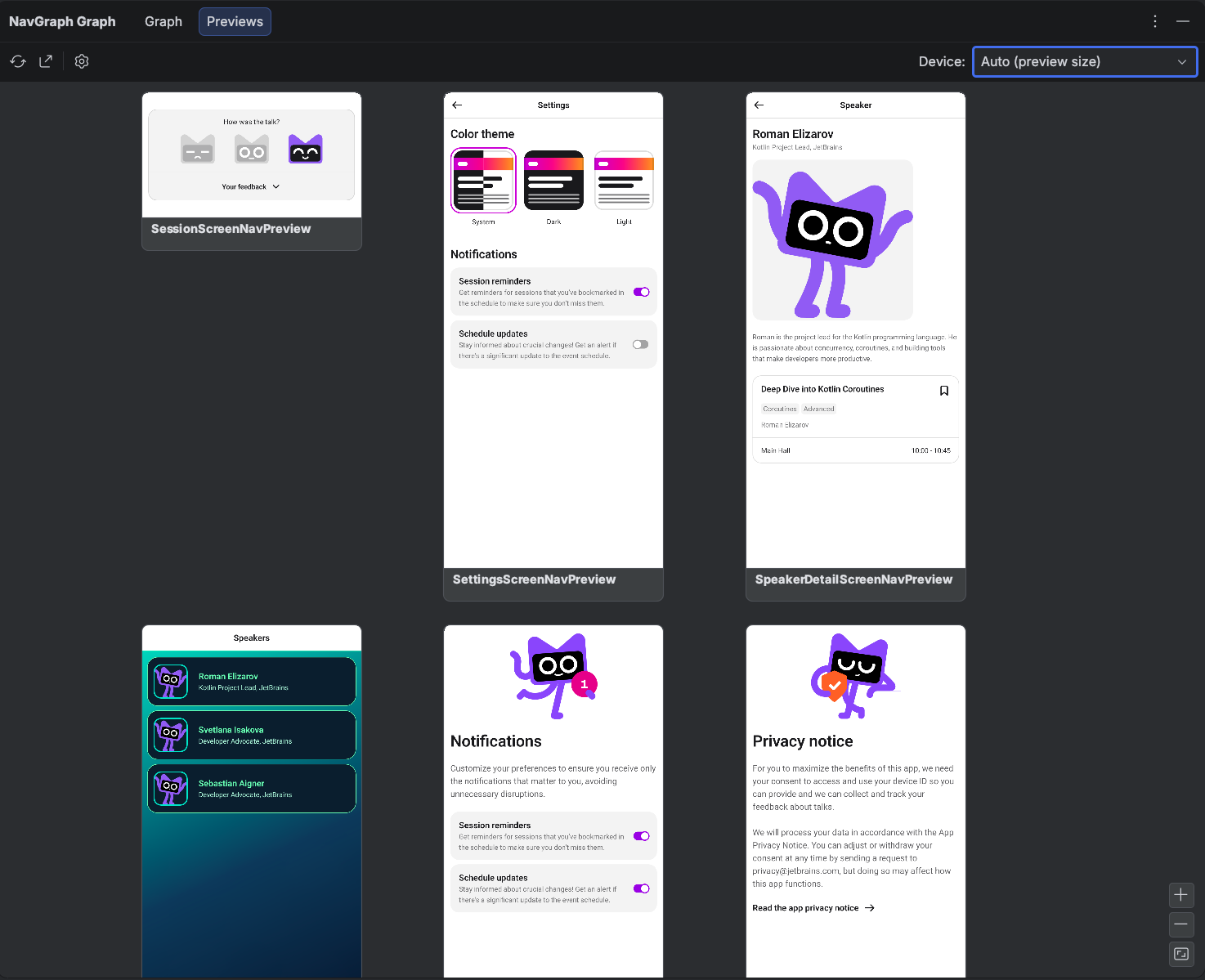
The Previews tab renders every @Preview in your project, not just the annotated screens, grouped by module
and package. It's a living design system overview: scan all screens and components at a glance, and jump to a
preview's source with a double click. Multipreview annotations are expanded, and @PreviewParameter providers are
honored.
Generate the preview gallery
The same pipeline can render every @Preview in your project into a gallery, grouped by module and package:
./gradlew :app:generatePreviewGallery # render every @Preview into build/navgallery
Export your navigation graph or preview gallery
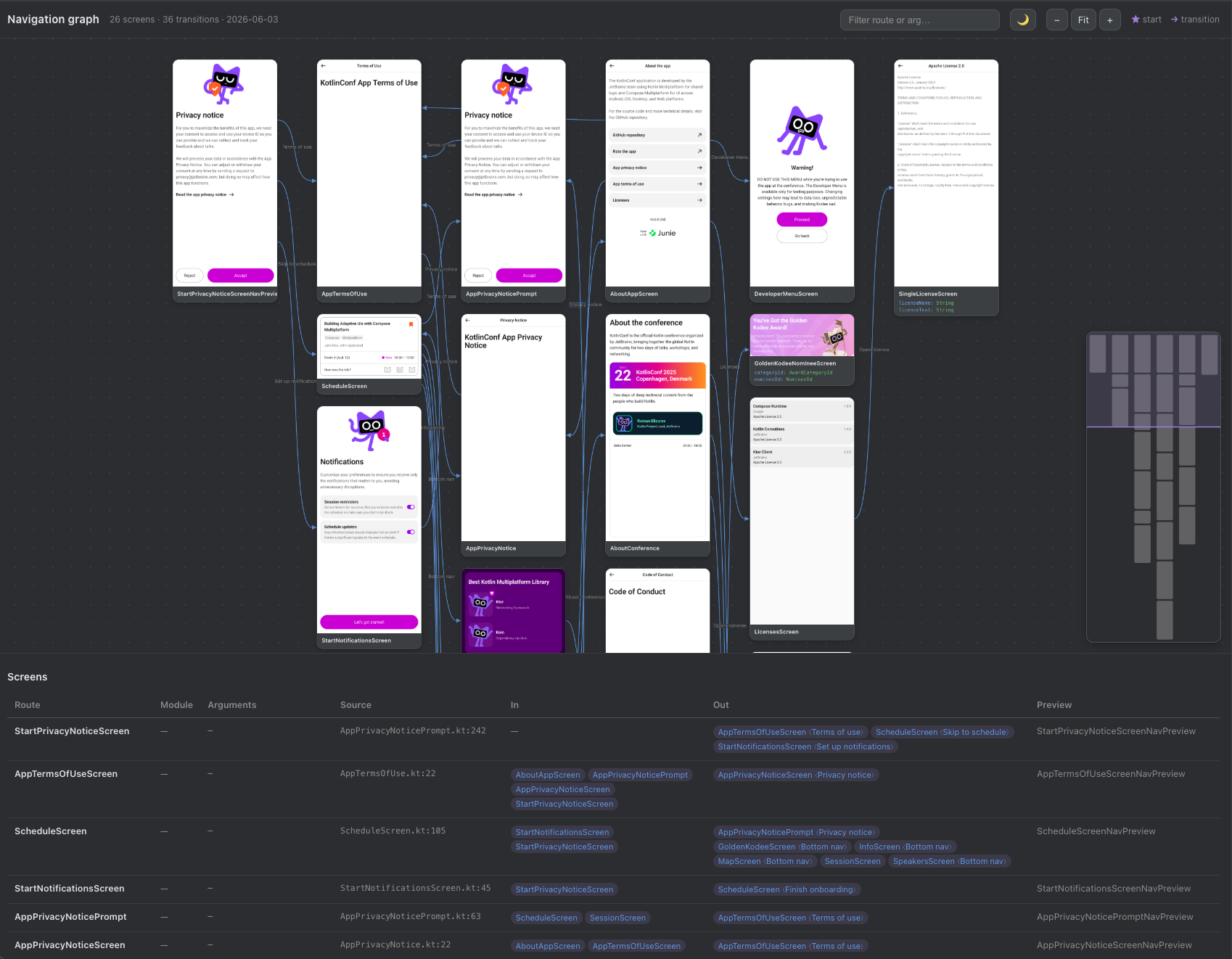
Everything the tool window shows can also leave the IDE as a standalone artifact, ready to drop into a pull request, a design review, or your team's wiki. Export the navigation graph as an interactive HTML page or a single PNG. You can directly export on your IDE by clicking the sharing icon, but also you can export them with the Gradle tasks below:
./gradlew :app:exportNavGraphHtml  # a standalone interactive HTML canvas
./gradlew :app:exportNavGraphImage  # a single PNG of the whole graph
The HTML export is a self-contained interactive page: pan and zoom the flow map, filter routes, and read the screens table with every argument, transition, and source location:
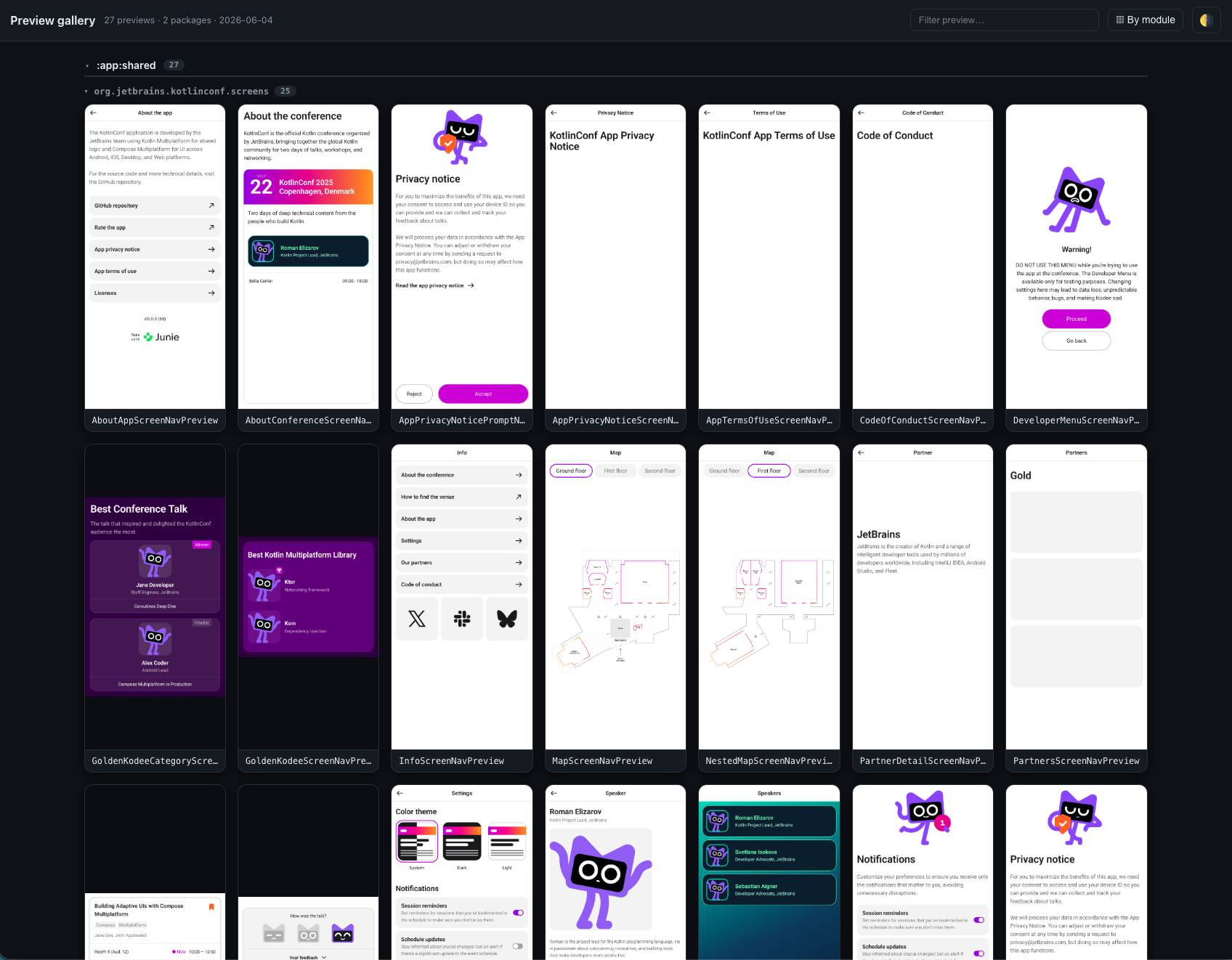
The preview gallery exports the same way, as a browsable HTML gallery or a single PNG contact sheet:
./gradlew :app:exportPreviewGalleryHtml  # a standalone HTML gallery
./gradlew :app:exportPreviewGalleryImage  # a single PNG contact sheet
Put the graph in your README
Mermaid needs no viewer at all: GitHub renders a ```mermaid block natively, so the graph can live in your README
and be regenerated on every build instead of going stale as a checked-in screenshot.
./gradlew :app:exportNavGraphMermaid # build/navgraph/nav-graph.mmd
flowchart LR
  n0["HomeScreen"]
  n1["FeedScreen"]
  n2["SettingsScreen"]
  n0 -->|"open feed"| n1
  n0 -.-> n2
  classDef navgraphStart fill:#ede7f6,stroke:#6750a4,stroke-width:2px;
  class n0 navgraphStart
Declared transitions draw solid (-->), inferred ones dotted (-.->), and the start destination gets its own class,
so the flowchart carries the same distinctions the canvas does.
Navigation Validation
A navigation change is otherwise invisible in review: a new destination, a changed typed argument, an added or
removed transition. You commit a .nav baseline (modeled on apiDump and apiCheck) so a git diff shows
exactly how navigation changed, and check fails when the baseline is out of date:
./gradlew :app:navDump  # write or update the committed baseline (app/nav/app.nav)
./gradlew :app:navCheck  # verify it; wired into check, so it fails on drift
Both tasks read the statically extracted graph directly and never render thumbnails, so they're fast enough to run on
every check and every CI build. The committed .nav baseline is intentionally human readable, so a pull request
diff reads like a description of your app's flow:
dest Article  args=(id: String, section: Section = …, query: String? = …)
dest Home  start
dest Profile  args=(userId: String)
edge Feed -> Profile
edge Home -> Feed
edge Profile -> Article  "Open article"
edge Settings -> Home  "home"
When the graph drifts from the baseline, navCheck prints a - removed / + added diff and fails the build, so the
change has to be reviewed and the baseline deliberately updated with navDump:
navgraph: navigation graph changed — app/nav/app.nav is out of date:

  - edge Profile -> Settings
  + dest Onboarding
  + edge Home -> Onboarding  "first run"

Run :app:navDump to update the baseline, then review the diff.
Two knobs tune the workflow: strict on CI but warning only locally, and gradual adoption across modules:
navgraph {
    failOnNavChange.set(System.getenv("CI") == "true")  // fail the build on CI, warn locally
    allowMissingBaseline.set(true)  // skip modules that haven't committed a baseline yet
}
The full guide, including multi module baselines and CI integration, lives in the Nav Baseline documentation.
Check the graph is actually navigable
The baseline reviews how navigation changed. navLint asks what it is: it walks the merged graph and reports
screens nothing can reach, a missing or duplicated start destination, and routes no @NavDestination binds.
./gradlew :app:navLint
navgraph: 2 navigation lint finding(s):

  [unreachable] Checkout
      no path from Home
  [unbound-route] Orphan
      declared as a route but no @NavDestination binds a screen to it
navCheck never catches these, because an unreachable screen sits in the baseline like any other and passes
check forever. Lint warns by default (navgraph { failOnNavLint } gates CI) and runs as its own step rather
than inside check, since it reads the whole app's aggregated graph. The full guide lives in the
Nav Lint documentation.
Review the change as a picture
The same comparison also renders. Because git already holds the baseline, "before" costs nothing:
./gradlew :app:exportNavDiffImage  # build/navgraph/nav-diff.png
./gradlew :app:exportNavDiffHtml  # build/navgraph/nav-diff.html
Destinations and transitions added by the change are green, removed ones are a red dashed ghost that still
shows the arguments they used to declare, and changed ones (an argument, a label) are amber, with a legend and
counts. Attach the PNG to a pull request and the reviewer sees what the change does to navigation in one image
instead of reconstructing it from a text diff. It is computed from the exact lines navCheck compares, so the
picture and the build can never disagree.
Kotlin Multiplatform Support
Compose Navigation Graph works on Kotlin Multiplatform out of the box: the annotations live in commonMain (published
for android, jvm, iosArm64/iosSimulatorArm64/iosX64, js, and wasmJs), and the Gradle plugin detects your
module shape and wires the right KSP pass automatically:
- KMP + Android: the graph is extracted from the Android compilation, and every screen still gets a device free
thumbnail. A shared module has no Android resources of its own, so the renderer reuses the consuming Android app's
merged Compose Multiplatform resources automatically. Complex Compose Multiplatform screens that Layoutlib can't
draw fall back to the Robolectric backend (
renderBackenddefaults toAUTO). The plugin auto-adds the Composeui-toolingthat device free rendering needs on KMP, so this works with only the plugin applied. - KMP without Android (iOS/JS/wasm only): extraction runs on the common metadata pass and produces a structure only graph: nodes, typed arguments, and transitions, without thumbnails.
See it on a real app: samples/sample-kotlinconf/ applies the plugin to JetBrains'
Compose Multiplatform KotlinConf app and renders its complete graph (26 screens, 36 transitions, every thumbnail
included). The full guide lives in the
Kotlin Multiplatform documentation.
Documentation
The full documentation covers the annotations, the navgraph { } DSL, the .nav baseline, the exports, and the IDE
plugin at skydoves.github.io/compose-nav-graph. Runnable demos live in
samples/sample/, samples/sample-kotlinconf/ for Kotlin Multiplatform, and
samples/sample-nowinandroid/ for a multi module setup.
More Plugins by the Author
If you find this plugin useful, check out the author's other developer tools for Jetpack Compose.
Compose Hot Reload for Android (HotSwan)
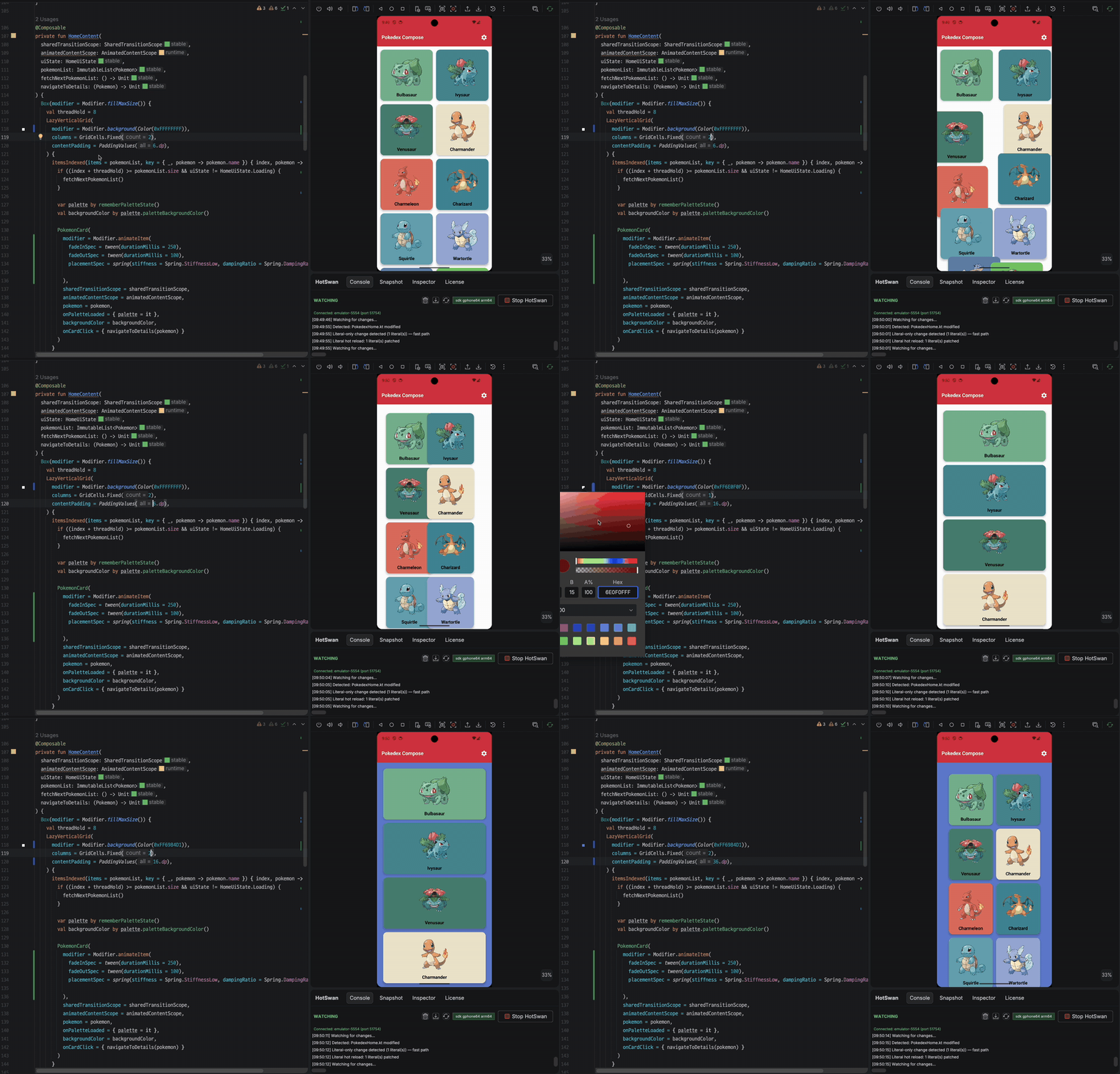
HotSwan hot reloads your Compose code on a real device or emulator in seconds. UI changes appear instantly while the app keeps its navigation and runtime state, with no reinstall or restart:
Compose Stability Analyzer
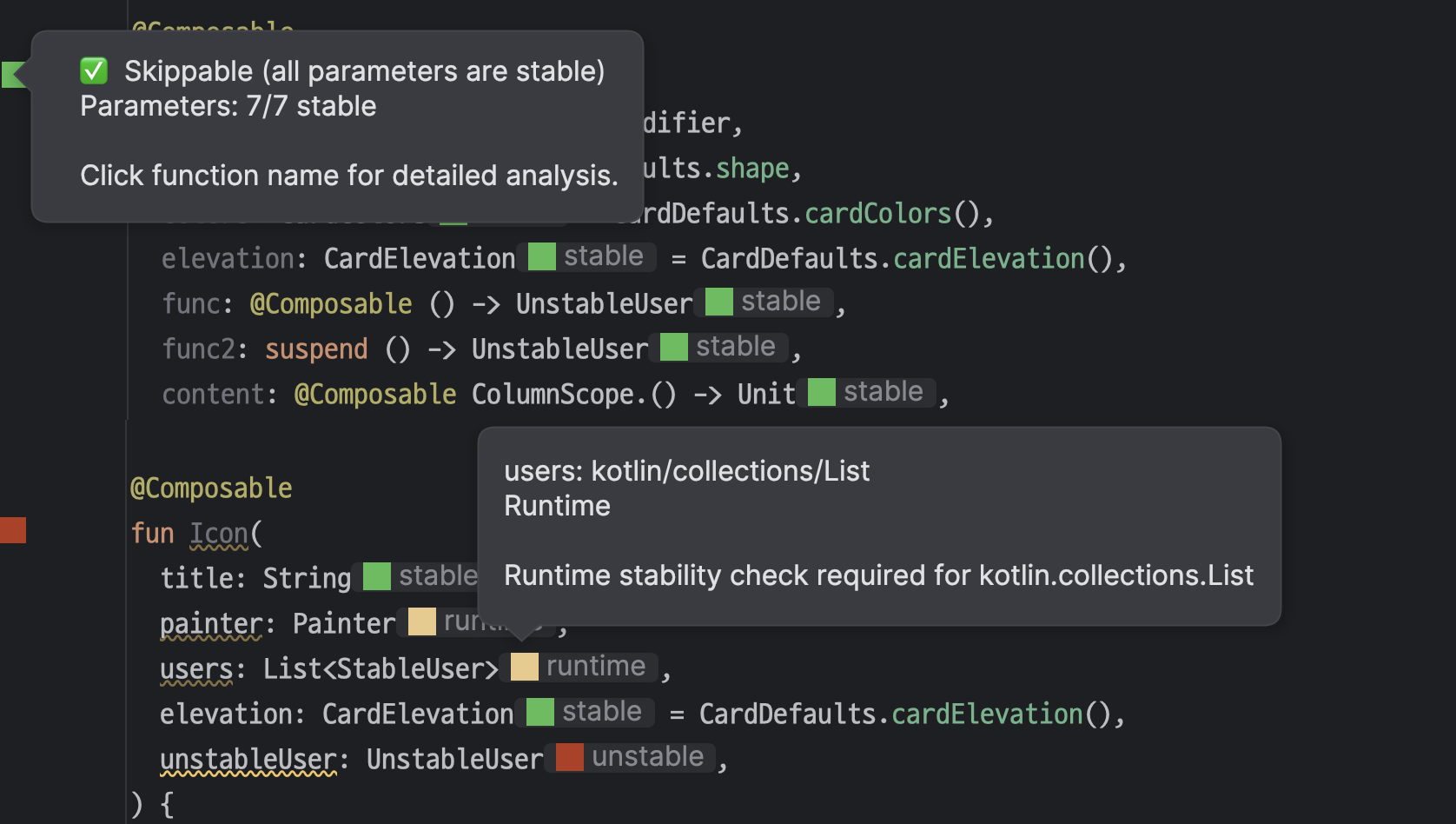
Compose Stability Analyzer analyzes the stability of your composables and visualizes recompositions in real time, with inline stability hints, recomposition counts, and quick fixes right inside Android Studio:
Find this library useful? :heart:
Support it by joining stargazers for this repository. :star:
Also, follow me on GitHub for my next creations! 🤩
License
Designed and developed by 2026 skydoves (Jaewoong Eum)

Licensed under the Apache License, Version 2.0 (the "License");
you may not use this file except in compliance with the License.
You may obtain a copy of the License at

    https://www.apache.org/licenses/LICENSE-2.0

Unless required by applicable law or agreed to in writing, software
distributed under the License is distributed on an "AS IS" BASIS,
WITHOUT WARRANTIES OR CONDITIONS OF ANY KIND, either express or implied.
See the License for the specific language governing permissions and
limitations under the License.
