
UrTV
تلفزيونك · UrTV
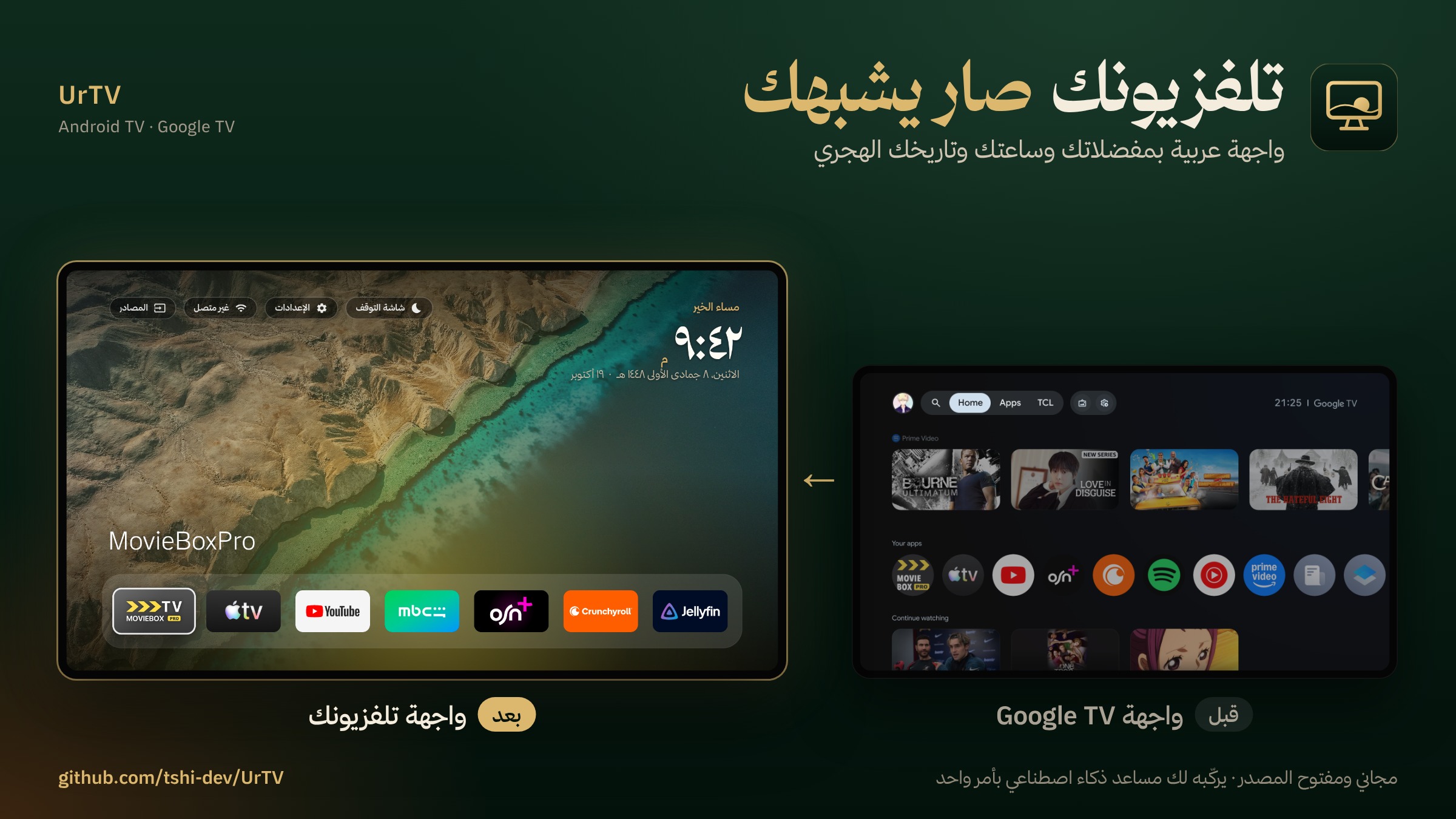
واجهة رئيسية عربية وشاشة توقف سعودية لتلفزيونات Android TV و Google TV، وتسريع آمن للتلفزيون.
يركّبها لك مساعد ذكاء اصطناعي بأمر واحد.
An Arabic home screen and a Saudi screensaver for Android TV / Google TV, and a safe speed-up.
Your AI agent sets it all up.
① التلفزيون
الإعدادات ← حول ← اضغط OK على Build سبع مرات. بعدها روح إلى خيارات المطوّر ← شغّل USB debugging.
② كمبيوتر على نفس الواي فاي، وعليه واحد من هذي
| Codex (OpenAI) | Claude Code (Anthropic) |
|---|---|
| مجاني بحساب ChatGPT | يحتاج اشتراك Claude Pro (20$ بالشهر) |
| حمّل تطبيق Codex | حمّل تطبيق Claude ← تبويب Code |
| الموافقات: اختر «Approve for me» | الموافقات: Allow للمهمة كلها |
ويندوز: ركّب Git وPython أول (winget install --source winget Git.Git Python.Python.3.12). Gemini CLI مجاني وناس قالوا يشتغل؛ ما جرّبناه.
③ الصق هذا
ركّب تلفزيوني من https://github.com/tshi-dev/UrTV: انسخ المستودع واتبع
docs/SETUP-PROMPT.mdخطوة بخطوة. أنت على كمبيوتر متصل بنفس شبكة الواي فاي حقت التلفزيون.
وش يصير بعد اللصق؟
يسألك عن مدينتك وأنديتك، والتلفزيون يسألك Allow مرة وحدة، وبعدها خلّه يشتغل: 40 دقيقة وكم إعادة تشغيل.
بترجعه مثل ما كان؟
نعم، بأي وقت: تطبيقاتنا تنحذف، واللي أطفأناه يرجع، وشاشة التلفزيون الأصلية ترجع.
optimize/reset.sh
نزلت نسخة جديدة؟
حدّث التطبيقين وإعداداتك كلها باقية. الشاشة نفسها تتحدّث لحالها. آخر الإعدادات، تحت «تحديث الشاشة الآن»، ثلاثة أسطر: الإصدار الحالي، والإصدار المتاح، وطريقة التحديث.
optimize/install.sh all
نزل تحديث للنظام وقفل تطبيقنا؟
أعد الإعداد كله بأمر واحد، وإعداداتك باقية.
optimize/run.sh again
Set it up in 3 steps
① The TV
Settings → About → press OK on Build 7 times. Then go to Developer options → turn on USB debugging.
② A computer on the same Wi-Fi, with one of these
| Codex (OpenAI) | Claude Code (Anthropic) |
|---|---|
| Free with a ChatGPT account | Needs Claude Pro ($20/month) |
| Download the Codex app | Download the Claude app → Code tab |
| Approvals: choose «Approve for me» | Approvals: Allow for the whole task |
Windows: install Git and Python first (winget install --source winget Git.Git Python.Python.3.12). Gemini CLI is free and reported to work; not tested by us.
③ Paste this
Set up my TV with https://github.com/tshi-dev/UrTV: clone it and follow
docs/SETUP-PROMPT.mdstep by step. You are on a computer on the same Wi-Fi as the TV.
What happens after pasting?
It asks your city and your clubs, the TV asks Allow once, then leave it: 40 minutes, a few restarts.
Can I put it back as it was?
Yes, anytime: our apps are removed, what we turned off comes back on, the TV's own screen returns.
optimize/reset.sh
A new version came out?
Update both apps; all your settings stay. The screen itself updates on its own. The settings row tells you when one exists.
optimize/install.sh all
The TV updated its system and locked our app out?
Redo the whole setup with one command, settings kept.
optimize/run.sh again
Safe: nothing is uninstalled; AirPlay, Chromecast and voice are never touched; a 5-minute safety switch puts the stock home back if ours doesn't come up. The apps are built and signed by GitHub Actions from this repo (version 3.N = the build number). The full prompt: docs/SETUP-PROMPT.md. To build a different screen: docs/RECREATE-PROMPT.md.
What you get
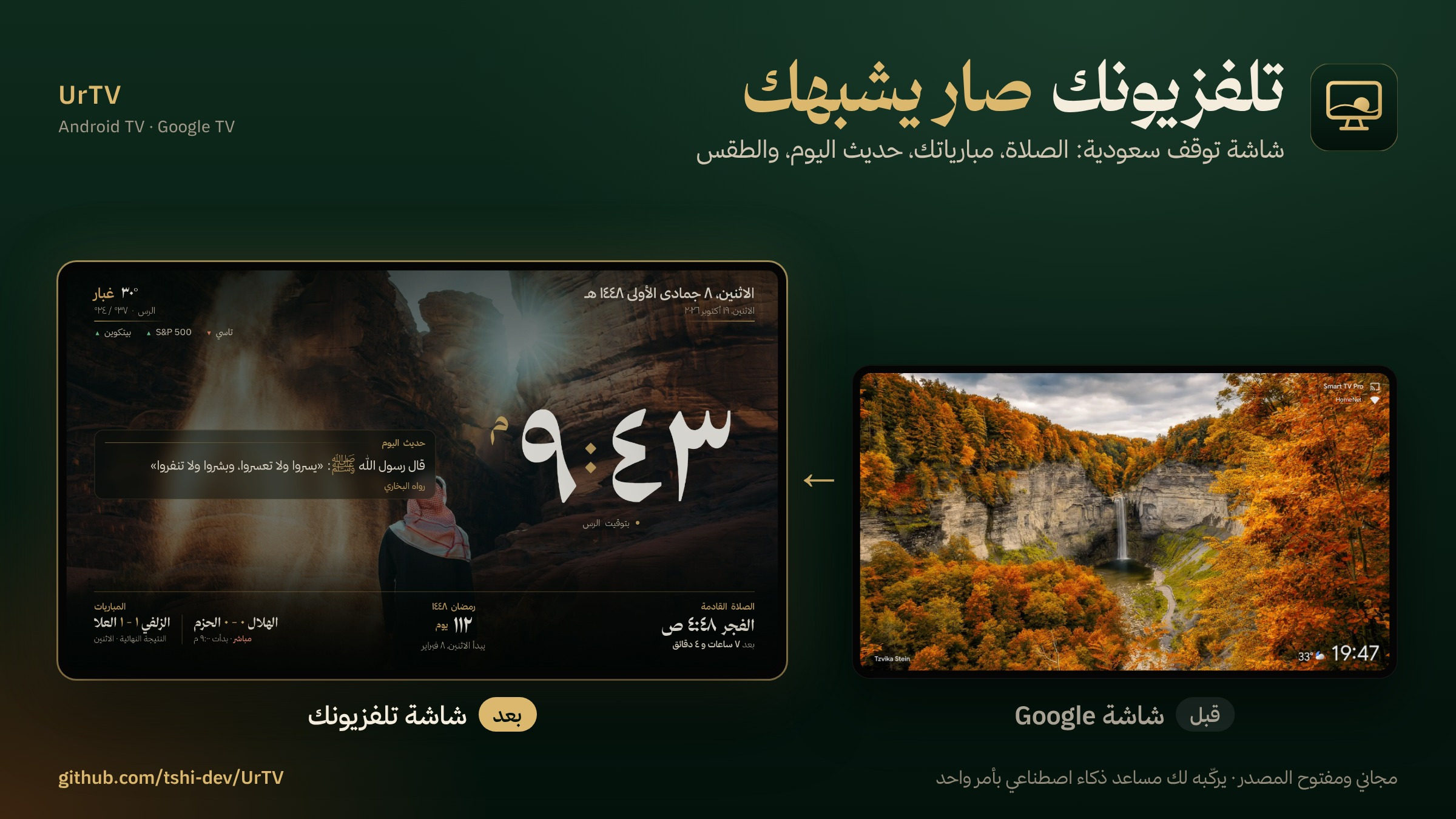
| شاشة تلفزيونك · screensaver | Clock, Hijri date, prayer times and iqama, Ramadan, your teams' matches, weather, markets, and beside the clock your choice of new episodes, today's prayers, the 5-day forecast, all your teams' games, a stock watchlist, or a verse/hadith of the day, over Saudi landscapes | urtv-screensaver.apk |
| تلفزيونك · home screen | Clean Arabic launcher: favourites row (5–10 apps) arranged in «ترتيب المفضلة», all apps, inputs, Wi-Fi, settings; «المهام» (tasks, by voice too), optional card from the screensaver (off by default). The «تلاوة» pill opens the Quran and the radio, with the adhan at Umm al-Qura times. App names show in Arabic: the name the setup agent gave it on this TV (optimize/dock.sh names / name), else the app's own Arabic name, else the one in res/values/app_names.xml, else its own name |
urtv-home.apk |
| Two free apps | TV Bro, a web browser for the TV, and SmartTube, YouTube without ads, from their own releases (skip with SKIP_EXTRAS=1) |
optimize/install.sh extras |
| Speed-up | Telemetry, ads and demos off (reversibly), closed apps frozen, Play Store kept from running in the background, faster animations | optimize/ |
Download the apps yourself: releases/apk-latest
(install with adb install; the agent route above also sets everything up).
Every build is also kept as a numbered release (v3.N, the screensaver and home version), to go back
to one: APK_TAG=v3.N optimize/install.sh all.
The home screen carries «تلاوة وأذان»: forty reciters (114 surahs each), live Quran radio, and the five daily adhans at Umm al-Qura times with a choice of 21 recordings. Nothing to install apart from the home app; docs/TILAWAH.md has the screens, the remote keys and the ADB controls.
The «تلاوة وأذان» screen on the TV
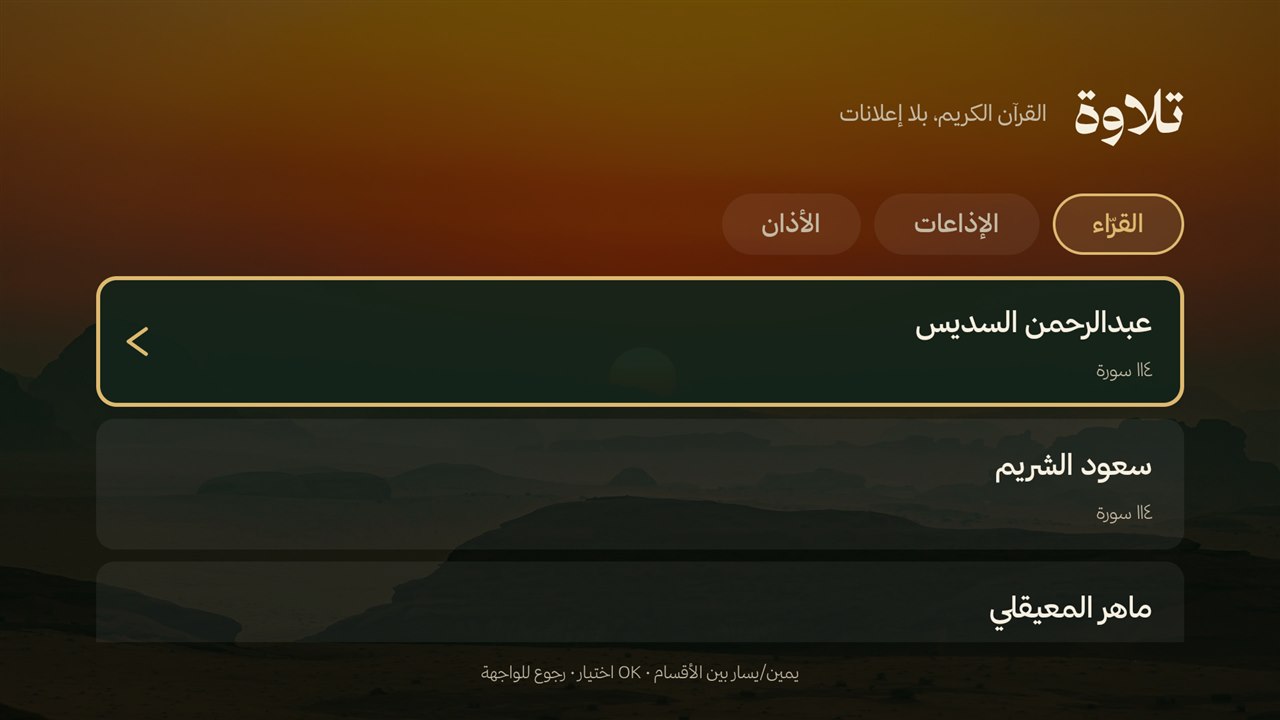 The «القرّاء · الإذاعات · الأذان» tabs Three tabs, read from the right. The selected row has a thick gold frame and a gold chevron. |
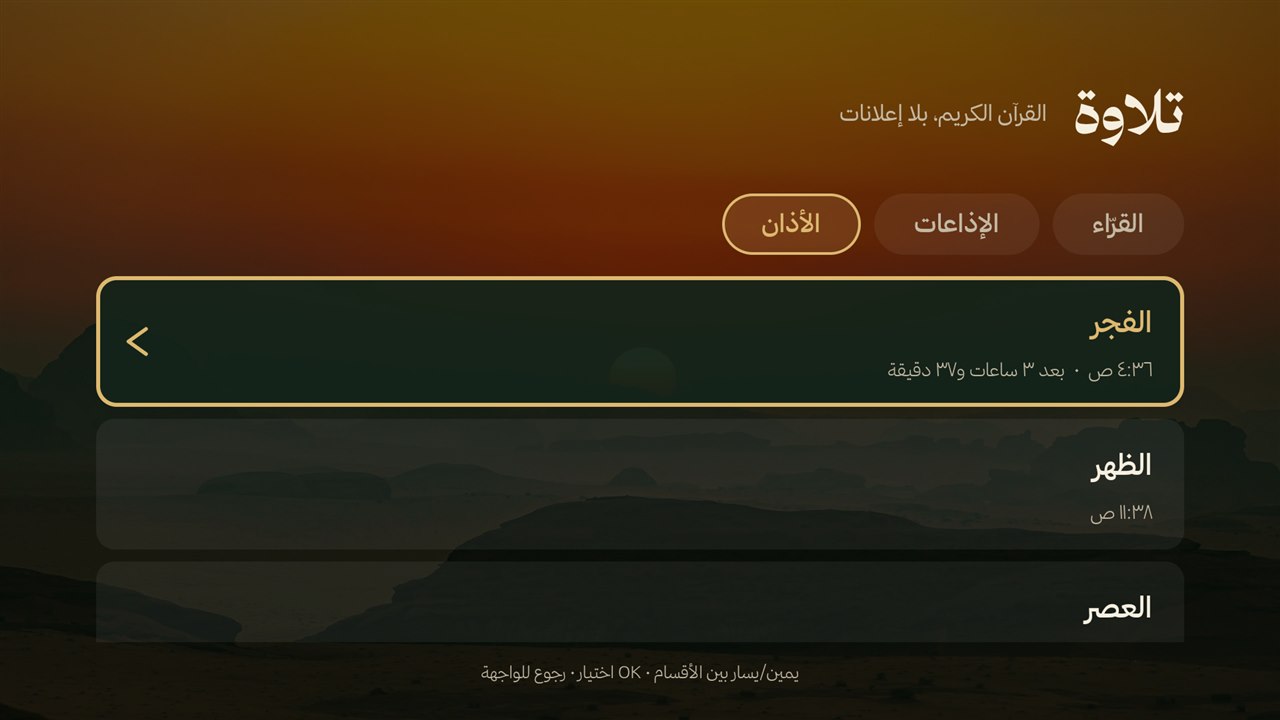 The «مواقيت أم القرى» times Today's five times, the next one in gold with the time left. |
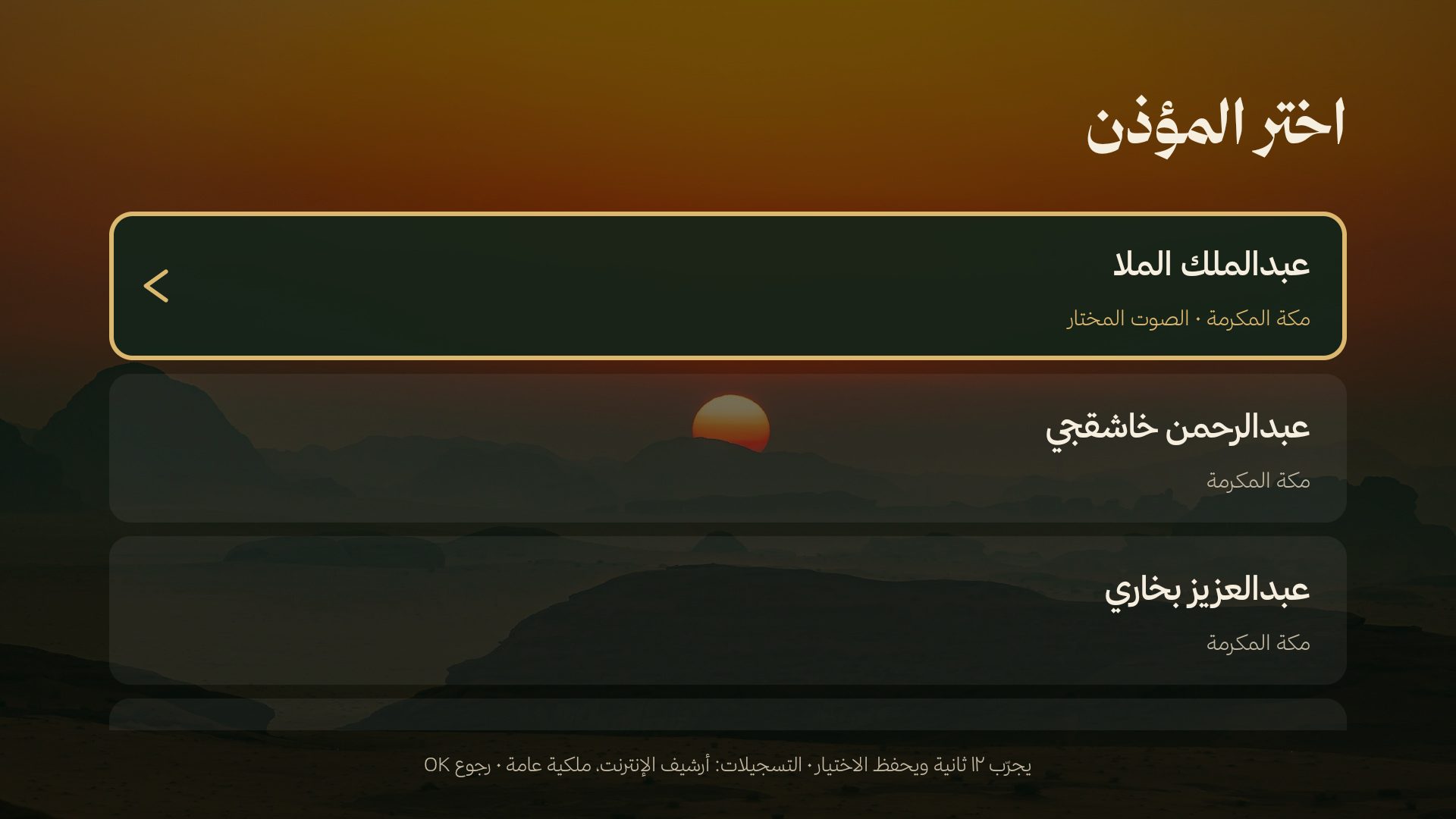 The «٢١ أذانًا» Twenty-one recordings — muezzins and mosques; the chosen one in gold with its city. |
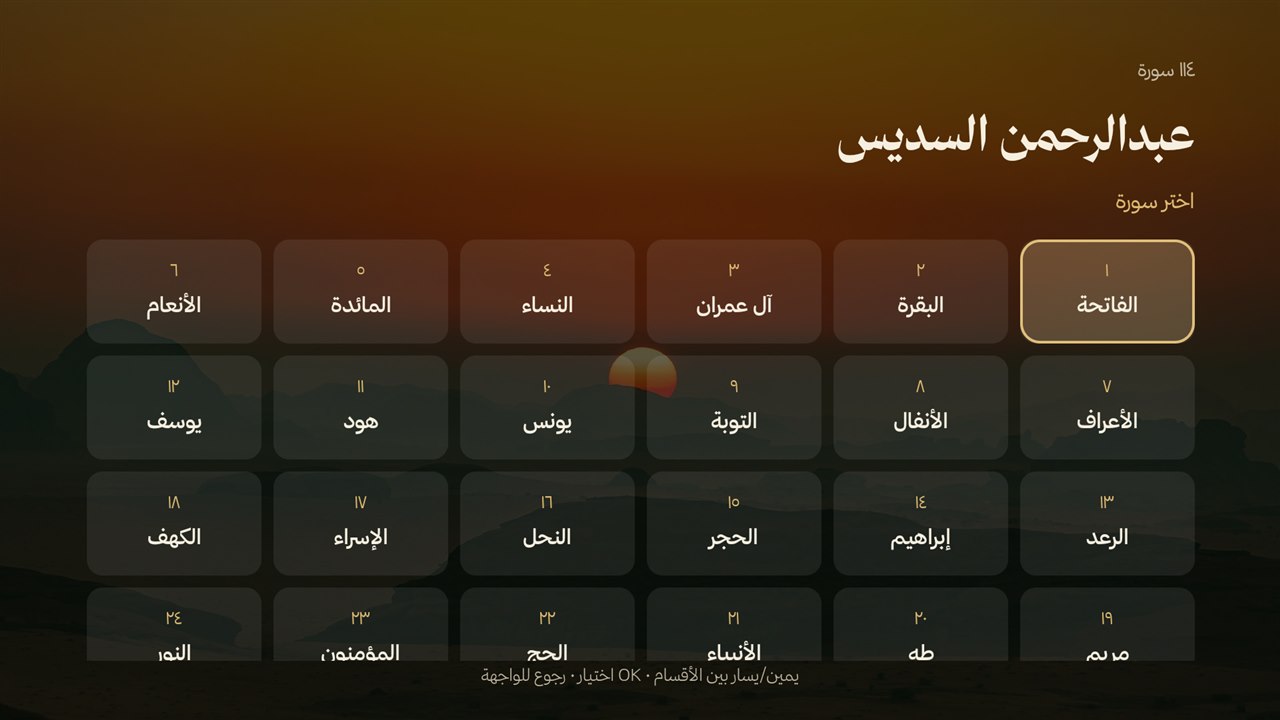 The «١١٤ سورة» grid The surahs of a reciter, six columns, right to left. |
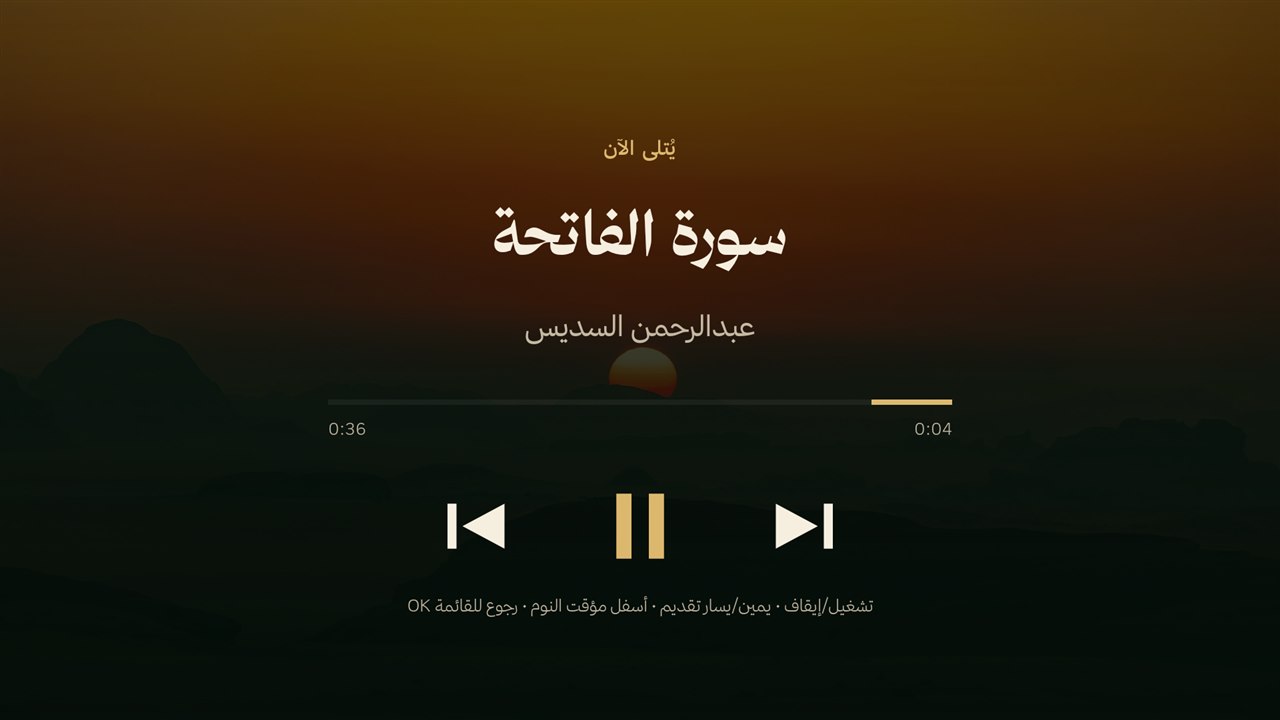 The «المشغّل» Title, reciter, progress and the transport row; during an adhan it shows the muezzin and hides the skip buttons. |
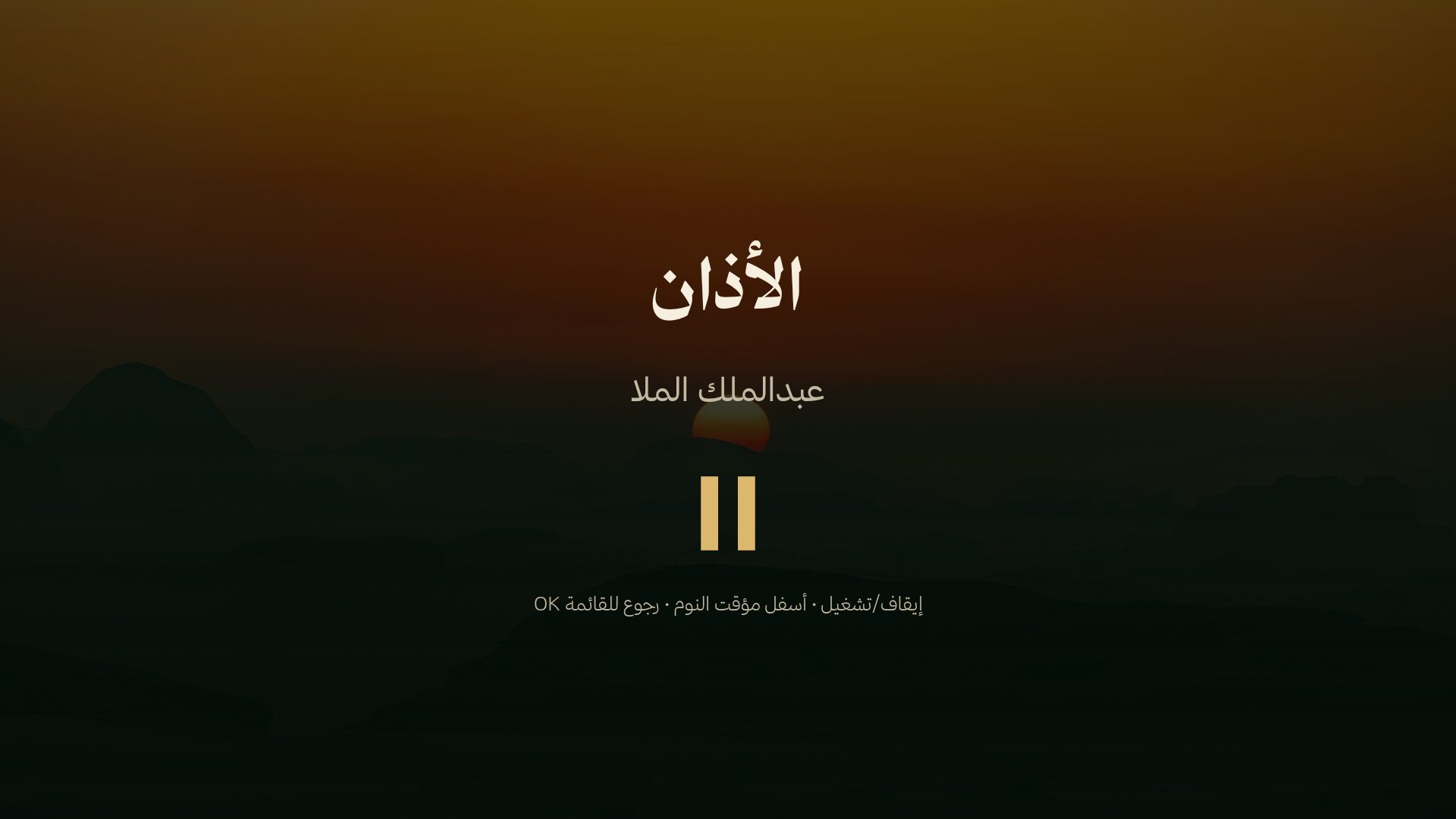 During the adhan The muezzin's name, and no skip or seek: the surah waits and comes back. |
For agents and scripts
Everything is scriptable over ADB, made for slow Wi-Fi (retries, resumable uploads, every step remembered):
optimize/find-tv.sh |
--check: can this terminal reach the home network at all (not from a cloud or sandbox) · then finds the TV (Windows, Mac, Linux) · pair <IP:port> <code> and connect <IP:port>: Android 11+ «Wireless debugging» for a TV that keeps port 5555 closed (needs adb) |
optimize/precheck.sh |
is it an Android TV (leanback; Samsung Tizen, LG webOS, phones are refused) and is its WebView 80 or newer · webview-store opens the update page on the TV |
optimize/run.sh |
the whole setup; run again after any failure to continue · status · again after a TV system update (redo all, settings kept) |
docs/FEATURES.md |
كل ميزة بالعربي: وش تسوي، ووين تغيّرها، ووش يكتب الوكيل |
AGENTS.md |
for AI agents, read first: where to start and the rules agents broke in reports |
docs/SETTINGS.md |
every setting and feature with its command, for agents: use these, never build your own |
optimize/saver.sh |
screensaver settings: show, cities, city, find-team, teams, leagues, card, home-card, greeting, events, genres, langs, minrating, photos, idle, digits, hijrioffset, clock24, national, cardstyle, markets (off/on), clocksize, mkstyle, stocks, slot, countdown, tasks, export / import (move the settings to a second TV, import previews until --yes), update |
optimize/photos.sh |
the owner's own photos, 1 to 10: add FILE..., list, del N, clear, mode mix|only, show |
optimize/dock.sh |
favourites row: show, apps, set, reset; hidden, hide PKG, show PKG for apps left off the home screen |
optimize/music.sh |
«تلاوة وأذان» over ADB: status, reciters, stations, surah, radio, pause, resume, seek, sleep, adhan (now, on/off, voice N) |
optimize/measure.sh · shot.sh |
memory before/after (restart + settle) · screenshots without navigating |
optimize/community.sh |
a TV our lists do not know: the tested list for exactly its model from CleanYourTV (MIT; optimize/lists/community/, made by .github/tools/community_lists.py) |
optimize/autostart.sh |
TCL only: allows our two apps to start at boot (the adhan after a restart, the sleep service), writes it to disk, and reports it |
optimize/keep.sh |
turn back on anything protected (AirPlay, casting, voice, updates…) that something turned off · off: what the setup turned off, by name · restore <pkg>: an app the person wants back, remembered so run.sh again leaves it on |
docs/TVS.md |
what was seen on each TV model (ADB port, home switch, what to watch out for) |
optimize/reset.sh |
back to stock: lists re-enabled, stock home and screensaver back, our apps removed |
optimize/share.sh |
if the owner wants: --preview writes how the setup went and prints exactly what would be sent, --send sends it: TV model, time per step, what failed, memory before/after, nothing personal; anonymous to the author (from their phone by a QR code if this computer is offline). --problem: a problem report any time, even from another computer; agents report problems this way, never as GitHub issues |
What we learned on real TCL sets, and what must stay on: docs/OPTIMIZE.md. Manual test plan: docs/TEST-PLAN.md.
For developers
src/template.html     the screen (HTML/CSS/JS, no framework); edit this, then run src/build.py
src/build.py          builds the two pages in dist/
dist/urtv.html        stand-alone page, fonts and photos inlined: open in any browser (F = full screen), works offline.
                      Not committed: run python3 src/build.py; without the private Thmanyah files it uses the system's Arabic font
dist/tv.html          light page the Android app loads (0.3 MB); the app serves fonts and photos from disk
android/app           the screensaver app (sa.urtv.screensaver): DreamService, settings, auto-update
android/launcher      the home screen (sa.urtv.home); sa.urtv.home.tilawah is «تلاوة»: catalog, player, adhan
assets/               fonts, bundled photos, Arabic team names, verse and hadith texts
photos/               the hosted photo set (5 shown per 4 days, rotating every 30 min)
optimize/             TV tools (Python ADB client, no adb binary needed); lists/ says what may be turned off
docs/                 the agent prompts (setup, recreate), what we learned on real TVs, test plan, photo credits
.github/              CI: APK builds, checks, data tools (verses, hadith, clubs, photos), README images
tests/run.sh          every check: build, data, fonts, scripts, private data, «تلاوة» and the adhan, flaky-ADB upload, the screen in a browser
A push to master builds both APKs in GitHub Actions, once tests/run.sh has passed in the same run, and publishes them
to apk-latest (with a version.txt, the number the settings screen shows as the newest) and a numbered v3.N
release; a push to next publishes apk-next instead (a test build, no wait for the checks). tests/run.sh runs on master, next,
content and pull requests. Local Android build (needs the SDK): python3 src/build.py && gradle -p android assembleRelease
(signed with the debug key; the release key lives only in the repository's secrets).
Screen settings come from the URL fragment (works on file:// and in WebView):
urtv.html#city=جدة&lat=21.5433&lon=39.1728&tz=Asia/Riyadh&teams=136013,136137&panel=prayers
teams: up to 20 TheSportsDB ids in priority order. leagues: whole leagues, up to 5, by TheSportsDB's name (leagues=Saudi-Arabian Pro League,NBA, default none): every game of every club in them joins the followed teams' games. panel: the card beside the clock: shows, prayers,
forecast, matches, verse, wisdom, adhkar, stocks, tasks, year (a dot for every day of the year) or none. events: other sports beside the teams' games, f1, ufc, boxing (default none; their league ids come from assets/shared/events.json, written by CI). stocks: the watchlist of the stocks card, up to 8
(2222,1120,AAPL,NVDA: 4 digits is a Tadawul code, letters a US ticker). Also genres, langs, shows, minrating for the episodes card,
digits: hindi (١٢٣, the default) or latin (123), national: auto (default; on National Day, 21–25 September, and Founding Day, 20–24 February, the accent turns Saudi green with a small line under the dates, and the day itself greets «كل عام والوطن بخير») or off, and cardstyle: the card's look, current (default), dark1,
glass1, dark3 or glass3. markets: up to 4 of tasi, aramco, spx, btc, gold, silver (per gram, in riyals),
xrp, in order (default tasi,spx,btc; mkbar=off hides the line and asks for nothing for it); clocksize: large (default), medium or small; mkstyle: arrows (a ▲/▼ only, the default) or prices (the price, the day's change and
the time of the last update).
tasks: the open «المهام», one per line, URL-encoded.
«المهام» are kept on the TV, no account: up to 12 of 60 characters in the screensaver app's settings, nothing
shown until one is added or the card is picked. Add them with optimize/saver.sh tasks add 'نص' (also list,
done N, del N, clear; N is the number list shows), or in the home app: the «المهام» pill lists them (OK marks
one done, «حذف» removes it) and its «🎤 تكلّم» button uses the TV's speech recognizer: «أضف مهمة …», «خلصت …»,
«احذف …», always confirmed on screen first (no recognizer: the button is hidden). The home app reaches the list
through the screensaver's ConfigProvider (/tasks), writes guarded by the signature permission WRITE_TASKS.
Where a sync would plug in (not built): Microsoft To Do or Todoist would read and write the same list through
Prefs.tasks()/addTask()/doneTask()/deleteTask(); the calls belong on a background thread like the one Updater.checkIfDue starts, with the owner's own app registration kept out of the repository.
«صوري», your own photos behind the screen (a favourite player, your country, your family): 1 to 10 JPEGs, put on
the TV only by your agent, optimize/photos.sh add FILE.... Each is made ready on the computer first (turned upright by its
EXIF orientation, shrunk to the TV's screen, at most 1920 px wide, JPEG quality 85, and all metadata removed: no location,
camera or date), so the TV decodes a small picture. mode mix (default) lets them join our Saudi photos in the rotation,
mode only shows only yours, on the screensaver and on the home screen's wallpaper; with none added nothing changes.
list, del N, clear and show (a screenshot of the screensaver with them) are there too, and the screensaver app's
settings row «صوري» shows the count and the mode and can remove them all.
Where they live: in the screensaver app's private folder files/own/ (1.jpg…N.jpg, each checked on arrival: a JPEG,
at most 3 MB and 3840×2160). The screensaver page asks for https://own.urtv.invalid/N.jpg and PhotoCache answers it from
that folder (never the network); the page gets #own=N&ownmode=mix|only only when there are some. The home app reads them
through the same ConfigProvider that serves /tasks: /own says how many, in which mode, and a revision; /own/N opens
photo N read-only, behind the signature permission READ_CONFIG (no world-readable file). Photos arrive through
/own-in, which only the shell may write (content write, behind DUMP like SaverReceiver), then SaverReceiver PHOTOS
checks and keeps them (where a TV lacks content write it reads the staged file in /data/local/tmp/urtv-own/ itself).
slot: what the bottom-left slot shows: matches (default; the weather when no team is
followed), weather (the next three days), fasting (the next recommended voluntary fast, from the Umm al-Qura calendar),
countdown (days to cd=YYYY-MM-DD, named cdname; the weather once it has passed), markets (the chosen markets with price and change) or none (the slot is hidden).
Other sports: the NBA and NFL are leagues like the football ones (their teams are in assets/shared/teams.json with a sport, Arabic names in teams-ar.json; find-team ليكرز finds them). Formula 1, UFC and boxing are events, not teams: the screen shows the next one of each chosen sport beside the teams' games (the free TheSportsDB gives one upcoming event per league; boxing has no time of day, so only the day shows). Tennis and a Saudi basketball league were looked for and are not on TheSportsDB's free API (see teams/report.json on the data-team-ids-* branch).
Whole leagues (#leagues=; «الدوريات كاملة» in the settings, optimize/saver.sh leagues 'Saudi-Arabian Pro League', the Arabic name «دوري روشن السعودي» works too, saver.sh show lists them). The page does not ask per club: CI
(.github/workflows/league-fixtures.yml, every 6 hours, by hand too, never on a push) writes each league's games of the coming week and
the last day and a half into one file, leagues/<slug>.json on the branch data-leagues (.github/tools/league_fixtures.py: eventsday.php for each day,
plus eventsnextleague.php and eventspastleague.php, because the free league calls are capped; the run's leagues/report.json says what each answered).
The screen downloads one file per followed league every 30 minutes (1 request each); a game under way is refreshed with lookupevent.php every
2 minutes (at most 6 league games at once, none twice). The league's games and the followed teams' are shown in one time order, a game
once even when both follow it; the slot pages two a time (every 15 s, 10 s once there are more than 3 pages, so a round of 9 passes in under a minute), the card beside the clock four rows. Only the
league's own file is read, so a club that is in two leagues (Abha: the Pro League and Division 1) shows only in the one it plays in this season.
A game is always one line: when two long names do not fit side by side the pair goes one to a page.
Data (free, no keys): Aladhan (prayer times: the city's country's method, Umm al-Qura for Saudi Arabia), Open-Meteo (weather), Yahoo and CoinGecko (markets), TVMaze (episodes), TheSportsDB (matches). Everything fails soft: offline, the clock, dates, prayer and Ramadan countdowns still work and the last good data stays on screen. A finished game's score stays up for a day.
Verse and hadith texts are never typed by hand: verses come from the Quran API via CI
(.github/tools/fetch_verses.py); each hadith is checked by CI (.github/tools/verify_hadith.py) against the
Arabic text of the six Sunni books, and only those found are shown, with the books as the source line.
The morning and evening adhkar (assets/shared/adhkar.json) go the same way (.github/tools/verify_adhkar.py; a
Sunan narration needs Al-Albani's Sahih/Hasan, a Quranic dhikr is checked against the Quran text); the card shows
only the entries .github/tools/apply_adhkar_report.py marked checked, and the verse or hadith of the day outside
the windows (morning: Fajr to Dhuhr, evening: Asr to Maghrib).
The Android apps check this repo for a new screen page when the screensaver starts, at most every 6 hours (so it must stay public), start fast (the page shows once the clock, saved panels and photo are ready), and come back after a power cut.
More
SECURITY.md (report a vulnerability) · CONTRIBUTING.md · CHANGELOG.md
Credits
Photos: Unsplash photographers, listed in docs/PHOTO-CREDITS.md. Fonts: Thmanyah, and
Noto Naskh Arabic for ﷺ ﴿﴾ (OFL, assets/fonts/). Quran text: KFGQPC Uthmanic Hafs 3.0 font and text, King Fahd Glorious Quran Printing Complex (free to use and distribute unmodified, notice); «التفسير الميسر» (King Fahd Complex) via api.alquran.cloud.
Quran recitations and live streams: mp3quran.net and qurango.net;
the Saudi Quran Radio stream is via radiojar. Adhan recordings: the
Azaan of World Mosques collection on Archive.org
(Public Domain Mark 1.0).
Home screen adapted from mihirgupta0900/tv-home (MIT,
android/launcher/LICENSE-tv-home). Package ratings from UAD-ng.
