graphify
Read this in other languages
English | 简体中文 | 日本語 | 한국어 | Deutsch | Français | Español | हिन्दी | Português | Русский | العربية | فارسی | Italiano | Polski | Nederlands | Türkçe | Українська | Tiếng Việt | Bahasa Indonesia | Svenska | Ελληνικά | Română | Čeština | Suomi | Dansk | Norsk | Magyar | ภาษาไทย | Oʻzbekcha | 繁體中文 | Filipino | עברית










Cut agent token spend by 80%. Graphify Cloud is always-on memory that governs your agents, keeps code quality high, and proves correctness with formal verification. Start a free 14-day trial →
Type /graphify in your AI coding assistant and it maps your entire project (code, docs, PDFs, images, videos) into a knowledge graph you can query instead of grepping through files.
- Code maps for free, fully local. Code is parsed with tree-sitter AST: deterministic, no LLM, nothing leaves your machine. (Docs, PDFs, images and video use your assistant's model, or a configured API key, for a semantic pass.)
- Every edge is explained. Each connection is tagged
EXTRACTED(explicit in the source) orINFERRED(resolved by graphify), so you can tell what was read directly from what was inferred. - Not a vector index. No embeddings, no vector store: a real graph you traverse. Ask a question, trace the path between two things, or explain one concept.
[!NOTE] Want this always-on? Graphify Cloud keeps the graph live across your entire SDLC: monorepo and cross-repo support, formal verification, and code review with a bird's-eye view of your SDLC, plus connectors for Sentry, Jira, and more so incidents and tickets sit in the same graph as your code. Start a free 14-day trial at app.graphify.com.
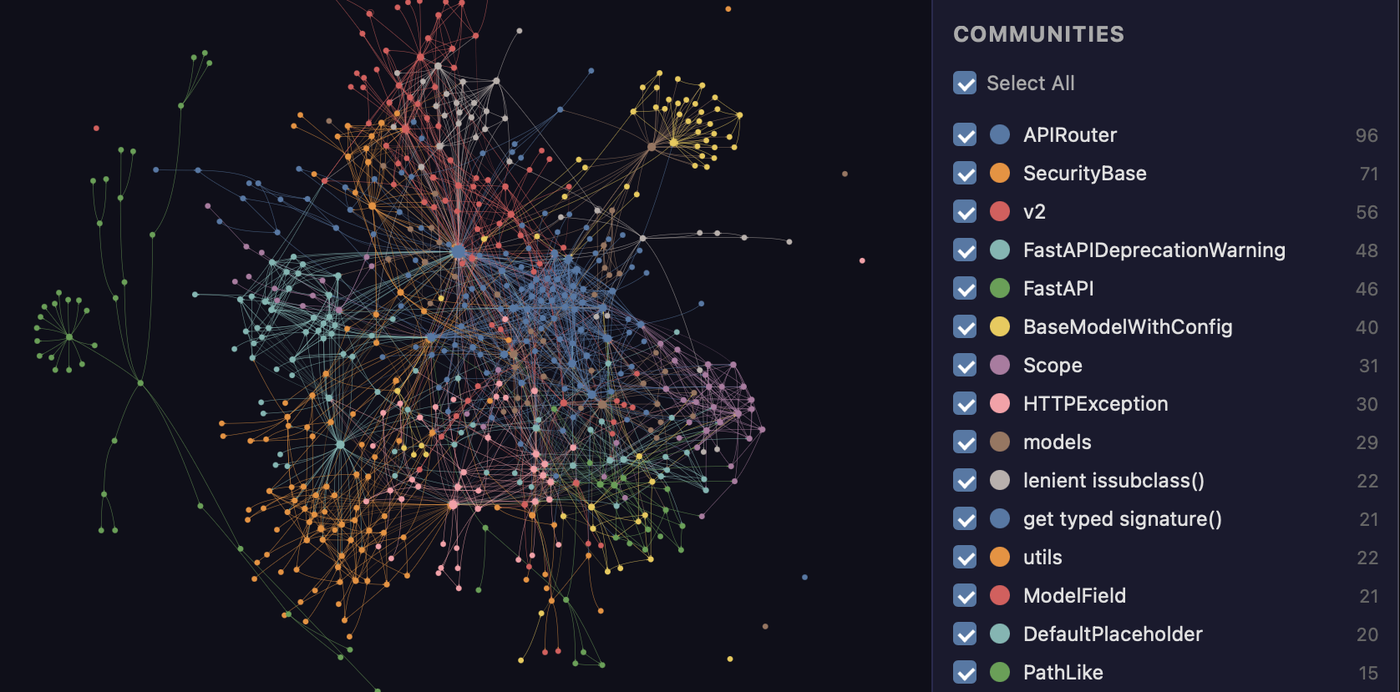
The FastAPI codebase mapped by graphify. Every node is a concept, colors are detected communities, and the whole thing is clickable in graph.html.
Get started (30 seconds). Needs Python 3.10+ and uv (or pipx):
uv tool install graphifyy      # install the CLI (or: pipx install graphifyy)
graphify install               # detects your assistant and registers the skill
Then, in your AI assistant:
/graphify .
That's it. You get three files:
graphify-out/
├── graph.html       open in any browser: click nodes, filter, search
├── GRAPH_REPORT.md  the highlights: key concepts, surprising connections, suggested questions
└── graph.json       the full graph: query it anytime without re-reading your files
The persisted graph includes graph.schema_version so integrations can detect
incompatible format changes, plus graph.graphify_version identifying the
Graphify release that produced it.
One install, any assistant, any OS. Claude Code, Cursor, Codex, Gemini CLI, GitHub Copilot, and 20+ more, on macOS, Linux, and Windows: pick your platform.
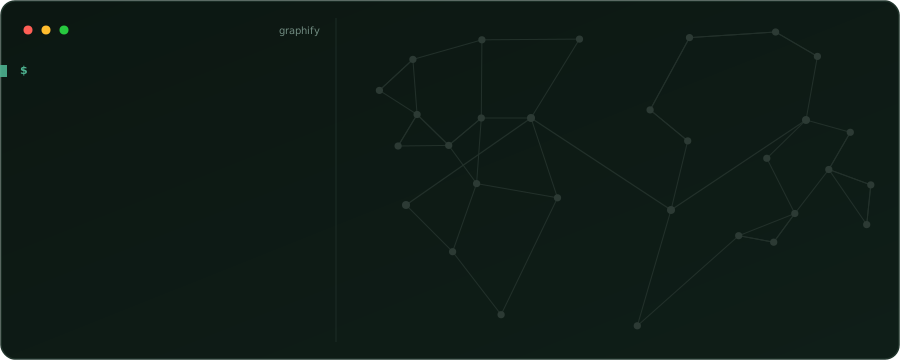
Once the graph is built you query it instead of reading files. Real output, graphify run on the FastAPI codebase shown above:
$ graphify explain "APIRouter"
Node: APIRouter
  Source:    routing.py L2210
  Community: 2
  Degree:    47

Connections (47):
  --> RequestValidationError [uses] [INFERRED]
  --> Dependant [uses] [INFERRED]
  --> .get() [method] [EXTRACTED]
  <-- __init__.py [imports] [EXTRACTED]
  ...

$ graphify path "FastAPI" "ModelField"
Shortest path (3 hops):
  FastAPI --uses--> DefaultPlaceholder <--references-- get_request_handler() --references--> ModelField
Every edge carries a confidence tag (EXTRACTED = explicit in the source, INFERRED = derived by resolution), so you can tell what was read directly from what was inferred. graphify query "<question>" returns a scoped subgraph for a plain-language question, and graphify path A B traces how any two things connect.
What it does
What you get out of the box:
| Capability | What you get |
|---|---|
| God nodes | The most-connected concepts, so you see what everything flows through |
| Communities | The graph split into subsystems (Leiden), with LLM-free labels |
| Cross-file links | calls / imports / inherits / mixes_in resolved across ~40 languages via tree-sitter AST |
| Query, path, explain | Ask a question, trace the path between two things, or explain one concept, all against graph.json |
| Rationale + doc refs | # NOTE: / # WHY: comments and ADR/RFC citations become first-class nodes linked to the code |
| Beyond code | Docs, PDFs, images, and video/audio all map into the same graph |
| Local-first | Code is parsed locally with tree-sitter (no LLM, nothing leaves your machine); only the semantic pass over docs/media calls a backend, and only if you configure one |
[!TIP] Running this across many repos or a monorepo? Graphify Cloud does it continuously and cuts agent token spend by 80%, with cross-repo links, SDLC-wide code review, formal verification, and Sentry/Jira connectors. Start a free 14-day trial →
Benchmarks: 0.497 recall@10, 0 LLM credits
| Benchmark | Metric | graphify | Field |
|---|---|---|---|
| LOCOMO (n=300) | recall@10 | 0.497 | mem0 0.048, supermemory 0.149 |
| LOCOMO (n=300) | QA accuracy | 45.3% | supermemory 49.7%, mem0 27.3% |
| LongMemEval-S (n=50) | QA accuracy | 76% | tied with dense RAG |
| ERPNext cross-tool (n=6) | key-fact coverage | 82.0% | grep/read baseline 70.8% |
| Graph build | LLM credits | 0 | per-token for most systems |
Every system ran on the same harness with the same model and budgets, scored by a judge blind-validated against a second judge (90.6% agreement, Cohen's kappa 0.81). Full per-system tables, the code-intelligence result, and reproduction commands: BENCHMARKS.md.
Documentation
Full guides and reference live at docs.graphify.com:
- Quickstart: build your first graph
- CLI reference: every command and flag
- Ask better graph questions: querying patterns
- Configuration: environment variables and tuning
- Supported inputs: languages and file types
- Team workflows and PR review
- Troubleshooting and How it works
Prerequisites
| Requirement | Minimum | Check | Install |
|---|---|---|---|
| Python | 3.10+ | python --version |
python.org |
| uv (recommended) | any | uv --version |
curl -LsSf https://astral.sh/uv/install.sh | sh |
| pipx (alternative) | any | pipx --version |
pip install pipx |
macOS quick install (Homebrew):
brew install python@3.12 uv
Windows quick install:
winget install astral-sh.uv
Ubuntu/Debian:
sudo apt install python3.12 python3-pip pipx
# or install uv:
curl -LsSf https://astral.sh/uv/install.sh | sh
Install
[!IMPORTANT] Official package: The PyPI package is
graphifyy(double-y). Othergraphify*packages on PyPI are not affiliated. The CLI command is stillgraphify.
The official source repository is Graphify-Labs/graphify.
The two-command quickstart is at the top of this README. This section covers the install methods, project-scoped installs, and every supported platform.
Install methods (pick one):
uv tool install graphifyy   # recommended, isolated env (if 'graphify' isn't found after, run: uv tool update-shell)
pipx install graphifyy      # alternative
pip install graphifyy       # may need PATH setup, see Troubleshooting below
Then run graphify install once. It detects which assistant you run and registers the skill, so there is no per-assistant setup. Open your AI assistant and type /graphify .
To install the assistant skill into the current repository instead of your user
profile, add --project:
graphify install --project
graphify install --project --platform codex
Project-scoped installs write under the current directory, for example
.claude/skills/graphify/SKILL.md or .agents/skills/graphify/SKILL.md (plus a
references/ sidecar the skill loads on demand), and
print a git add hint for files that can be committed.
Per-platform commands that support project-scoped installs accept the same flag,
for example graphify claude install --project or graphify codex install --project.
[!TIP] Hitting
command not found, apip-on-Mac/Windows issue, PowerShell quoting,uvxusage, git-hook PATH quirks, or strict mode? See Installation and Troubleshooting.
Pick your platform (20+ assistants, click to expand)
| Platform | Install command |
|---|---|
| Claude Code (Linux/Mac) | graphify install |
| Claude Code (Windows) | graphify install (auto-detected) or graphify install --platform windows |
| CodeBuddy | graphify install --platform codebuddy |
| Codex | graphify install --platform codex |
| OpenCode | graphify install --platform opencode |
| Kilo Code | graphify install --platform kilo |
| GitHub Copilot CLI | graphify install --platform copilot |
| VS Code Copilot Chat | graphify vscode install |
| Aider | graphify install --platform aider |
| OpenClaw | graphify install --platform claw |
| Factory Droid | graphify install --platform droid |
| Trae | graphify install --platform trae |
| Trae CN | graphify install --platform trae-cn |
| Gemini CLI | graphify install --platform gemini |
| Hermes | graphify install --platform hermes |
| Kimi Code | graphify install --platform kimi |
| Amp | graphify amp install |
| Agent Skills (cross-framework) | graphify install --platform agents (alias --platform skills) |
| Kiro IDE/CLI | graphify kiro install |
| Pi coding agent | graphify install --platform pi, plus graphify pi guard install for the native guard |
| Cursor | graphify cursor install |
| Devin CLI | graphify devin install |
| Google Antigravity | graphify antigravity install |
Codex users also need multi_agent = true under [features] in ~/.codex/config.toml for parallel extraction. CodeBuddy uses the same Agent tool and PreToolUse hook mechanism as Claude Code. Factory Droid uses the Task tool for parallel subagent dispatch. OpenClaw and Aider use sequential extraction (parallel agent support is still early on those platforms). Trae uses the Agent tool for parallel subagent dispatch and does not support PreToolUse hooks, so AGENTS.md is the always-on mechanism.
--platform agents (alias --platform skills) targets the generic cross-framework Agent-Skills locations: the spec's user-global ~/.agents/skills/ (read by npx skills and spec-compliant frameworks) for a global install, and ./.agents/skills/ for a project (--project) install. The bare graphify install stays single-platform (Claude Code) by design: use the named agents platform when you want the skill discoverable by any framework that reads .agents/skills.
Pi has no PreToolUse hook, so graphify pi guard install registers a native Pi extension (via Pi's own pi install <package directory>) that runs the installed graphify hook-guard before Pi's read, grep, find and search-style bash calls. Fresh/stale graph decisions and the GRAPHIFY_HOOK_STRICT=1 once-per-session indexed-read denial come from that same policy, so Pi matches Claude Code's hook behavior; guidance arrives as a <system-reminder source="graphify"> steering message. It needs Pi 0.58.4 or newer: earlier versions let a steering message skip the rest of a parallel tool-call batch. The package ships inside the Graphify installation, so install Graphify persistently (uv tool install graphifyy or pipx install graphifyy, not uvx), restart Pi after installing or upgrading, and remove it with graphify pi guard uninstall. Only local file targets are inspected; the hook needs graphify on an absolute PATH entry outside the project, is bounded to a two-second, 256 KiB-in/64 KiB-out call, and fails open. The same package also loads in Oh My Pi: omp plugin install "$(graphify pi guard path)". The registered path contains the Python version and venv, so re-run graphify pi guard install after changing either, and remove the old entry with pi remove <old path>.
Codex uses
$graphifyinstead of/graphify.
Optional extras (install only what you need)
| Extra | What it adds | Install |
|---|---|---|
pdf |
PDF extraction | uv tool install "graphifyy[pdf]" |
office |
.docx and .xlsx support |
uv tool install "graphifyy[office]" |
google |
Google Sheets rendering | uv tool install "graphifyy[google]" |
video |
Video/audio transcription (faster-whisper + yt-dlp) | uv tool install "graphifyy[video]" |
mcp |
MCP stdio server | uv tool install "graphifyy[mcp]" |
neo4j |
Neo4j push support | uv tool install "graphifyy[neo4j]" |
falkordb |
FalkorDB push support | uv tool install "graphifyy[falkordb]" |
svg |
SVG graph export | uv tool install "graphifyy[svg]" |
leiden |
Leiden community detection (graspologic on Python < 3.13; native backend on 3.13+) | uv tool install "graphifyy[leiden]" |
ollama |
Ollama local inference | uv tool install "graphifyy[ollama]" |
openai |
OpenAI / OpenAI-compatible APIs | uv tool install "graphifyy[openai]" |
gemini |
Google Gemini API | uv tool install "graphifyy[gemini]" |
anthropic |
Anthropic Claude API (--backend claude, uses ANTHROPIC_API_KEY) |
uv tool install "graphifyy[anthropic]" |
bedrock |
AWS Bedrock (uses IAM, no API key) | uv tool install "graphifyy[bedrock]" |
azure |
Azure OpenAI Service (--backend azure, uses AZURE_OPENAI_API_KEY + AZURE_OPENAI_ENDPOINT) |
uv tool install "graphifyy[openai]" |
sql |
SQL schema extraction | uv tool install "graphifyy[sql]" |
postgres |
Live PostgreSQL introspection (--postgres DSN) |
uv tool install "graphifyy[postgres]" |
dm |
BYOND DreamMaker .dm/.dme AST extraction (may need a C compiler + python3-dev if no wheel matches your platform) |
uv tool install "graphifyy[dm]" |
terraform |
Terraform / HCL .tf/.tfvars/.hcl AST extraction |
uv tool install "graphifyy[terraform]" |
pascal |
Pascal / Delphi .pas/.dpr/.dpk/.inc AST extraction (more accurate calls/inherits edges; falls back to a regex extractor when absent) |
uv tool install "graphifyy[pascal]" |
ocaml |
OCaml .ml/.mli AST extraction |
uv tool install "graphifyy[ocaml]" |
commonlisp |
Common Lisp .lisp/.cl/.lsp/.asd AST extraction |
uv tool install "graphifyy[commonlisp]" |
robot |
Robot Framework .robot/.resource extraction (suites, test cases, keywords, keyword-call and resource/library import edges) |
uv tool install "graphifyy[robot]" |
chinese |
Chinese query segmentation (jieba) | uv tool install "graphifyy[chinese]" |
all |
Everything above | uv tool install "graphifyy[all]" |
Make your assistant always use the graph
Run this once in your project after building a graph:
Run graphify <platform> install once in your project, for example graphify claude install or graphify codex install (or graphify install --platform <name>).
This writes a small config file that tells your assistant to consult the knowledge graph for codebase questions, preferring scoped queries like graphify query "<question>" over reading the full report or grepping raw files.
- Hook platforms (Claude Code, Gemini CLI): a hook fires automatically before search-style tool calls (and, on Claude Code, before reading source files one by one via the Read/Glob tools) and nudges your assistant toward the graph path.
- Instruction-file platforms (Codex, OpenCode, Cursor, etc.): persistent instruction files (
AGENTS.md,.cursor/rules/, etc.) provide the same query-first guidance.
GRAPH_REPORT.md is still available for broad architecture review.
Exactly which files each platform writes (CodeBuddy's CODEBUDDY.md + PreToolUse hooks, Codex's AGENTS.md, Kilo's native .kilo plugin, Cursor's alwaysApply rule, and so on) is covered in Always-on setup.
To remove graphify from all platforms at once: graphify uninstall (add --purge to also delete graphify-out/). Or use the per-platform command (e.g. graphify claude uninstall).
CLI skills or MCP instructions?
The instructions installed by graphify install and those supplied with a Graphify MCP connection describe different ways to query a graph:
| Setup | Guidance to use | Query access |
|---|---|---|
| Local CLI and installed assistant skill | The platform instructions written by graphify install |
Run graphify query, graphify path, and graphify explain against the local graph (graphify-out/ by default). |
| Connected Graphify MCP server | The connection's instructions and the tools listed by that server | Call the listed MCP tools against the graph served by that connection. Tool names and descriptions come from the server. |
Both encourage scoped graph queries before broad source searches. Choose the instructions that match the tools your assistant can actually access; neither block establishes a universal precedence rule for your assistant's instruction files. If you use both integrations, identify which graph each queries and choose a primary query path instead of copying two unconditional instruction blocks into AGENTS.md.
graphify install installs the local assistant integration; it does not establish an MCP connection. An MCP client does not need to run local CLI queries to use its connected server. A locally hosted server still needs its own Graphify installation and graph, while a hosted connection may serve a graph that is not present in the client's working directory. If the expected tools are missing, check the relevant CLI installation or MCP connection rather than treating the other setup's instructions as interchangeable.
What's in the report
GRAPH_REPORT.md summarizes the god nodes, communities, and key paths for broad architecture review. How the graph is built and what it contains: How graphify works.
What files it handles: ~40 languages
graphify parses ~40 programming languages locally with tree-sitter AST, and maps docs, PDFs, images, and audio/video through an optional semantic pass. Full list: Supported inputs.
Common commands
/graphify .                        # build graph for current folder
/graphify ./docs --update          # re-extract only changed files
/graphify . --cluster-only         # rerun clustering without re-extracting
/graphify . --cluster-only --resolution 1.5      # more granular communities
/graphify . --cluster-only --exclude-hubs 99     # suppress utility super-hubs from god-node rankings
/graphify . --no-viz               # skip the HTML, just the report + JSON
/graphify . --wiki                 # build a markdown wiki from the graph
graphify export callflow-html      # Mermaid architecture/call-flow HTML (auto-regenerates on every git commit if hook is installed)

/graphify query "what connects auth to the database?"
/graphify path "UserService" "DatabasePool"
/graphify explain "RateLimiter"

/graphify add https://arxiv.org/abs/1706.03762   # fetch a paper and add it
/graphify add <youtube-url>                       # transcribe and add a video

graphify hook install              # auto-rebuild on commit + branch checkout (run `graphify update .` after `git pull`: see "Recommended workflow" below)
graphify merge-graphs a.json b.json              # combine two graphs

graphify prs                       # PR dashboard: CI state, review status, worktree mapping
graphify prs 42                    # deep dive on PR #42 with graph impact
graphify prs --triage              # AI ranks your review queue (uses whatever backend is configured)
graphify prs --conflicts           # PRs sharing graph communities: merge-order risk
See the full command reference below.
Ignoring files
graphify honors .gitignore and supports --exclude patterns and a project .graphifyignore. Details: Configuration.
Project configuration
Create a .graphifyrc in the scan root for settings that belong to the project rather than to one run. One key=value per line; lines beginning with # are comments.
Ambiguous extensions. Some extensions mean different languages in different projects: .inc is PHP on pfSense, Pascal in a Delphi tree, SQL or assembly elsewhere; .h is C or C++; .m is Objective-C or MATLAB. graphify has to pick one global default, and when it picks wrong the file does not fail: it parses as the wrong language and yields a handful of incidental nodes, so the graph looks populated while the real symbols are missing. Declare what the extension means in your repo:
# .graphifyrc
# A language name:
language.inc=php
# Or an extension graphify already knows:
language.tpl=.ts
# Baked into the git hooks (see Team setup):
viz_node_limit=0
The declaration flows through classification, extractor selection, grammar and resolution, imports, graphify watch, and the AST cache (a file re-parsed under a different language never reuses the old entry), and the same .graphifyrc is read by extract, update, the hooks, the MCP server, and the /graphify skill. A typo is reported once on stderr and the scan continues with the defaults. How declarations interact with caching, incremental rebuilds, and import resolution: Configuration.
Team setup
Commit or share the graph so your whole team queries the same context, and review pull requests with graph context. See Share context with your team and Review pull requests.
Using the graph directly
Beyond your AI assistant, query graph.json straight from the CLI with graphify query, graphify path, and graphify explain. A name that matches several nodes is refused with the candidates listed rather than guessed. Scripts can read the outcome from the exit code: 0 an answer, 3 an ambiguous name, 4 no matching node. See Ask better graph questions and the query reference.
Environment variables
Backends, API keys, hook behavior, and tuning are controlled by environment variables. Full table: Configuration.
Privacy
- Code files: processed locally via tree-sitter. Nothing leaves your machine. A code-only corpus requires no API key:
graphify extractruns fully offline. On a mixed repo, add--code-onlyto index just the code and skip the docs/PDFs/images that would otherwise need an LLM. - Video / audio: transcribed locally with faster-whisper. Nothing leaves your machine.
- Docs, PDFs, images: sent to your AI assistant for semantic extraction (via the
/graphifyskill, using whatever model your IDE session runs). Headlessgraphify extractrequiresGEMINI_API_KEY/GOOGLE_API_KEY(Gemini),MOONSHOT_API_KEY(Kimi),ANTHROPIC_API_KEY(Claude),OPENAI_API_KEY(OpenAI),DEEPSEEK_API_KEY(DeepSeek), a running Ollama instance (OLLAMA_BASE_URL), AWS credentials via the standard provider chain (Bedrock - no API key needed, uses IAM), or theclaudeCLI binary (Claude Code - no API key needed, uses your Claude subscription). The--dedup-llmflag uses the same key. - Data residency:
graphify extractauto-detects which provider to use based on which API key is set (priority: Gemini → Kimi → Claude → OpenAI → DeepSeek → Azure → Bedrock → Ollama). When it auto-detects, it prints the exact environment variable that chose the provider, so a run is never a surprise. To choose explicitly, pass--backend, or setGRAPHIFY_BACKEND=<name>; setGRAPHIFY_BACKEND=noneto disable all LLM backends (semantic extraction and theclaude -plabeling fallback) and keep a code-only graph. For code with data-residency requirements, useGRAPHIFY_BACKEND=ollama/--backend ollama(fully local). Kimi (MOONSHOT_API_KEY) routes to Moonshot AI servers in China. - No telemetry, no usage tracking, no analytics.
- Query logging: every
graphify query,graphify path,graphify explain, and MCPquery_graphcall is logged to~/.cache/graphify-queries.login JSON Lines format (timestamp, question, corpus, nodes returned, duration). Full subgraph responses are not stored by default. SetGRAPHIFY_QUERY_LOG_DISABLE=1to opt out, orGRAPHIFY_QUERY_LOG=/dev/nullto silence without disabling the code path.
Troubleshooting
Common install and extraction issues and their fixes: Troubleshooting.
Full command reference
Every command and flag, with examples: CLI reference.
Learn more
- docs.graphify.com: full documentation: guides, command reference, and integrations
- How it works: the extraction pipeline, community detection, confidence scoring, benchmarks
- ARCHITECTURE.md: module breakdown, how to add a language
- Optional integrations: Docker MCP Toolkit + SQLite
- The Memory Layer: the book on the ideas behind graphify, the architecture end to end
Graphify Cloud
Graphify Cloud is the always-on layer built on top of graphify. Instead of a graph you rebuild on demand per folder, it keeps one live graph across your entire software development lifecycle:
- 80% fewer tokens: always-on memory means your agents stop re-reading and re-explaining the codebase every session.
- Monorepo and cross-repo: one connected graph across every service and repository, not a graph per folder.
- Formal verification: check architectural and dependency invariants against the live graph.
- Code review with a bird's-eye view of your SDLC: see how a change ripples across the whole system before you merge.
- SDLC connectors: pull in Sentry, Jira, and more, so incidents, tickets, and code live in one graph.
- Always-on: updates continuously in the background across code, docs, and meetings.
Start a free 14-day trial at app.graphify.com →
Contributing
Contributions are welcome. See CONTRIBUTING.md for the development setup, the test and CI-parity commands, the git workflow, and what makes a strong contribution (worked examples and extraction bug reports are the most useful). Architecture and how to add a language: ARCHITECTURE.md.
New here? Say hi on Discord or in GitHub Discussions.
Contributors
Made with contrib.rocks.
Translations
The README is available in 32 languages. Use the language switcher at the top of this file to read it in yours, or browse docs/translations/. To improve a translation or add a new one, open a pull request against the matching file there.
Building on graphify
Building something in the graphify ecosystem? That is encouraged. If your project uses "graphify" in its name (for example graphify-dashboard or graphify-action), please add a short note to your README clarifying that it is community-built and not affiliated with or endorsed by Graphify Labs. "graphify" and the graphify logo are marks of Graphify Labs; please do not use them in a way that implies official status.
Community and links




